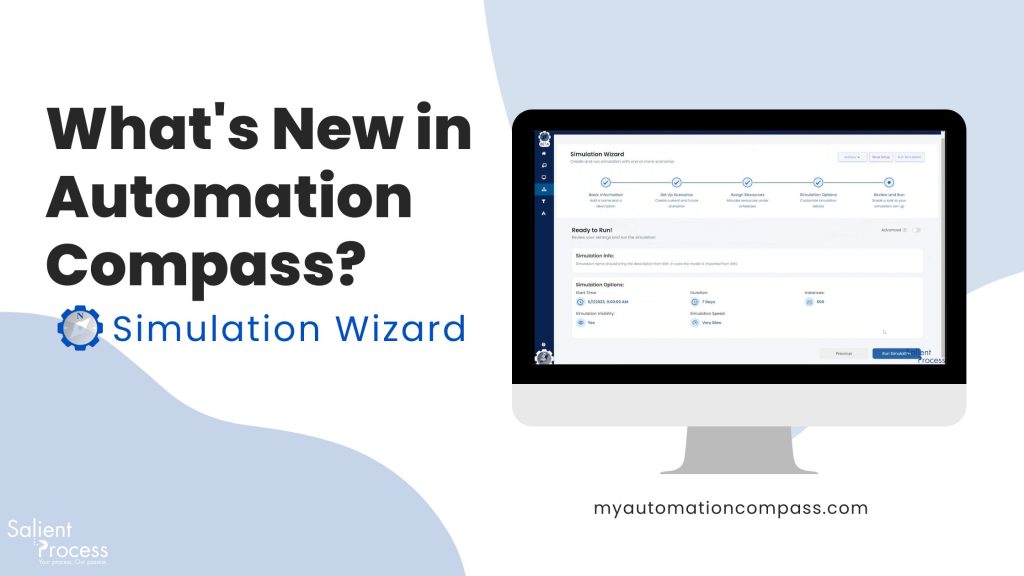
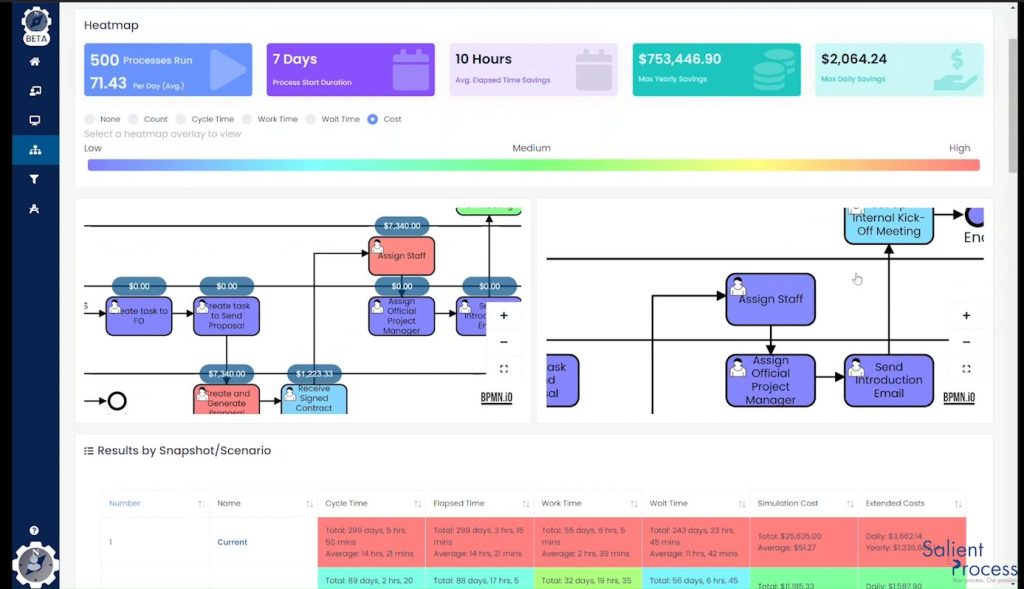
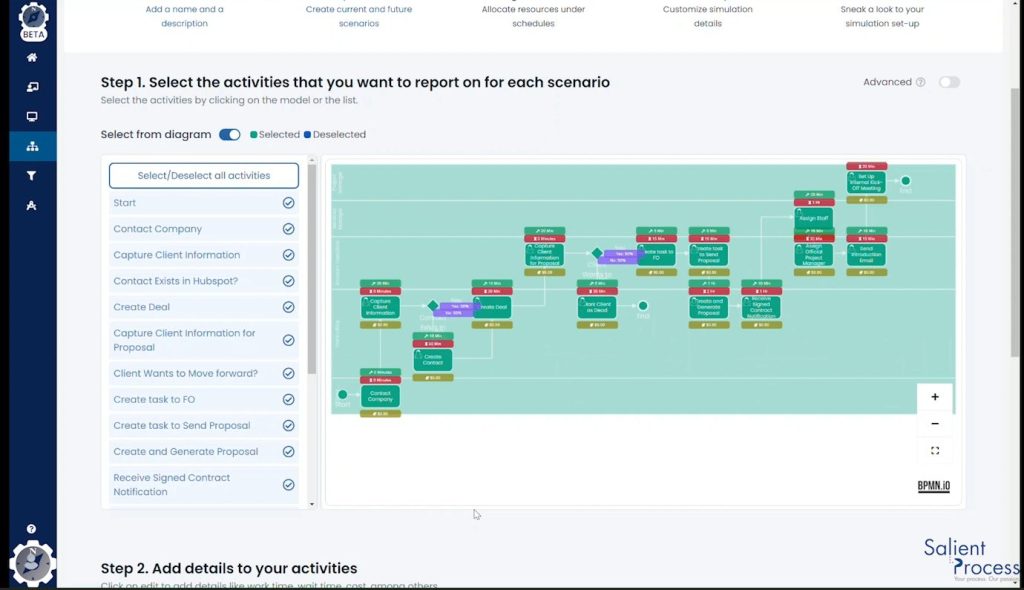
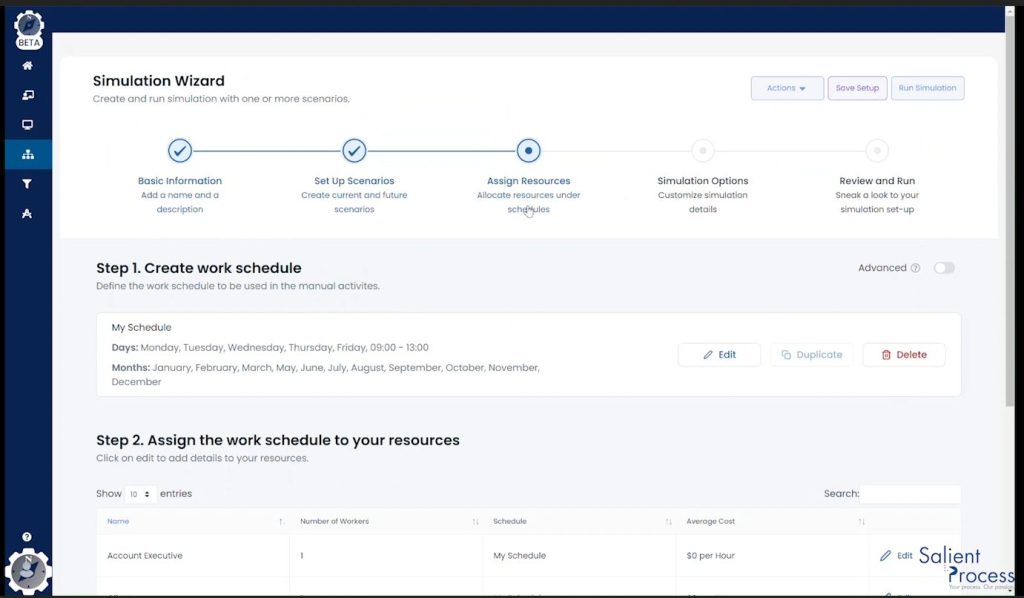
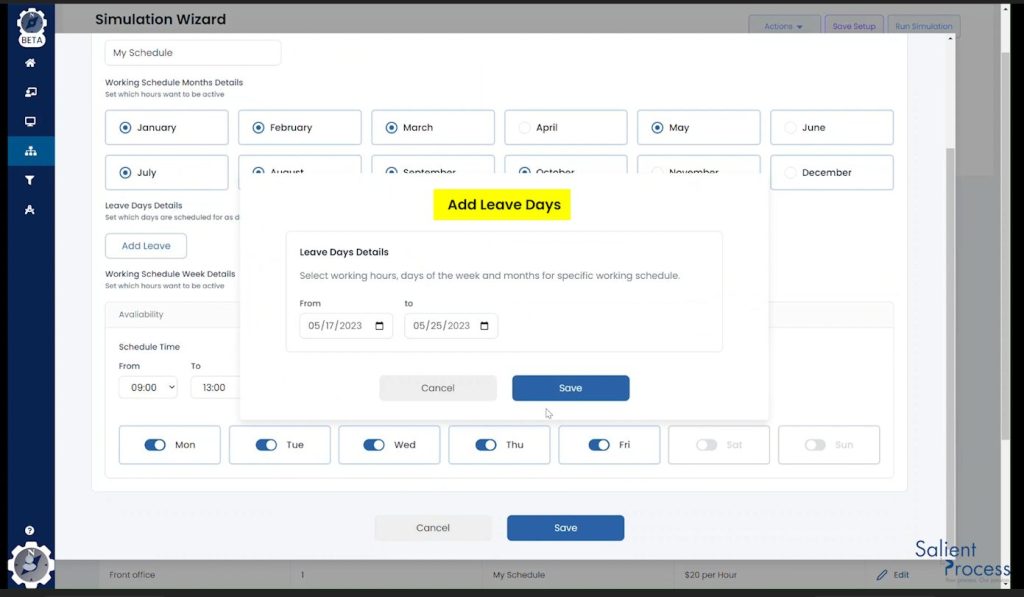
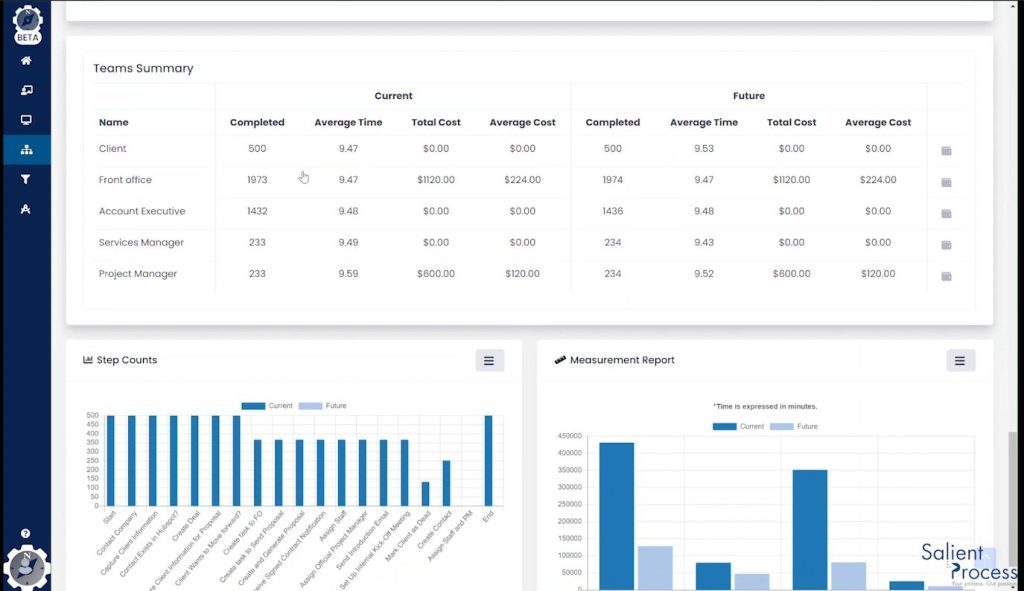
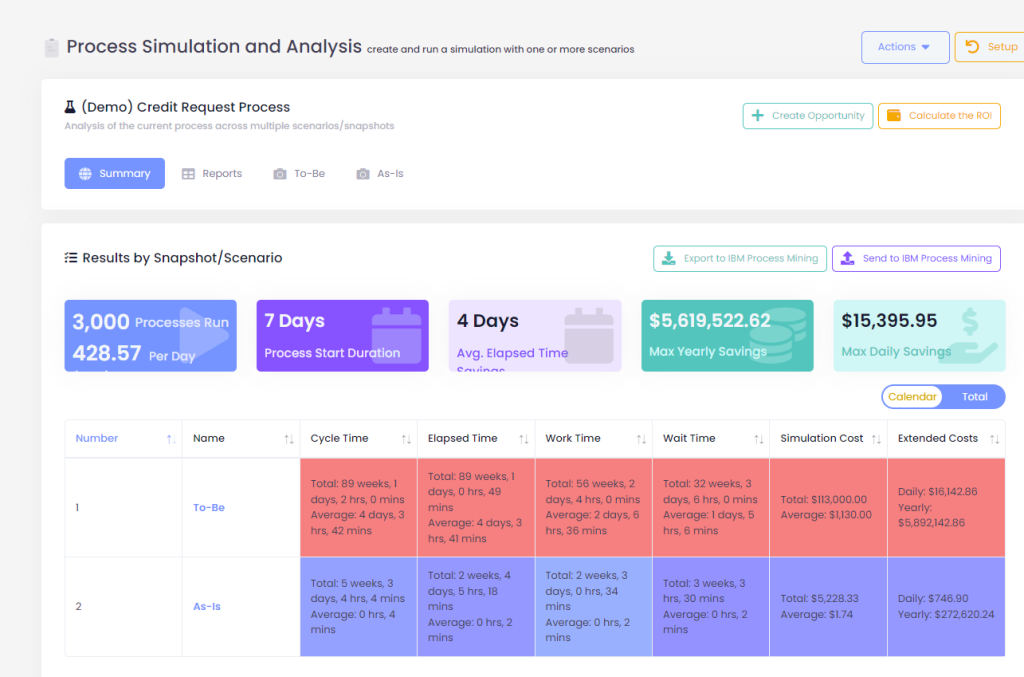
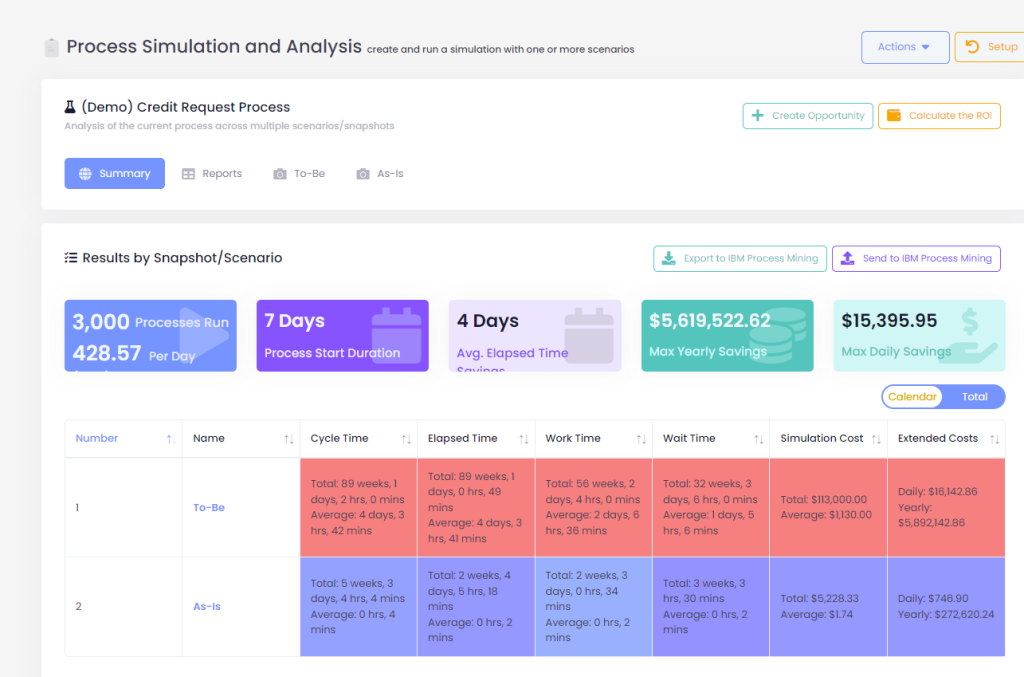
We are excited to announce the release of the new simulation engine for Automation Compass. This version brings several improvements to the simulation engine, including real-time visualization of the simulation running and the ability to select which activities you want to analyze and report on; it considers weekly schedules for the workers and programmed leaves like holidays. Additionally, we have made several improvements to the visualization of the results.
The simulations are displayed in real-time, allowing you to see how each scenario performs as the simulation progresses. This provides a clear and immediate view of where queues are building and where bottlenecks may occur.
2. Selective Activity Reporting
This new version lets you choose which activities you want to analyze and report. This allows you to focus on the most critical areas of your process and quickly identify where improvements can be made.
3. Week Schedules for Workers
Automation Compass now considers workers’ week schedules when simulating processes. This ensures that the simulation accurately reflects the real-world conditions under which your process operates
4. Programmed Leave Time
The new simulation engine also considers programmed leave time, such as holidays, when simulating processes. This ensures that your simulation is accurate even when workers are unavailable due to scheduled time off.
5. Improved Visualization of Results
We have significantly improved the visualization of results, making it easier to understand and interpret the data. The new interface includes interactive charts, graphs, and customizable dashboards, allowing you to view the data in a way that makes sense for your business.
We are confident that these new features and enhancements will provide significant value to Automation Compass users, and we look forward to continuing to improve the product to meet your needs. If you want to learn more about how to use the new simulation features, explore the following tutorial.
Request a Free Trial With Automation Compass Today
Our aim is to keep you informed about the latest features, improvements, and bug fixes in Automation Compass. To achieve this, we have added release notes to our website and LinkedIn, providing you with detailed information about each update we make.
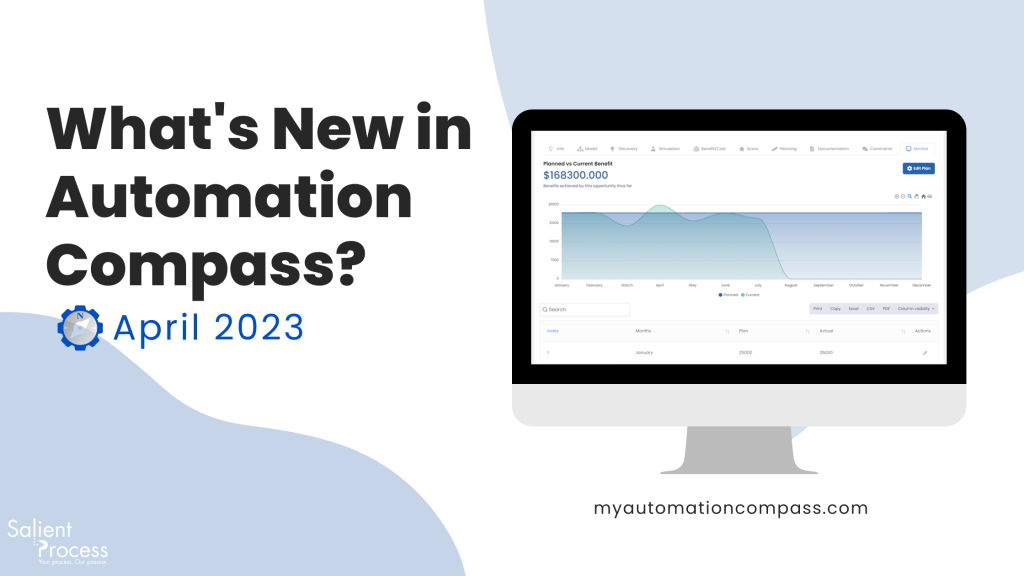
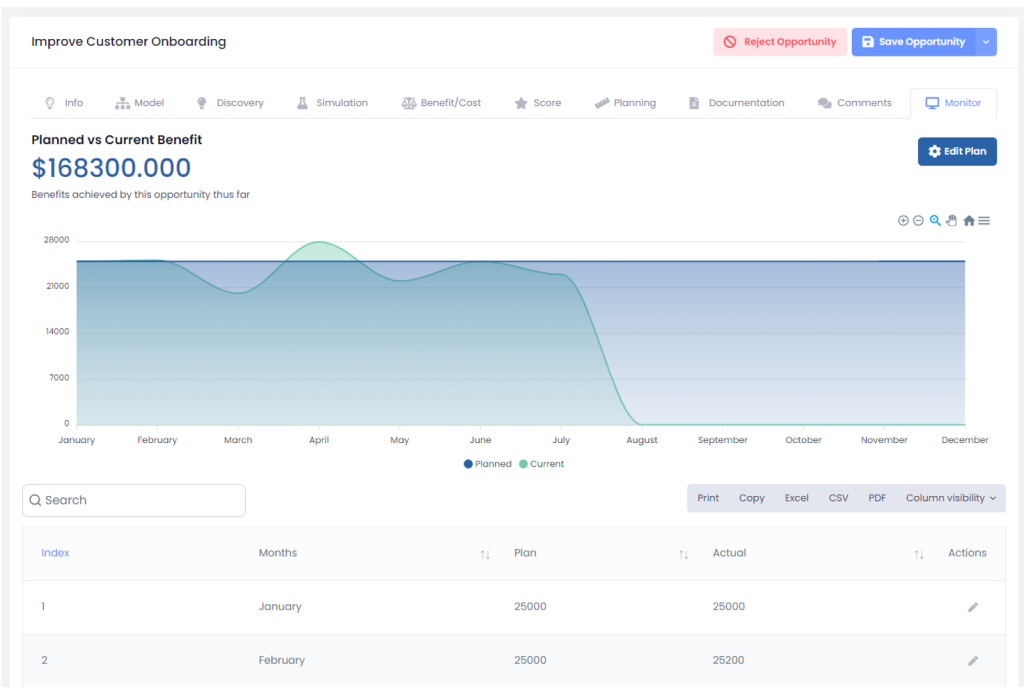
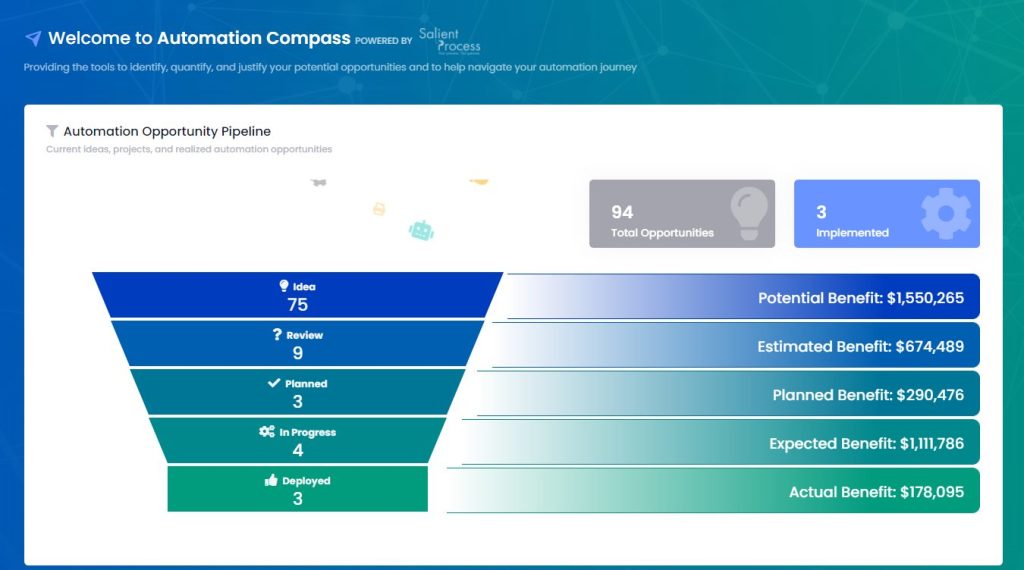
Keep track of your opportunities by monitoring the planned benefit vs. the actual with the new Monitor Tab. We know how important it is to stay on top of your process improvement projects, and this new feature makes it easier than ever to do just that.
2. Process Maturity Assessment
The new assessment feature made evaluating your process maturity level much more straightforward. It helps you assess your process maturity level and identify areas for improvement to prioritize and optimize your business processes, drive action, and achieve your goals.
3. 2-Factor Authentication
Add an extra layer of security to your account by enabling two-factor authentication in your settings. You must enter a verification code and your password for added protection.
4. New User Type
We’re introducing a new user type called the “Editor” user. As an Editor, you can add and modify opportunities and processes while keeping your business architecture data and account settings safe and secure. This feature is designed to give you more control over user permissions, ensuring your data stays protected.
🔧Bug Fixes
Automatic Heatmap Creation Issue Fixed
Forgot Password Validation Bug Fixed
NVPR Value Issue on Imported Opportunities Resolved
Process Deletion Bug from Dashboard Widget Fixed
Capability Map Issue on Import from BWL Resolved
⭐Improvements
New Simulation Engine: This version includes real-time visualization of the simulation running and the ability to select which activities you want to analyze and report; it considers weekly schedules for the workers and programmed leaves like holidays. Additionally, we have made several improvements to the visualization of the results and general settings.
Automatic Capability Linking: Automating the linking process made it easier for you to link opportunities to their complementary capabilities. When you connect a process to a capability, all opportunities within that process will be automatically linked to the same capability without manual linking. Additionally, when you create a new opportunity from a process, the capability associated with that process will automatically be linked to the new opportunity, helping you avoid errors and ensuring consistency and accuracy in your business architecture.
Organizational Goals and Score: The opportunity table now includes columns for “Organizational Goals” and “Score,” allowing users to quickly sort and filter opportunities based on these criteria. This helps users prioritize opportunities that align with their organization’s goals and improve their overall score.
Default Heatmap Color Schema: The heatmap settings now return to the default color schema, making it easier for users to quickly identify improvement areas and optimization opportunities.
🔜Coming Soon
Improved filtering capabilities: Soon, users will have access to an improved filtering system for process and opportunity tables, allowing for more precise and efficient sorting and filtering of data. This upcoming feature is expected to save users time and improve the accuracy of their searches.
New widget for planned vs. actual benefit: Another upcoming feature is a planned vs. actual widget that will allow users to visualize the amount of benefits generated by the process improvement opportunities deployed, quantifying the savings/benefits within specific timeframes by capability or pipeline. This feature will provide users with valuable insights into the impact of their opportunities and help them make informed decisions.
Request a Free Trial With Automation Compass Today
This interview covers DJ’s background and how he got into the business rules space! We cover #ruleautomation, discuss industries, and use cases that are favored. We discuss what type of role within a company is best suited to bring in rule automation, how rule automation fits into the agenda of most companies’ strategy decks, and more!
Watch Episode 24 now!
Follow along with the episode now!
Guest: DJ Des Jardins, Salient Processes Principal Business Automation Consultant
Background
23+ years in the rules technology, business rules management space
Navy 6.5 Years
2000: Working at Versata
Worked with Blaze and implemented business rules on mainframe solutions
Move to iLog doing technical pre-sales until they were acquired by IBM
Did pre-sales at IBM
Moved into Product Management at IBM and pivoted to BPM side of the house
After some time passed, went back to do Product Management with the iLog product which became something else
then ODM moved into the partner world at IBM
Now with Salient Process for 6+ years now as Salients ODM practice lead
Does decision automation have a favorite industry?
Insurance claim management & fraud in the financial areas
This type of role in the insurance world is seens as the biggest early Adopters and users for BRMS (Business rules management systems)
Where ODM fits
Automating due processing: Looking to see what people are doing claims adjudication or evaluations for things like fraud. Not only does it speed up the process but it takes the decision logic that a human was doing that was processing claims manually and automating as much as that can be standardized and increasing the straight due processing percentages.
Reducing cost, improving quality and creating consistency
THEN the actual adjudicators and claim technicians would deal with more of the exception handling and complex things that they are really needed for.
How does this fit into the trends in the business landscape right now?
(Current date: April 2023)
Companies are looking to automate and make those decisions consistent
What to understand about the tool
Business Rule Management Systems (BRMS) sole purpose is to make a decision. On transactional basis, you ask it a question, it gives you an answer. Business Rules are written in a Plain Language Syntax (No Hard Code), allowing non-programmers to understand exactly what the solution is doing.
For example: “I have this situation, this data, these claims, loan applications, etc… but I have questions I have to answer such as what is the risk score? Should I do this or that? What should I do next?”
Those are the kinds of decisions being made. (As mentioned above) They have the straight due processing approach we want to process electronically, but companies are really looking for the consistency and accuracy on top of that.
Even if you are hand-coding and automating the rules, the benefits of the BRMS isn’t there such as
Timely changes
Collaborate easier
Push changes faster
Manage rules within the business not just as a unit
Encapsulates siloed rules and makes them reusable, resharable, and quantifiable within nature
Easy to read and understand
How do you infuse this platform into business processes?
The mindset
“If you remember that all BRMS does is answer a question, and questions are answered throughout any solution… it’s in essence of anywhere you see an “if” condition- IF you have a condition, THEN you have an action. The goal is to look at a higher level and start to identify what the decision point are. If you can identify this- the complexity is simplified.”
Identifying the different high level decision points:
Are you making a decision? Yes or no
What decision are you making? and then what is THAT decision?
Are you deciding risk score? Calculations? Evaluations? Etc.
Once you have the decision points identified, you can categorize, group or evaluate them and look at which would be a good candidate to be made into a decision service. The hardest one is better to do first and the easy ones will fall into place. You can start easy- it is the companies preference.
What does a team who is doing decision automation look like?
Organization Roles
You can have one person playing many roles or all of the roles. Minimally, the roles you need are a
Operational Decision Manager (ODM) Developer
Rule Author – Foundational role
Architect
Testing / IT
The Roles Together (Small Company)
Have the developer work with the Subject Matter Expert (SME) to understand the questions being asked, then figure out what data you need to have coe in and out.
The ODM Developer will build the “Operational Framework” which is all the artifacts necessary to implement the services without the rules. It’s all the technical aspects that the individual need to have the skill set for.
Then build the rules on top of the framework, and as you evolve the rules, the framework could evolve as well.
“Three Tier Governance”
The simple stuff
Daily Stuff
I need a developer
The goal is to have a framework that rule authors only need to do their work. They write rules, test rules and modify rules. Have them manage the day-to-day change activities without requiring heavy code on the operational side.
The Roles Together (Large Company)
Need the same roles and can even have small individuals in these roles but even if you have 30-40 rule authors, once the company is stable, the developers maintain the infrastructure, framework and begin doing rule deployments daily because the organization and the volatility of the logic… you evolve into this.
How would you describe a good candidate for a rule author?
Business Policy Analyst: They understand the business policies that go into the decisions / rules
Subject Matter Experts: Ideally someone who is willing to take the responsibility of using the system and make sure it works correctly.
They need to have technical expertise and not afraid to use computers, comfortable writing rules, testing rules, taking responsibility of managing them and testing them.
What is the future of Rule Automation?
More holistic implementations.
“I would say 90% of the business rules applications and solutions i’ve worked on had nothing to do with business processes. There was no business process solution automating behind the scenes.
What the industry needs to have is more holistic solution where we have those business processes managing the long-term activities, we have automation within that-determining what tasks can be done in an automated way, what tasks need to be managed by a human, ensuring the data gets to the human at the right time, right place, right order, etc. In addition, automating those decisions. Allowing humans to only deal with the escalations. Also allowing integrations of systems.
“I’ve always pictured the whole solution as something that covers not a technology platform or portfolio, but a holistic look at what you’re trying to solve. Every solution has a process involved. Every solution has a decision involved. Every solution has contextual data. Every solution has events, actions, activities. There is absolutely no reason why solutions can’t be built around holistically managing those problems/ requirements as a holistic solution.”
Importance of Decisions
You always start with a decision. It doesn’t matter what solution is consuming it. If you have other solutions you’re putting into place such as business process or other platforms, you are still making decision. If you identify the decision points, you select your decision services and consume it within the old applications and then start to build off that. Aside from data, decisions is the root of everything.
Common objections to implementing rule automation
Trusting the automation
Often times, the misconception is that our rules, concepts are too complicated for a BRMS. It’s complicated from a human perspective, not for the technology.
Moving the task to be electronic
Its old code, its procedurally spread out and its uncomfortable to understand how the technology can find and exact the rules.
Advice to business leaders:
Instead of saying this is too complex, say “maybe I don’t know what they are exactly and where they are” and move to automate them. We’re not pulling up business rules, we are pulling out a decision. You work on a decision, by a decision basis, find a decision whether its complicated or simple, find a decision that’s being made and replicate that decision externally. You can do this by looking at old code, looking in manuals, asking the people that do the work, etc. Its natural for people to want to pull this information themselves and convert that into a system themselves but there’s tools out there that will do this for you and if you do it the way you think it should be done, you’re not doing it right. You will not get the benefits
Identifying your best solution fit
Not everything is going to be a good fit for business rules. Some decisions are better left in other platforms like BAW but the key is to identify, which is which. You’ll often find that the hard ones you don’t want to do right now are the best fit. Identify the decision points, pick which ones are good for your BRMS and focus on the best ones for that.
Watch Episode 24 Now
Have a Topic Idea? Let Us Know
If you have a topic idea, contact us today. We want our podcast to answer your questions, and if you have something that you want to hear, we would love to know. In addition, you can ask questions and get in touch with our Salient Process team.
Why Salient
At Salient Process, we understand the importance of comprehensive digital transformation. We work closely with each client and use a North Star methodology to align your procedures with overall business goals. Our expert team works hard to understand your unique needs, making a customized plan for success. With our Digital Business Automation solutions, you can move closer to your digital transformation goals.
Subscribe now
👉Subscribe to Bots & Thoughts: The Hyperautomation Podcast
We’ve all been there. Locked in a conference room with a stack of easter-colored sticky notes staring into the abyss of a blank white board. Catering is on its way: Valentino’s, the second best pizza in the city. We need something to show for this.
Fast forward to 5PM, we have successfully peppered our white board with a barrage of sticky notes (the spirit of Easter is among us). We throw our arms in the air ready to rest our laurels on the conversations we’ve had and the work that’s been done. Before retiring for the evening, someone pulls out a phone and snaps a picture of our latest art installment – a backup in case the janitor comes through after-hours and removes every last trace of our efforts.
Conversations have been had. Processes have been discovered. What next? Often, nothing at all.
SO…Whats Next?
It must be obvious that this isn’t the best way to conduct this exercise, and taking no action is the worst possible outcome. All the healthy back-and-forth that uncovered inefficiencies, problems, even disconnects, will be forgotten in time… much less acted upon.
Our new video illustrates how using a tool like IBM Blueworks Live with IBM Business Automation Workflow not only helps us map better, but also serves as a launchpad for actionable Automation through the construct of “managed processes”….
Turn your Process Maps into Process Apps!
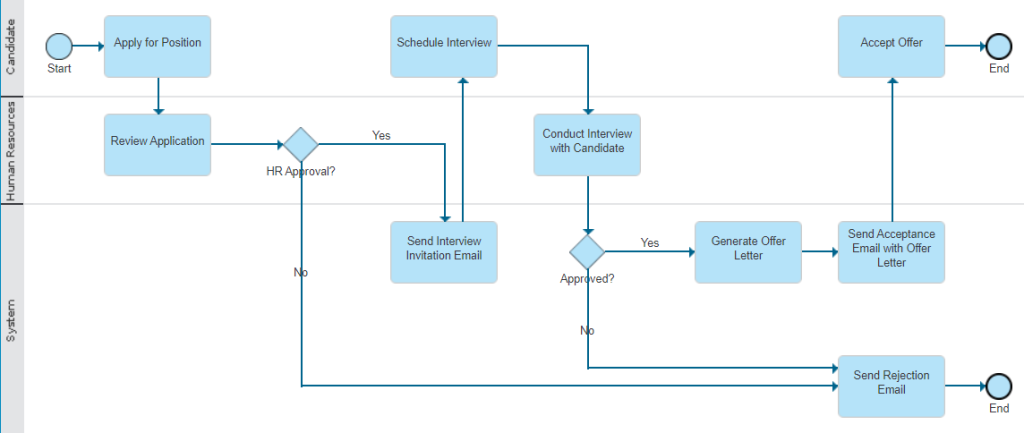
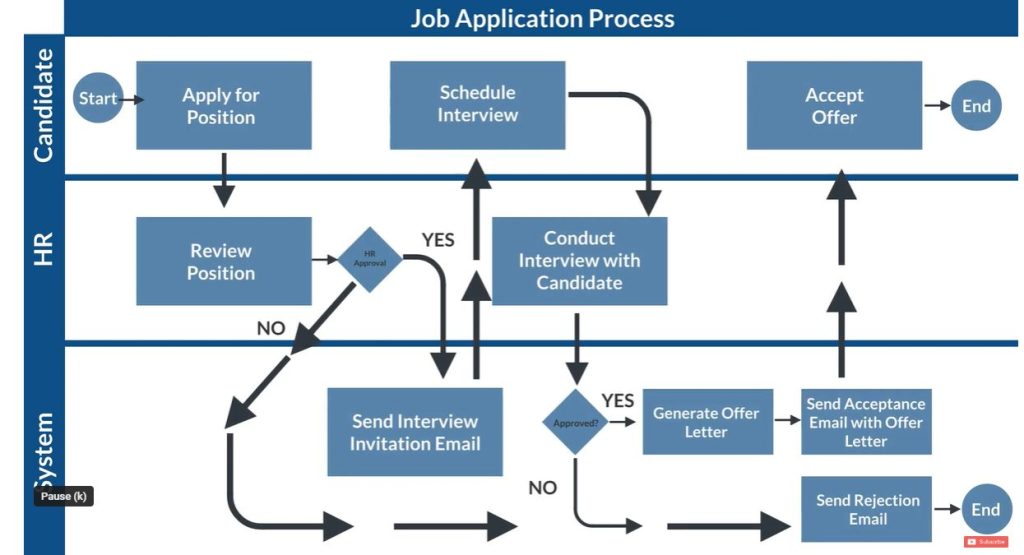
How do we take the information we gather through the process mapping exercise and take action? In this example, we have an HR process mapped in IBM Blueworks Live.
This map illustrates the way the process should work… on paper. By automating it, we can enforce the process exactly.
First, the swimlanes become the people or teams. The participants will be alerted when they have outstanding work items to complete. Once their items are completed, they can work on other things until they’re needed again.
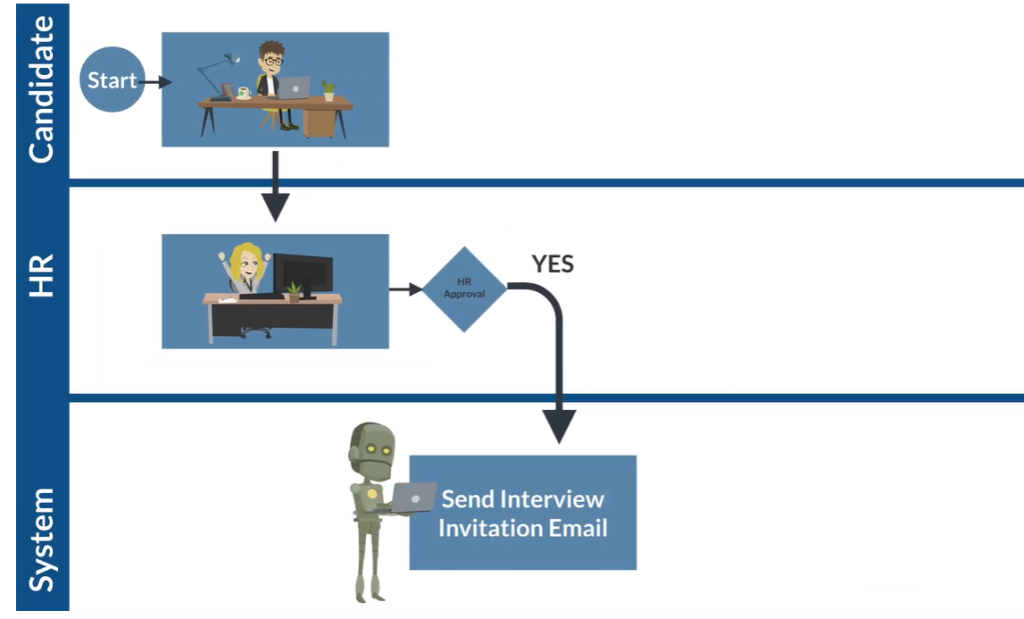
By turning these process maps into process apps, we introduce the concept of a managed process. Most processes are not managed, so the participants have to manage them manually. By leaning into a managed process and building trust amongst the participants, work can go from this
to this!
Management is also concerned with outcomes and their timely delivery. Managers are only involved when a problem arises that actually requires human intervention. The process solution is smart enough to give the insights needed to take remediating actions. If it’s humming, managers can watch from afar, confident that everything is running smoothly.
What was once just a process map is now a fully functional and trusted process application – designed for the business by the business, delivering peace of mind to both the workers and management.
What was once a barrage of easter-colored sticky notes is now a managed process, charged like the Energizer Bunny.
Why Salient
Process mining and process mapping are integral tools for companies. You might need process mapping or mining to transform existing structures. Don’t stop at process mapping! Automating workflows and eliminating bottlenecks can streamline operations, increase efficiency, and drive business growth.
We can help you get started with an Digital Business Automation solution, contact us today.
As a user of our tool Automation Compass, we want to ensure that you are always up-to-date with the latest features, improvements, and bug fixes. That’s why we have implemented release notes on our website, which provide comprehensive information about each update we make to our product.
We encourage you to check out our release notes regularly to stay informed about the latest updates and improvements for Automation Compass. As always, we appreciate your feedback and suggestions, and we look forward to providing you with the best possible user experience.
The new settings page is designed to make managing your personal and company information easier than ever! User settings such as My Profile, Password, and Two-Factor Authentication have been moved for easier access, while Company Settings now includes Integrations, Pain Points for Processes, and User Management of the Account.
Here’s how to link your BWL account with the new settings page:
2. Heatmap by Efficiency
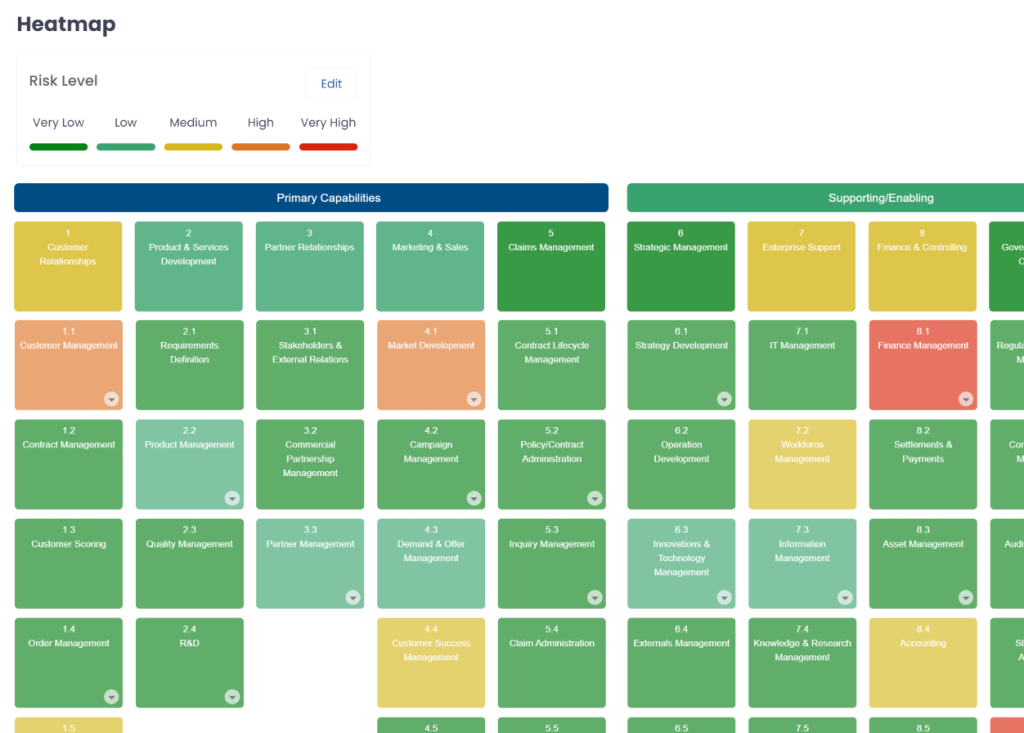
With this update, you can now create an automatic capability heatmap based on the efficiency of your processes. By using data-driven decision making, you’ll be able to prioritize capabilities with ease.
The capability efficiency is based on the efficiency average of the processes linked to the capability, which means the higher the efficiency, the more productive the capability.
🔧Bug Fixes
We are up to date!
⭐Improvements
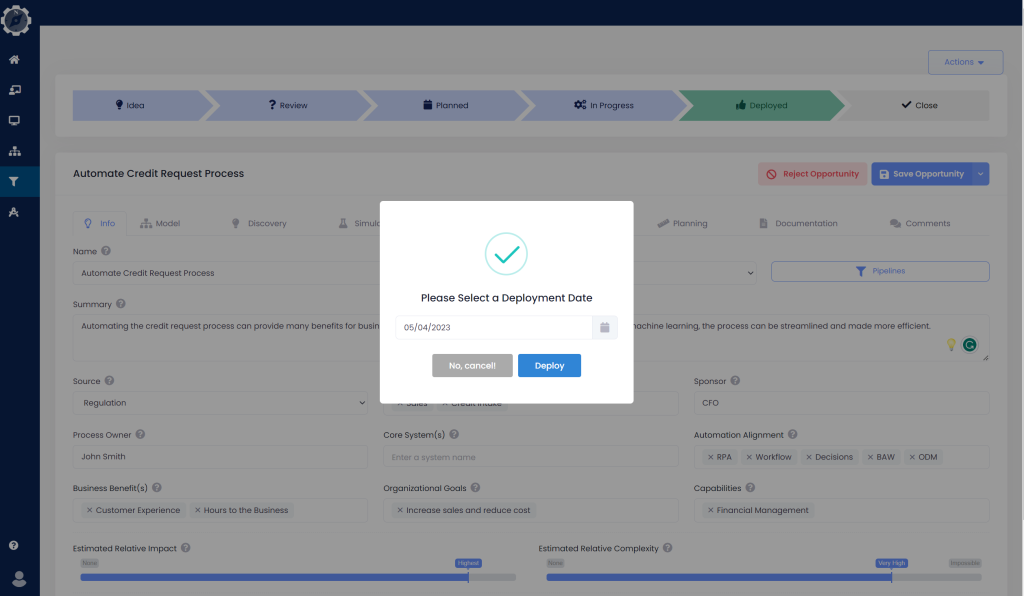
Deployment Date: we’ve added a new way to capture the deployment date when you click on the deployment status of your opportunity. This means that you can now confirm the exact day since the project was delivered, and start tracking the value it generates and the savings it creates.
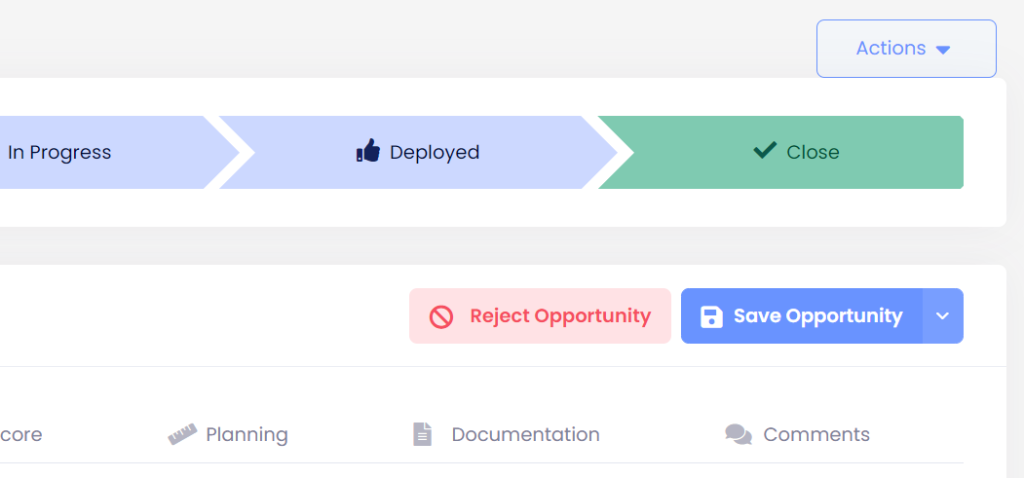
Opportunity status: we’ve introduced a new “Opportunity Status Close” feature. When you close your opportunity, it means that you have achieved the expected benefits during the monitoring phase, and we can now successfully close it. This also means that it won’t show up in reports or charts anymore. It’s a great way to keep your workspace organized and only focus on the opportunities that are still active.
🔜Coming Soon
We have a big release coming soon! Get ready for our new simulation engine that will take into consideration trends, the queues generated in each activity, and the real work schedule of your workers to provide you with more accurate and realistic scenarios. This will help you visualize potential improvements and savings in your processes.
2FA: You’ll be able to add an extra layer of security to your Automation Compass account with two-factor authentication. This feature will help ensure that your account is better protected against unauthorized access, and will help us meet SOC 2 requirements for information security.
Request a Free Trial With Automation Compass Today
Through conducting extensive client interviews, the Automation Compass team has come to understand that businesses can fall into one of three categories when it comes to their level of process improvement. To better serve our clients, we have created the Operational Excellence (OPEX) Lab,which offers three entry points that align with these categories; Business Architecture, Process Analysis, and Opportunity Tracking.
Depending on their needs and goals, clients can choose the entry point that is best suited for their business. Each entry point comes with its own set of options, tailored to meet the unique needs of the client. Ultimately, the lab enables us to understand where clients are in their process journey, and to offer them the most appropriate tools and guidance to advance their automation initiatives. Click to learn about the Business Architecture and Opportunity Tracking Entry Points.
To further understand each entry point, we have put together three seperate blogs that highlights each entry point, how they work together, how to get started using Automation Compass, and how to get started in the Operational Excellence Lab.
Let’s dive in to learning about Process Analysis.
What is Process Analysis?
Process analysis is the systematic evaluation and optimization of business processes to improve their efficiency, effectiveness, and overall performance. It involves identifying the steps involved in a particular process, analyzing the flow of information, materials, and resources, and identifying bottlenecks, redundancies, and inefficiencies. The goal of process analysis is to identify areas for improvement and implement changes that lead to better results.
Companies use process analysis as part of their process and automation journey to achieve several benefits. It helps to identify areas of improvement that can lead to cost savings, increased efficiency, and faster turnaround times. By optimizing processes, companies can reduce the amount of time and resources needed to complete a task, resulting in lower costs and higher productivity.
**Please note that in the following description, we will use the term “Business Transformation Team” to refer to the internal team within your company that is practicing the methodology. However, the actual name of the team may differ from one company to another.
The Process Analysis Entry Point
As a Business Transformation team with a Process-Driven mindset, you are likely prioritizing, evaluating, and documenting processes to enhance efficiency, performance, and metrics.
Your team may already have process documentation, such as cycle time, cost, and pain points, and could be looking at process prioritization for mapping, improvement, or documentation. They may also be evaluating different scenarios and opportunities to improve process efficiency, performance, or metrics. Automation Compass can provide appropriate starting points based on your team’s maturity level to streamline the process.
Get Started in Automation Compass
**If your company does not already have an Automation Compass account, navigate to our Automation Compass website to follow along with steps or you can request a demo here.
You can use the capability map to represent your company’s process taxonomy, framework, or classification. Assign level 1 capabilities to the highest level in the process framework and level 2 capabilities to the second level. Keep attaching capabilities until you reach the process, then connect each process to specific capabilities.
In case your company doesn’t have a process framework, you can still import and prioritize the processes you are analyzing based on your goals and priorities, but make sure that the goals are captured in the “North Star.”
If your company is focusing on a specific process and wants to analyze it, you can import the process and skip the goals or process framework. From there, you can discover automations, run simulations, and create opportunities.
Once you have imported your processes, you can use our prioritization feature to find the next process to improve based on your strategy, identify potential automations, and run simulations.
Video Tutorial
If you would like to see the starting points in action, please watch our video tutorial here.
How the Entry Points Work Together
While each entry point has its unique focus, the categories are not exclusive to one another. In fact, companies may find themselves leveraging two of these entry points at the same time.
If you start with a top-to-bottom approach, you’ll need to focus on the capabilities that require more attention and have processes attached to them. You’ll have to conduct a more thorough process analysis to determine how to enhance the capability and prioritize which processes to analyze first.
Once you have identified the processes to improve, you can then carry out discovery and simulation.
From Process Analysis to Business Architecture
On the other hand, if you start from the bottom and need to analyze a specific process, you can determine whether that process belongs to a capability that requires improvement. This approach can assist you in prioritizing your efforts more effectively.
The first option is to begin with the processes themselves and generate opportunities for improvement as required. This approach enables you to keep all your ideas organized in one place and analyze the potential impact of each idea while simultaneously monitoring ongoing implementations.
From Opportunity Tracking to Process Analysis
The second option is to begin with the ideas themselves and employ them as a starting point for identifying processes that require improvement or documentation. This approach can assist you in determining whether an improvement aligns with your team’s strategic objectives and identifying processes that require more attention.
Reminder, these steps are what you can expect to see depending on your entry point and your level of process improvement maturity.
The Automation Compass Team will…
Collect any Business Artifacts, such as Process Framework / Customer Journey Maps / Value Chains / Value Streams / Business Architecture from your company
Create a customized process improvement project based on your company’s level of process improvement maturity.
Review, refine, and develop your processes based on your business needs.
Analyze the artifacts to identify areas for process improvement.
Creation of as-is and to-be process documentation delivered via Blueworks Live maps and imported into Automation Compass
Prioritization of improvement opportunities in Automation Compass.
Creation of a Business Case for the opportunities based on your business goals.
Training from Expert Process Analysts on the tools the lab provides throughout the duration of the project
Lab Resources
By participating in the Operational Excellence lab, companies can access a wide range of resources that will help accelerate their process transformation journey and achieve their goals faster and more efficiently. The Lab resources include:
Automation Compass Tool
Training on the Automation Compass Tool
Training on IBM Blueworks Live
Work side by side with an Expert Process Analyst who can help you start your journey.
Access and Training on Blueworks Insights
Click the following links if you would like to learn more about
We want to offer you an exclusive deal to help you take your skills to the next level. In addition to the free resource the lab provides, we’re offering an incredible 60% discount off the standard program price.
Don’t miss out on this limited-time offer to transform your business. Click below to learn more and take advantage of this incredible deal today!
Get Started Today!
Businesses can greatly benefit from participating in our Operational Excellence Lab as they have the opportunity to shape the future of their own transformation process. This is an opportunity for companies to enhance their automation journey by learning and implementing automation compass as a solution that aligns your initiatives with your business goals.
You’ll not only have exclusive access to the latest and greatest features of Automation Compass, but our team of Senior Process Analysts will work with your team directly to ensure we are providing the best foundational support for your company.
If you’re eager to get started, contact us here! Take advantage of the Opex Lab exclusive offer with heavily discounted pricing and free resources. Don’t miss out on this opportunity, inquire for more information today.
Through conducting extensive client interviews, the Automation Compass team has come to understand that businesses can fall into one of three categories when it comes to their level of process improvement. To better serve our clients, we have created the Operational Excellence (OPEX) Lab, which offers three entry points that align with these categories; Business Architecture, Process Analysis, and Opportunity Tracking.
Depending on their needs and goals, clients can choose the entry point that is best suited for their business. Each entry point comes with its own set of options, tailored to meet the unique needs of the client. Ultimately, the lab enables us to understand where clients are in their process journey, and to offer them the most appropriate tools and guidance to advance their automation initiatives. Click to learn about the Business Architecture and Process Analysis Entry Points.
To further understand each entry point, we have put together three seperate blogs that highlight each entry point, how to get started using Automation Compass, and how companies can get started to participate in the Operational Excellence Lab.
Let’s dive in to learning about Opportunity Tracking.
What is Opportunity Tracking?
Opportunity tracking refers to the process of identifying, analyzing, and managing potential business opportunities in order to maximize revenue and profitability. Companies use opportunity tracking to ensure that they are able to capitalize on every potential opportunity for improvement.
Opportunity tracking is an important tool for companies looking to optimize their processes and maximize their revenue and profitability. By using this approach, they can identify and capitalize on potential opportunities, while also improving their overall efficiency and productivity.
**Please note that in the following description, we will use the term “Business Transformation Team” to refer to the internal team within your company that is practicing the methodology. However, the actual name of the team may differ from one company to another.
The Opportunity Tracking Entry Point
The Opportunity Tracking Entry Pointis for companies with many improvement ideas and ongoing projects that require prioritization and tracking. The teams are looking to identify improvement opportunities across the organization and/or have automation and are looking to expand its use across the organization.
Businesses with multiple ongoing projects can use Automation Compass to streamline the management of the opportunity lifecycle and generate necessary reports for easy tracking. The Business Transformation Team can prioritize opportunities efficiently and effectively by utilizing different criteria, such as impact, effort, and ROI. Automation Compass can help manage the opportunity lifecycle and track all relevant data, providing specific types of reports and additional information necessary for implementing improvements. When prioritizing opportunities that are still in the idea stage, different criteria can be used, such as impact, effort, and ROI.
For Opportunity Tracking Driven companies, there are several starting points in Automation Compass depending on your company’s maturity.
Get Started in Automation Compass
**If your company does not already have an Automation Compass account, navigate to our Automation Compass website to follow along with steps or you can request a demo here.
Capabilities of Automation Compass
Streamline the management of the opportunity lifecycle and generate necessary reports for easy tracking. You can import all opportunities from an Excel file along with relevant information into Automation Compass. From there, you can prioritize automation opportunities based on different criteria such as impact, complexity, cost, time, quality, or strategic alignment.
Capture all new ideas inside the platform and have visibility of all of them in Automation Compass.
Track the progress of opportunities that are already deployed to measure planned versus actual benefit.
Prioritize the next opportunity to be implemented and keep track of all ongoing projects in the organization.
If you would like to see the starting points in action, please watch our video tutorial here.
How the Entry Points Work Together
While each entry point has its unique focus, the categories are not exclusive to one another. In fact, companies may find themselves leveraging two of these entry points at the same time.
Opportunity Tracking + Business Architecture
From Business Architecture to Opportunity Tracking
If you are using a business architecture approach to drive process improvements, consider integrating opportunity tracking into your methodology. One effective way to do this is to track the opportunities generated during your analysis in the company’s capability map. By doing so, you can identify which capabilities require further improvement efforts and which ones already have improvement ideas in place.
From Opportunity Tracking to Business Architecture
On the other hand, when prioritizing opportunities, you may want to consider prioritizing those that are linked to the capability map and are aligned with the company’s goals. This approach allows you to focus less on areas that are already excelling and more on those that can help improve capabilities that are underperforming.
Opportunity Tracking + Process Analysis
From Process Analysis to Opportunity Tracking
The first option is to begin with the processes themselves and generate opportunities for improvement as required. This approach enables you to keep all your ideas organized in one place and analyze the potential impact of each idea while simultaneously monitoring ongoing implementations.
From Opportunity Tracking to Process Analysis
The second option is to begin with the ideas themselves and employ them as a starting point for identifying processes that require improvement or documentation. This approach can assist you in determining whether an improvement aligns with your team’s strategic objectives and identifying processes that require more attention.
Reminder, these steps are what you can expect to see depending on your entry point and your level of process improvement maturity.
The Automation Compass Team will…
Collect any Business Artifacts, such as Process Framework / Customer Journey Maps / Value Chains / Value Streams / Business Architecture from your company
Create a customized process improvement project based on your company’s level of process improvement maturity.
Review, refine, and develop your processes based on your business needs.
Analyze the artifacts to identify areas for process improvement.
Creation of as-is and to-be process documentation delivered via Blueworks Live maps and imported into Automation Compass
Prioritization of improvement opportunities in Automation Compass.
Creation of a Business Case for the opportunities based on your business goals.
Training from Expert Process Analysts on the tools the lab provides throughout the duration of the project
Lab Resources
By participating in the Operational Excellence lab, companies can access a wide range of resources that will help accelerate their process transformation journey and achieve their goals faster and more efficiently. The Lab resources include:
Automation Compass Tool
Training on the Automation Compass Tool
Training on IBM Blueworks Live
Work side by side with an Expert Process Analyst who can help you start your journey.
Access and Training on Blueworks Insights
Click the following links if you would like to learn more about:
We want to offer you an exclusive deal to help you take your skills to the next level. In addition to the free resource the lab provides, we’re offering an incredible 60% discount off the standard program price.
Don’t miss out on this limited-time offer to transform your business. Click below to learn more and take advantage of this incredible deal today!
Start Tracking Improvement Opportunities Today!
Businesses can greatly benefit from participating in our Operational Excellence Lab as they have the opportunity to shape the future of their own transformation process. This is an opportunity for companies to enhance their automation journey by learning and implementing automation compass as a solution that aligns your initiatives with your business goals.
You’ll not only have exclusive access to the latest and greatest features of Automation Compass, but our team of Senior Process Analysts will work with your team directly to ensure we are providing the best foundational support for your company.
If you’re eager to get started, contact us here! Take advantage of the Opex Lab exclusive offer with heavily discounted pricing and free resources. Don’t miss out on this opportunity, inquire for more information today.
Through conducting extensive client interviews, the Automation Compass team has come to understand that businesses can fall into one of three categories when it comes to their level of process improvement. To better serve our clients, we have created the Operational Excellence (OPEX) Lab,which offers three entry points that align with these categories; Business Architecture, Process Analysis, and Opportunity Tracking.
Depending on their needs and goals, clients can choose the entry point that is best suited for their business. Each entry point comes with its own set of options, tailored to meet the unique needs of the client. Ultimately, the lab enables us to understand where clients are in their process journey, and to offer them the most appropriate tools and guidance to advance their automation initiatives. Click to learn about the Opportunity Tracking and Process Analysis Entry Points.
To further understand each entry point, we have put together three seperate blogs that highlight each entry point, how to get started using Automation Compass, and how companies can get started to participate in the Operational Excellence Lab.
Let’s dive in to learning about Business Architecture.
What is Business Architecture?
Business architecture is a framework that defines the organizational structure, business processes, information flows, and capabilities required for a business to operate effectively. It provides a holistic view of the organization and its operations, enabling companies to align their strategies and objectives with their business processes, IT systems, and other resources.
Business Architecture is an essential tool for companies looking to improve their operations, optimize their systems, and achieve their strategic objectives. It provides a holistic view of the organization, enabling companies to make informed decisions, streamline processes, and stay competitive in today’s rapidly changing business environment.
**Please note that in the following description, we will use the term “Business Transformation Team” to refer to the internal team within your company that is practicing the methodology. However, the actual name of the team may differ from one company to another.
The Business Architecture Entry Point
The Business Architecture Entry Point is ideal for teams with a holistic approach to improving company outcomes and a strong focus on business strategy and architecture.
The Business Transformation team adopts a comprehensive approach to drive enhancements of the company’s processes, efficiency, and overall performance. They may use various holistic artifacts such as:
Value Chains
Value streams
Customer Journey, and/or Capability Maps
etc.
to evaluate the company’s current state and identify areas for improvement. By connecting these artifacts to processes and stages, the team can determine which processes need improvement to achieve desired outcomes. Additionally, they establish company-wide metrics, indicators, and goals to guide improvement programs.
For Business Architecture Driven companies, there are several starting points in Automation Compass depending on your company’s maturity.
Get Started in Automation Compass
**If your company does not already have an Automation Compass account, navigate to our Automation Compass website to follow along with steps or you can request a demo here.
If your company has established organizational goals or targets for process improvement, you can begin capturing them in the North Star module.
If your company has a holistic artifact, such as a value chain or value stream, you can use the capability map to represent it. The elements created in the capability map will automatically create a value chain. Alternatively, you can just use level 1 capabilities to represent a value stream.
If your company has multiple holistic artifacts, we recommend using the one that represents the entire company, has the most data available, and can be linked to the processes.
You can use the capability map to represent your company’s process taxonomy, framework, or classification. Assign level 1 capabilities to the highest level in the process framework and level 2 capabilities to the second level. Keep attaching capabilities until you reach the process, then connect each process to specific capabilities.
If your company has identified its capabilities or has a capability map, you can easily import or create it in Automation Compass.
After importing the existing elements, you can analyze them to drive actionable insights.
Video Tutorial
If you would like to see the starting points in action, please watch our video tutorial here.
How the Entry Points Work Together
While each entry point has its unique focus, the categories are not exclusive to one another. In fact, companies may find themselves leveraging two of these entry points at the same time.
Business Architecture + Opportunity Tracking
From Business Architecture to Opportunity Tracking
If you are using a business architecture approach to drive process improvements, consider integrating opportunity tracking into your methodology. One effective way to do this is to track the opportunities generated during your analysis in the company’s capability map. By doing so, you can identify which capabilities require further improvement efforts and which ones already have improvement ideas in place.
From Opportunity Tracking to Business Architecture
On the other hand, when prioritizing opportunities, you may want to consider prioritizing those that are linked to the capability map and are aligned with the company’s goals. This approach allows you to focus less on areas that are already excelling and more on those that can help improve capabilities that are underperforming.
Business Architecture + Process Analysis
From Business Architecture to Process Analysis
If you start with a top-to-bottom approach, you’ll need to focus on the capabilities that require more attention and have processes attached to them. You’ll have to conduct a more thorough process analysis to determine how to enhance the capability and prioritize which processes to analyze first.
Once you have identified the processes to improve, you can then carry out discovery and simulation.
From Process Analysis to Business Architecture
On the other hand, if you start from the bottom and need to analyze a specific process, you can determine whether that process belongs to a capability that requires improvement. This approach can assist you in prioritizing your efforts more effectively.
Reminder, these steps are what you can expect to see depending on your entry point and your level of process improvement maturity.
The Automation Compass Team will…
Collect any Business Artifacts, such as Process Framework / Customer Journey Maps / Value Chains / Value Streams / Business Architecture from your company
Create a customized process improvement project based on your company’s level of process improvement maturity.
Review, refine, and develop your processes based on your business needs.
Analyze the artifacts to identify areas for process improvement.
Creation of as-is and to-be process documentation delivered via Blueworks Live maps and imported into Automation Compass
Prioritization of improvement opportunities in Automation Compass.
Creation of a Business Case for the opportunities based on your business goals.
Training from Expert Process Analysts on the tools the lab provides throughout the duration of the project
Lab Resources
By participating in the Operational Excellence lab, companies can access a wide range of resources that will help accelerate their process transformation journey and achieve their goals faster and more efficiently. The Lab resources include:
Automation Compass Tool
Training on the Automation Compass Tool
Training on IBM Blueworks Live
Work side by side with an Expert Process Analyst who can help you start your journey.
Access and Training on Blueworks Insights
Click the following links if you would like to learn more about
We want to offer you an exclusive deal to help you take your skills to the next level. In addition to the free resource the lab provides, we’re offering an incredible 60% discount off the standard program price.
Don’t miss out on this limited-time offer to transform your business. Click below to learn more and take advantage of this incredible deal today!
Get Started Today!
Businesses can greatly benefit from participating in our Operational Excellence Lab as they have the opportunity to shape the future of their own transformation process. This is an opportunity for companies to enhance their automation journey by learning and implementing automation compass as a solution that aligns your initiatives with your business goals.
You’ll not only have exclusive access to the latest and greatest features of Automation Compass, but our team of Senior Process Analysts will work with your team directly to ensure we are providing the best foundational support for your company.
If you’re eager to get started, contact us here! Take advantage of the Opex Lab exclusive offer with heavily discounted pricing and free resources. Don’t miss out on this opportunity, inquire for more information today.
The Automation Compass team has developed the Operational Excellence (OPEX) Lab, which offers three entry points (Business Architecture,Process Analysis, and Opportunity Tracking) that cater to different business needs based on their level of process improvement. The lab provides various resources like personaltraining sessions, free tools, workshops, and industry experts to support companies at any stage of their process transformation journey. Our team has designed this lab to be a hands-on, experiential learning environment where companies can test different strategies and techniques safely. By utilizing the resources provided by the OPEX Lab, companies can accelerate their process transformation journey and achieve their goals more efficiently.
Depending on your companies needs and goals, please navigate to the color coded entry point that is best suited for your business. There, you will find the entry point with its own information best suited for your team.
The Operational Excellence (OPEX) Lab
The Operational Excellence lab was designed by the Automation Compass team to help companies at any stage of their process transformation journey, from those just starting out to those with more experience. The lab is designed to be a hands-on, experiential learning environment, where companies can test out different strategies and techniques in a safe and supportive setting.
Business Architecture Entry Point
The Business Architecture Entry Point is ideal for teams with a holistic approach to improving company outcomes and a strong focus on business strategy and architecture. The team uses Business Artifacts such as Value Chains, Value streams, Customer Journey, and/or Capability Maps, etc. to evaluate the company’s current state and identify areas for improvement. By connecting these artifacts to processes and stages, the team can determine which processes need improvement to achieve desired outcomes.
Next Steps
If your team is driven by Business Architecture, click here for more information and resources that can help you succeed by using Automation Compass.
Process Analysis Entry Point
The Process Analysis Entry Point is ideal for teams that have a clear understanding of their companies existing processes and seeking to optimize and streamline them. Your team may already have process documentation, such as cycle time, cost, and pain points, and could be looking at process prioritization for mapping, improvement, or documentation. You may also be evaluating different scenarios and opportunities to improve process efficiency, performance, or metrics.
Next Steps
If your team is process driven,click here for more information and resources that can help you succeed by using Automation Compass.
Opportunity Tracking Entry Point
The Opportunity Tracking Entry Point is for companies with many improvement ideas and ongoing projects that require prioritization and tracking. The teams are looking to identify improvement opportunities across the organization and/or have automation and are looking to expand its use across the organization.
Next Steps
If your team is looking to identify and track opportunities,click here for more information and resources that can help you succeed by using Automation Compass.
What to Expect in the OPEX Lab
Reminder, these steps are what you can expect to see depending on your entry point and your level of process improvement maturity.
The Automation Compass Team will…
Collect any Business Artifacts, such as Process Framework / Customer Journey Maps / Value Chains / Value Streams / Business Architecture from your company
Create a customized process improvement project based on your company’s level of process improvement maturity.
Review, refine, and develop your processes based on your business needs.
Analyze the artifacts to identify areas for process improvement.
Creation of as-is and to-be process documentation delivered via Blueworks Live maps and imported into Automation Compass
Prioritization of improvement opportunities in Automation Compass.
Creation of a Business Case for the opportunities based on your business goals.
Training from Expert Process Analysts on the tools the lab provides throughout the duration of the project
Lab Resources
By participating in the Operational Excellence lab, companies can access a wide range of resources that will help accelerate their process transformation journey and achieve their goals faster and more efficiently. The Lab resources include:
Automation Compass Tool
Training on the Automation Compass Tool
Training on IBM Blueworks Live
Work side by side with an Expert Process Analyst who can help you start your journey.
Access and Training on Blueworks Insights
Click the following links if you would like to learn more about
We want to offer you an exclusive deal to help you take your skills to the next level. In addition to the free resource the lab provides, we’re offering an incredible 60% discount off the standard program price.
Don’t miss out on this limited-time offer to transform your business. Click below to learn more and take advantage of this incredible deal today!
Get Started Today!
Businesses can greatly benefit from participating in our Operational Excellence Lab as they have the opportunity to shape the future of their own transformation process. This is an opportunity for companies to enhance their automation journey by learning and implementing automation compass as a solution that aligns your initiatives with your business goals.
You’ll not only have exclusive access to the latest and greatest features of Automation Compass, but our team of Senior Process Analysts will work with your team directly to ensure we are providing the best foundational support for your company.
If you’re eager to get started, contact us here! Take advantage of the Opex Lab exclusive offer with heavily discounted pricing and free resources. Don’t miss out on this opportunity, inquire for more information today.