Think BIG or Fail Trying


Author: Geoffrey Hamm, Sr. Automation Advisor


Approaching my ten-year anniversary in the Automation industry, I have been fortunate enough to work with my fair share of clients. My career has afforded me the luxury of international travel, a fancy meal here and there, and a lot of exposure to how different businesses work. 

Coming from a consulting background, I’m not your typical “salesman.” Most salesmen, for instance, are heavily involved in the front end of a project but tend to taper off. My background is in end-to-end project work – from requirements gathering to production support. That is where I cut my teeth and, as a result, I have a much different perspective than a lot of my peers. 

You may be asking yourself: “Is this an autobiography? Why is he telling me all this? 

Well, a lot of the time I hear sellers pushing this “start small, scale responsibly” initiative. While I don’t fully disagree, I do think this is often just the path of least resistance – especially from a sales perspective. 

The less palatable reality is that a responsibly scaled Automation initiative often requires a substantial amount of upfront work (i.e., you can’t always just “start small”). 

Imagine you’re trying to build a house. I can give you a few pallets of wood and a few cases of nails, and you may be able to build a room. If I give you more wood, more nails, maybe even some labor, you can start adding on to it, but without a blueprint (or a vision of some sortrework will pretty much be inevitable, and you’ll probably be severely dissatisfied with the final product – windows looking into other rooms, split levels, etc… 

Have you ever walked into someone’s house and noticed an interior brick wall that looks like it should be an exterior brick wall? It’s probably because it was an exterior brick wall. This same thing happens with Automation programs: businesses buy the tools, start building without a “blueprint”, and it shows. 

Let’s take a look at a few Automation examples – 

We had a client who invested heavily in RPA. Once the licenses were acquired, it was off to the races! Their developers were rolling out tasks prolifically. But, since oversight was an afterthought, no COE was established, no best practices were enforced, and no reuse was identified. The honeymoon phase ended when a few key web interfaces shifted, and they had 30-40 bots quit working overnight. This wasn’t a “good look”, especially in the eyes of upper management. Regardless of the way it was perceived, the reality is that all this could have been avoided with just a little more planning. 

We had another client using our Workflow tool. They had several process applications deployed across a sizeable environment. In this instance, reuse actually was a focus area. The problem was that, in several cases, it was contrived. Services were so reusable and so dynamic that nobody on their in-house development team knew how they really worked (they also suffered from high turnover). As a result, developers were frequently making changes to one “path” which broke something in another.

In both of these examples, the culprit isn’t the technology – it is a lack of vision, planning and expertise. If they had a better understanding of what they were trying to accomplish, paired with a sturdy plan and some professional help, these issues would not exist. 

Automation is an art form, like architecture or… art. Imagine giving paint brushes and a canvas to a team of twenty and expecting a Mona Lisa-esque result. Without a plan? Without guidance? Without expertise? Not gonna happen.

Expertise is important. Companies like Salient Process are here to help stand up successful, long-term Automation programs. We spot pitfalls ahead of time so you don’t have to “learn the hard way.”

The fact that our tools are low-no code and extremely accessible sometimes gives clients the false impression that expertise is optional. A hammer is low-no code and extremely accessible. A saw is no code. I have several hammers and a saw, yet I can’t build furniture. Expertise is not optional.

One of the biggest risks of starting small is that it may prevent you from ever getting big. Clients who approach these technologies unassertively and unsupervised can quickly find themselves in the corner thinking “this just doesn’t work for us”. Then they may go back to the market looking for alternatives. But unless they change the way they adopt and make use of their tools, the same problems will always present themselves – regardless of vendor. 

Picture a guy with an awful swing who blows all his spare cash on new clubs. At some point, it might be time to consider putting those funds towards lessons instead.

Planning and executing big initiative takes a lot of work, and it costs money, but at least it will be money well spent. 

We want all our clients to be long-term. They won’t be long-term clients if they’re not satisfied. And, desperately clinging to my construction analogy, they won’t be satisfied if their solutions have split levels, windows looking into other rooms, and interior brick walls that look like they used to be exterior ones. 

I think most homeowners would agree that a blueprint, a plan, and skilled labor is well worth it – especially with hurricane season approaching. 


So, for those considering a new Automation initiative:

Instead of “starting small and scaling responsibly”, consider thinking big, starting responsibly, and scaling indefinitely”. It just may be the difference between success and failure.

To learn more about scaling to Digital Business Automation

Let’s Chat!

START YOUR Digital Business Automation JOURNEY TODAY

CONTACT SR. AUTOMATION ADVISOR, GEOFFREY HAMM HERE TO IMPROVE YOUR JOB, CORPORATION AND LIFE. 


RELATED CONTENT
MORE ON HYPERAUTOMATION:
MORE ON SALIENT PROCESS:

Salient Process is a full-service digital business automation shop and proud IBM Automation business partner. To learn more about us at our website, request a free consultation with one of our expert automation advisors! We look forward to guiding you and your company along your own unique Digital Business Automation journey.


STAY CONNECTED

👉Subscribe to Bots & Thoughts: The Digital Business Automation Podcas

👉Subscribe to our Spotify Here

👉Subscribe to our Apple Podcast

👉Subscribe to our Google Podcast Here


⏩Subscribe to Salient’s Monthly Newsletter Here 

🎤Be our next guest! Sign up Here

📲Contact our Podcast Host Here 


  ⏩LinkedIn

👉 Follow Bots & Thoughts on Here

👉 Follow Salient Process Here

👉 Follow our Podcast Host Here

  ⏩Youtube 

  ⏩Twitter 

🌐Learn more at Salient Process

Creating the Hyperautomation Organization


Author: Brian French, CEO and Founder of Salient Process


This is Part III of our video series on Hyperautomation.

In this video, we discuss building the Hyperautomation organization.

Previously we covered What is Hyperautomation and Scaling Beyond RPA to Hyperautomation. 


Part 1: What is Hyperautomation

In Part one of the “What is Hyperautomation” series, we covered the disciplined iterative of the infinite loop that is business-driven hyperautomation

[insert loops]

Part 2: Scaling Beyond RPA to Hyperautomation

In Part two “Scaling Beyond RPA to Hyperautomation, we discuss

[insert picture] 

Part 3: Creating the Hyperautomation Organization

In part 3 of the Hyperautomation Loop Series, we will be defining the organizational side of executing the Hyperautomation infinite loop.  This chapter will be broken up into 5 sections to break it all down in an organized manner

  1. Defining the Digital Ops Toolbox 
  2. Solution
  3. Oversight 
  4. Virtual Process Team 
  5. Project Team 


SECTION 1: DIGITAL OPS TOOLBOX

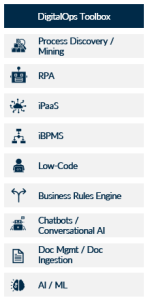
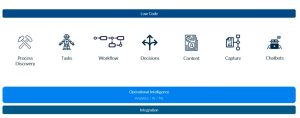
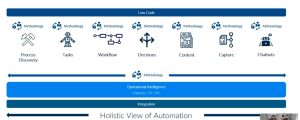
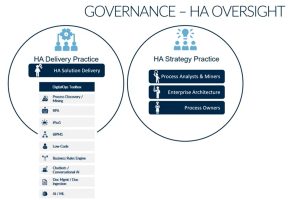
Before we begin, we will discuss how automation is done today by leveraging the Digital Ops Toolbox. We start with breaking down the

Digital Ops Toolbox into layman’s terms.

If we were to break down the tool box, here is what it might look like: 

Process Discovery/ Mining = Process Discovery 

RPA= RPA or Task

iBPMS= Workflow 

Business Rules Engine= Decisions 

Doc Mgmt/ Ingestion = Content and Capture Automation

Chatbots/ Conversational AI = Chatbots!

This leaves us with AI / ML, iPass, and Low-Code. 

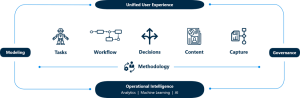
By taking AI/ML and applying that across all of the capabilities within the Digital Ops Toolbox will gives us Operational Intelligence

Then we apply iPaas which incompaces the Analytics and AI Integration for connecting to other systems 

And finally we apply Low-Code. Low-Code is something we can describe as something each capability should offer but it can span all these areas, just like Operational Intelligence and Integration. 

Now, if we look at this picture, it looks seemingly well put together! We cover a lot of automation ground. For many companies, they have a lot of these components of the Digital Ops Toolbox already in place. 

BUT… 

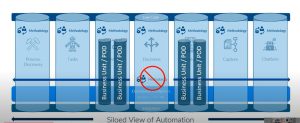
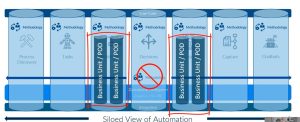
When you dig deeper, at least at most companies, these end up being verticals of automation and tend to be run in isolation from other areas. They’re effectively silos and there’s not a approach to automation across them. 

Within each of these silos, there may be a methodology but there is no overarching methodology or governance across these automation silos. In addition, somethings you even have silos, within the silos- where organizations have each business unit determine what their approach to automation should be independently.

So then, you have an even MORE fractured methodology across these silos. 

So… What is the ANSWER to this challenge?  

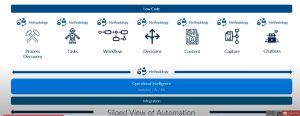
Well, we need a Holistic Approach to Hyperautomation! 

This effectively means we are looking across the spectrum of hyperautomation and not just stuck in our silos. We still need capabilities specific methodologies, but also need an overarching methodology across automation. 

(Siloed View of Automation)

We need to remove the barriers between the functional areas of automation and make sure automation is being looked at as a overarching effort, rather than a myopic approach!

(Holistic View of Automation) 


SECTION 2: SOLUTION

Okay… So how do we do that? 


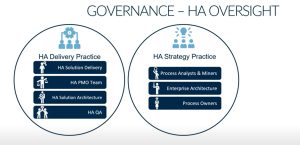
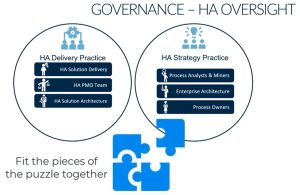
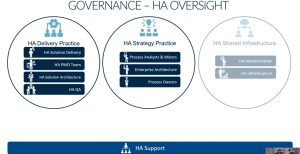
Governance- Hyperautomation Oversight. 


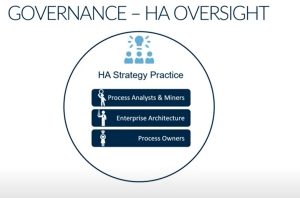
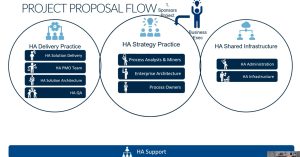
The first thing to focus on is the Hyperautomation Strategy Practice, which consists of:

  1. Process Analyst / Miners 
  2. Enterprise Architecture (Business Architecture)
  3. Process Owners 


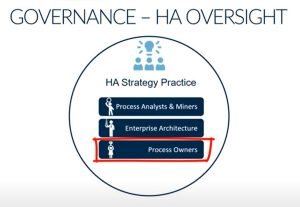
Just for references, a Process Owner is someone who has invested interest in making sure that is a successful one. Their bonus may be tied to how well the type of process in question performs. They’re also someone who is respected throughout the organization. People look to them as the implicit leader of that process, but it is not typically an official position at companies 


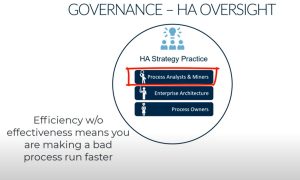
Process Analysts and Minors is a key role for making sure all of your key processes are documented and for your specific automation efforts. You have these experienced analysts that are looking at this, not just from a process perspective, but an automation perspective to make sure your processes are running efficiently and effectively. 


Hyperautomation Delivery Practice


The second part is Hyperautomation Delivery Practice. This consists of: 

  1. Hyperautomation Solution Delivery
  2. Hyperautomation Project Management 
  3. Hyperautomation Solution Architecture 
  4. Hyperautomation QA (Testing)


Hyperautomation  Solution Delivery is made up of the people that have the capabilities in the different Digital Ops Toolbox technologies. In other words, these represent the verticals mentioned above.

The Solution Delivery team has the capability to deliver expertise in those different technologies. 

Of course in the Hyperautomation Delivery Practice,  we need Hyperautomation Project Management but you also need Solution Architecture. 

A Solution Architect is someone who understand at a high level the different technologies work and how they can best be combined to enable your business to get their work done faster and smarter with less manual and mundane work. 

and lastly, you always need testing (Hyperautomation QA). 


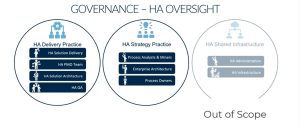
Hyperautomation Shared Infrastructure 


The third part is Hyperautomation Shared Infrastructure. This consists of: 

  1. Hyperautomation Administration
  2. Hyperautomation Infrastructure 


At the time, it is out of scope for this particular discuss so we won’t be touching on this too much.  All in all- it is more economical and scalable to have a shared set of capabilities and infrastructure that your Hyperautomation practice could access. 

Lastly, we will need support throughout all of these phases. 


SECTION 3: OVERSIGHT

Still with me? good. Let’s talk oversight.


As far as overall Hyperuatomation Organization goes, how would oversight work?

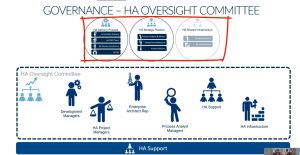
Within this structure, there needs to be a Hyperautomation Oversight Committee that would be essentially made up of key representatives the 3 spheres shown above, as well as support.

This group would be responsible for vetting project proposals that come from the hyperautomation strategy practice. The oversight committee is responsible for the roadmap for hyperautomation, and a for anything that spans the 3 spheres above. 

WAIT!!

Before we discuss how an oversight committee works… lets step back and …

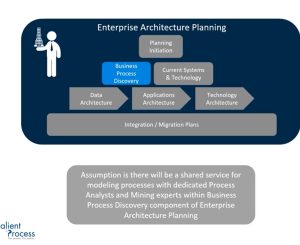
Define how Process Modeling and Mining should be structured from an Organization Perspective. 

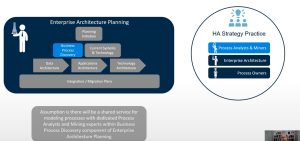
This process role is one of the most important components organizations need to succeed at Hyperautomation.  If we look at a typical enterprise architecture planning structure, Business Process Discovery fits in there nicely.

Typically, it is a shared service with process analysts or miners doing the process discovery and mining and then relating that back to the rest of the enterprise. 


The Hyperautomation Strategy Practice (shown above) has analysts who are more focused on specific hyperautomation projects, and creating not only the “as-is” and “to-be” process models but whether and what parts of those processes are suitable for applying automation to. Of course, much of the grunt work of process discovery can be accomplished by process mining now… however, process analysts provide that last mile infrastructure. 

Okay… Back to the Governance (Oversight) Team!


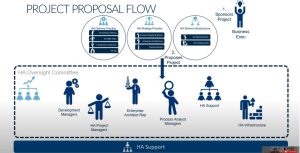
Let’s look at how a project will flow through the oversight committee!

A Business Executive would sponsor a project. The Hyperautomation Strategy Practice would take a look at that project and say “Okay… does this fit in for what we do within out overarching Hyperautomation Delivery Practice?” 

SECTION 4: VIRTUAL PROCESS TEAM 

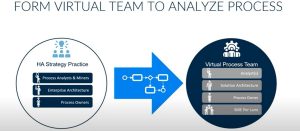
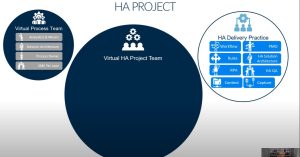
The first thing they will do is form a virtual process team

to take a look at that process. That team could consist of one or more analysts from that strategy team.

  • The Solution Architect

    (mentioned earlier in section 2, pt. 2: Hyperautomation Delivery Practice) would know across hyperautomation (or the digital ops toolbox) how these different technologies can help the company before more effective and efficient.

  • The Process Owner

    (mentioned earlier in section 2, pt. 1: Hyperautomation Strategy Practice) will be apart of the Virtual Process Team 

  • Subject Matter Experts

    We will need Subject Matter Experts for each swimlane in the process 

The team is to step get that process documented…

at least at a high level. You can achieve this by the Process Mining or Manual Process Modeling (mentioned in section 3: Oversight) but truthfully- you need both. Process Mining can get you some of the data you need, but the last mile of process analysis requires human insight and knowledge of your business. 


Once we have things documented, 

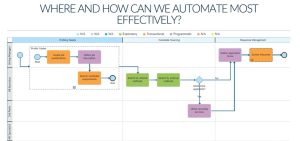
now the team finds what areas of this process need to be automated

or if it even makes sense to automate any of the processes.  The approach recommended here, is to take a holistic view. 

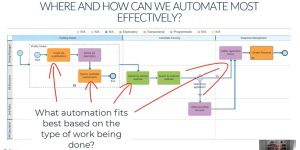
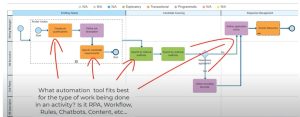
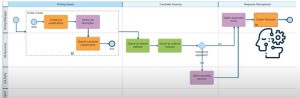
We want to find out what type of automation best fits with the type of work being done. We don’t want to take a process and squeeze it into a workflow or bpms solution. We don’t want to see if we can squeeze it into content management or make the whole thing run on by putting in RPA… We need to look at the process and say what types of automation makes sense based on the type of work being done. 

We will create an orchestration that leverages the automation capabilities as necessary. This means it might be RPA, or it might be sequential workflow. 


Or in some cases, the work might be so expert that none of the automation tools apply.It my just be a human augmented by artificial intelligence.


But the key is you have to look at the processes from a holistic perspective and determine what the best automation is to apply based on the work being done. That is the job of the virtual process team. 

SECTION 5: PROJECT TEAM 

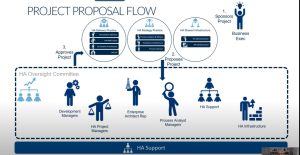
If they determine that its a fit within our overarching Hyperautomation Delivery Practice – The Business Executive is going to sponsor that project to proceed to the Hyperautomation Oversight Committee. 

The Hyperautomation Oversight Committee is going to look at it, compare it against their roadmap, look at their bandwidth, etc. They’re going to determine, “Can we do this project given all the other things we have going on?”

If they say yes, they’ll go ahead and approve the project. 

At this point, you have to determine what the best team would be to build the project. 

In order to have continuity, we are going to make that virtual process team apart of the virtual hyperautomation project team.


From there we cover the issue with the way organizations are approaching Hyperautomation today (silos). 

We then propose a solution by leveraging a flexible and scalable approach to building teams for Hyperautomation.  

Botverter: Automatically Convert Your Current Automation Anywhere Bots to IBM RPA


Author: Jared Michalec, VP of Client Services


In July of 2020, IBM announced that it was acquiring a relatively small Robotic Process Automation (RPA) company with unique Artificial Intelligence (AI) capabilities called WDG

While this move solidified IBM’s offerings in the Hyperautomation arena, and rounded out the IBM Automation platform to be entirely sourced by IBM software, it also presented some interesting challenges.

First and foremost is market-share.  


The Dilemma 

It is important to note that WDG, now called IBM RPA, is arguably as good as, if not superior to the other leading RPA vendors in many ways. The platform supports a large number of commands (600+) that give developers much more control over what the bot is doing vs. the competitive tools. In addition, there are very powerful AI and chatbot features and integrations that are impressive differentiators. Further, the unique architecture allows for new ways to deploy your new bots concurrently so that it can provide a dramatic decrease in the capacity needed to run multiple bots.  

Another significant value proposition for IBM RPA is that it is part of a larger hyperautomation offering from IBM. Very few (if any) other software vendors can provide the full end-to-end capabilities needed in a hyperautomation platform. Since RPA is only one part of the larger automation story, IBM RPA becomes more than just a single, stand-alone tool. Instead, organizations can utilize the capabilities of RPA where it makes sense, like plug in other capabilities such as workflow, business rules, content management, and data capture. 

The problem is this:

How can IBM break into a fairly saturated market (especially since prior to this offering IBM was rebranding and reselling Automation Anywhere’s platform) that most of IBM’s go-to customers are already using the IBM flavor of Automation Anywhere? There is of course a learning curve, which is interestingly not much of an issue and we will address later. So, even if an organization currently running IBM Automation Anywhere wanted to switch to the new IBM RPA tool, they would need to manually re-write all of the current bots, right?

Wrong. 


Removing the Barrier to Adoption 

Immediately following the announcement of the new IBM RPA platform, Salient Process went to work on addressing this potential barrier. If you are familiar with Salient, you know we are always looking at ways to enhance and add value to the existing IBM Automation technologies. If this is news to you, I highly recommend checking out some of our blogs on our other accelerators here 

Our goal was simple in concept:

Find a way to automatically convert an IBM Automation Anywhere bot to an IBM RPA (WDG) bot with minimal manual input.

However, what seemed to be straightforward in concept proved to be a bit more challenging in practice. The main reason was that while most RPA platforms are doing very similar things (automating the repetitive and manual activities of humans), there are nuances in the approach that need to be considered. For example, updating an Excel spreadsheet can be done by emulating the mouse clicks and keystrokes, but it can also be done in a more code-based approach via published libraries for the Microsoft Office suite.  

Without going into too much technical detail, there were subtle (and not so subtle) differences in how Automation Anywhere scripts its bots and how IBM RPA is implemented. 

In order to support as many conversions as possible, each Automation Anywhere command was analyzed and dissected to determine the best way to replicate that functionality with IBM RPA. Because the commands in IBM RPA are much more granular and deliberate, it is common for a single Automation Anywhere command to convert to two or more IBM RPA commands. For example, imagine a bot that needs to open a browser and navigate to a page and get the HTML data from that page for later processing. In Automation Anywhere, this is a single, broader command called “Extract Source”. In IBM RPA, this would be implemented with 3 distinct commands since the tool gives the RPA developer much more control over what the bot is doing. These commands would be 

  1. Start the browser
  2. Navigate to the URL
  3. Get the HTML source. 

Once the differences were identified, it was a matter of building a reusable conversion routine for each and every Automation Anywhere command that could be supported in the new IBM RPA platform. This timeconsuming effort led to some interesting designs and a deeper understanding of the two platforms, and also paved the way for potential future innovations that Salient is planning to build for the IBM RPA tool. 

Introducing… Botverter!

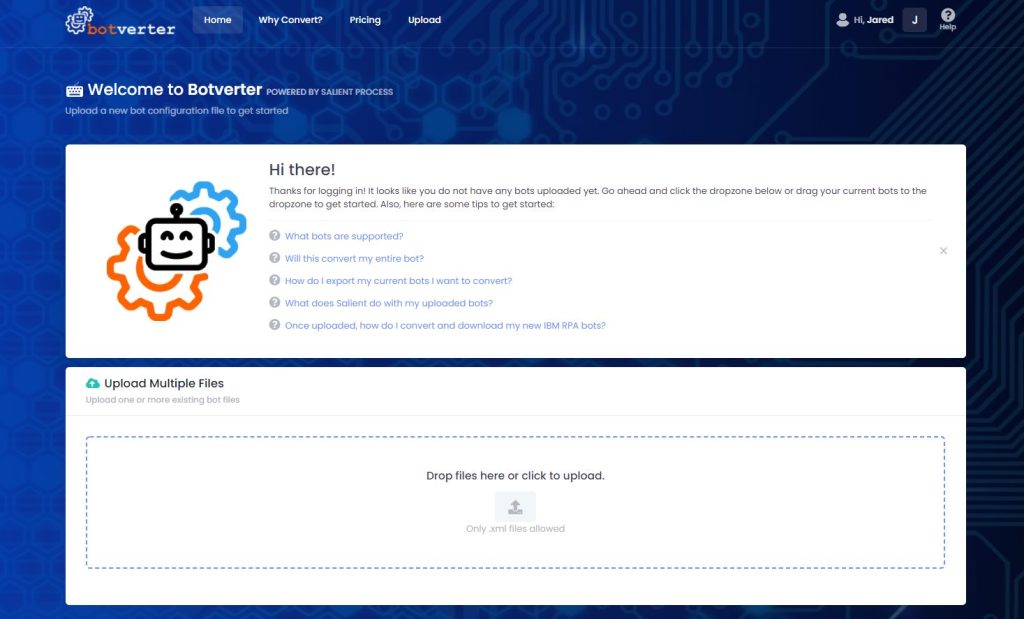
Now that the conversion could be largely automated with this development effort by Salient, it needed an accessible and intuitive platform to deliver it to our customers and partners around the world. Thus, Botverter was born.

This easy-to-use interface allows users to not only upload and convert their IBM Automation Anywhere bots, it also provides analysis and estimates to see how much of the bot can be automatically converted, and highlights the features and commands that do not have an equivalent command in IBM RPA or where information is missing, such as scripts and MetaBots.

www.Botverter.com

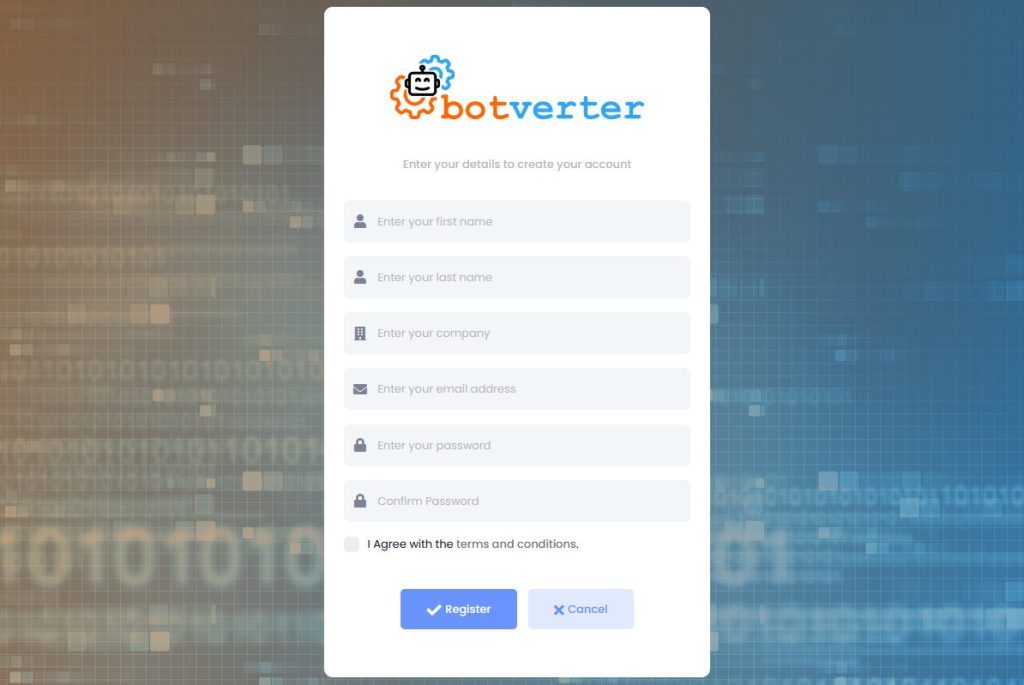
1. Register

Using a company email address, anyone can register for Botverter for free. 


Figure 1: Register 

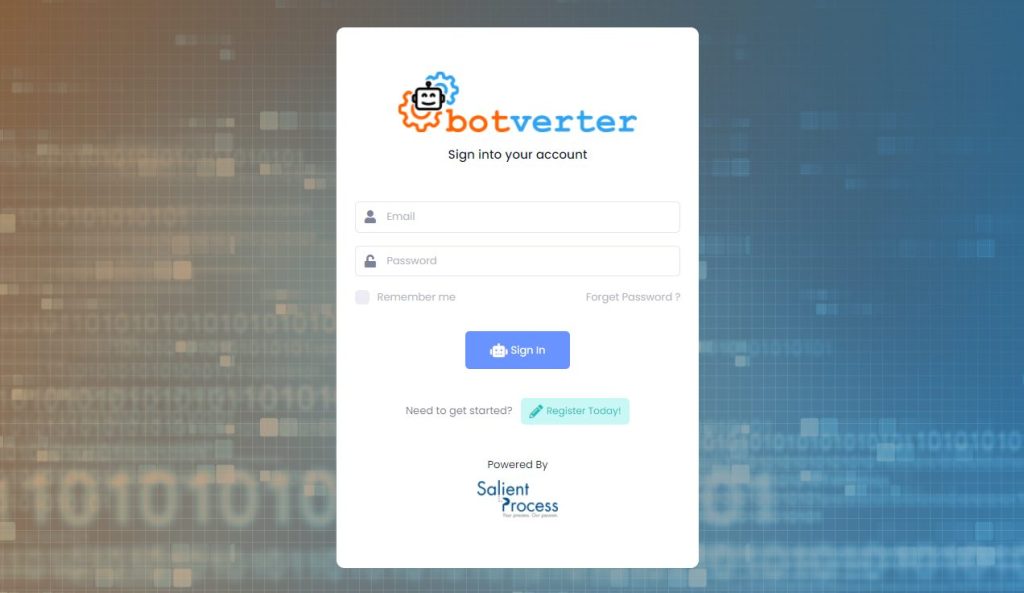
 2. Log In

Once you have confirmed your registration, you can log into the tool using your email address and password. 


Figure 2: Log In 

 3. Upload

In the Automation Anywhere development tool Bot Creator, you have the option to export your bot as a .xml file. This is the file that needs to be uploaded to Botverter (rather than the encrypted .atmx file). Once you have exported this file, you can drag it to the drop zone in Botverter or click the drop zone and select the file(s) you want to upload. 

Figure 3: Upload Your Current Bot(s)

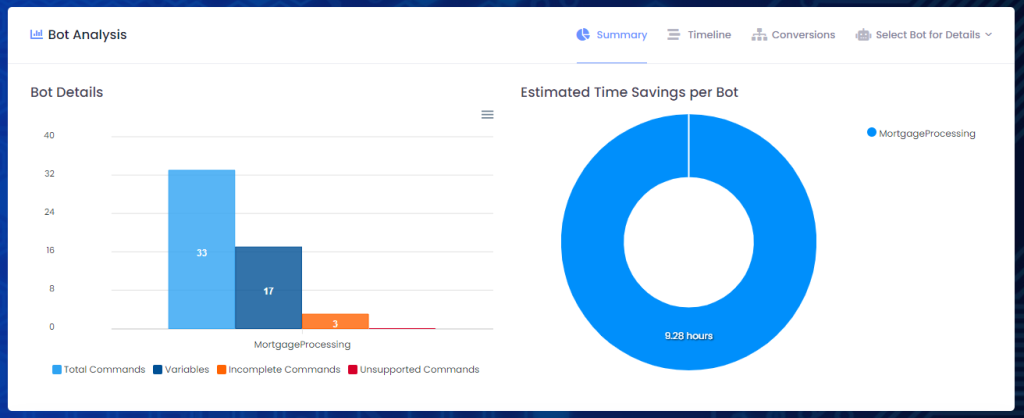
4. Analyze

Immediately following the upload process, you will get a set of charts and reports that give many metrics such as:  how many commands and variables are in the current bot, how many commands this would become in IBM RPA, how many incomplete or unsupported commands there are, and the estimated time savings this would be compared to re-writing the bot in IBM RPA. The time savings calculation is based on a sophisticated algorithm that not only accounts for the number of commands, but also the complexity of the command, the context and options included in the command, and other factors.  

Figure 4: Analyze the Conversion 

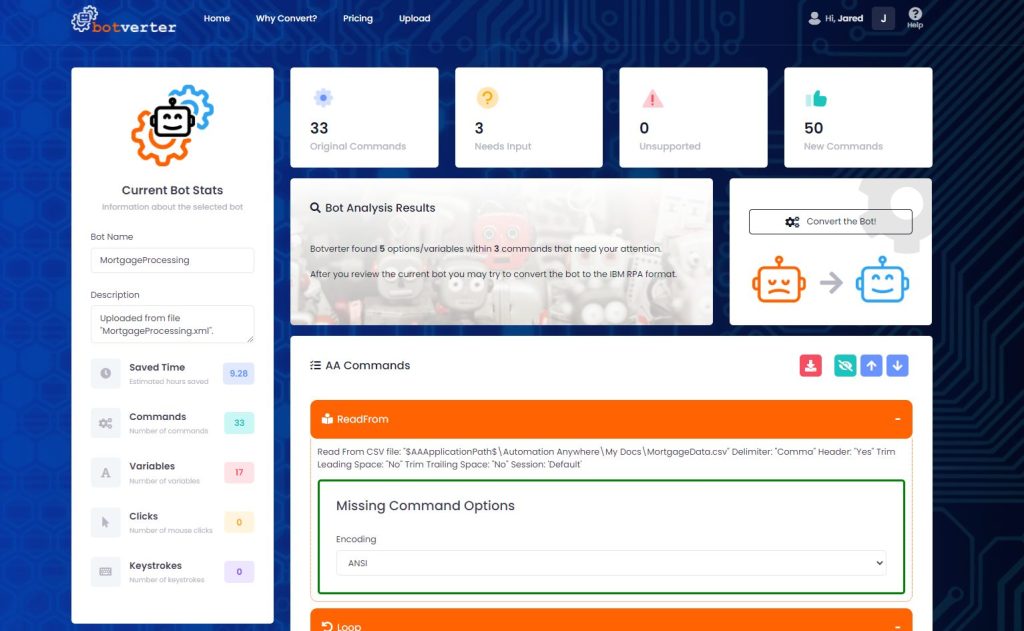
5. Add Missing Options and Review Unsupported Commands

When the bot is exported from Automation Anywhere to the .xml format, it is likely that this export does not include all of the information necessary to automatically convert it to the new IBM RPA bot. There are many reasons for this such as reliance on an environment variable, a script or MetaBot, or that it is simply not included in the export. This last reason is  an issue even if moving from one Automation Anywhere environment to another using these exports.  

To address this, Botverter provides a wizard and visual cues to add these missing options and values and to, where possible, provide default values or drop-downs to allow users to select from a list.  

In some cases, there are commands that have no equivalent in IBM RPA. This is rare, but Botverter also provides a way to view all unsupported commands that will need to be added manually once the conversion is completed. Even when commands are not supported, Botverter will insert clear comments so that an IBM RPA developer can easily find where these missing features are in the new bot and add them seamlessly. 

Figure 5: Add Missing Options 

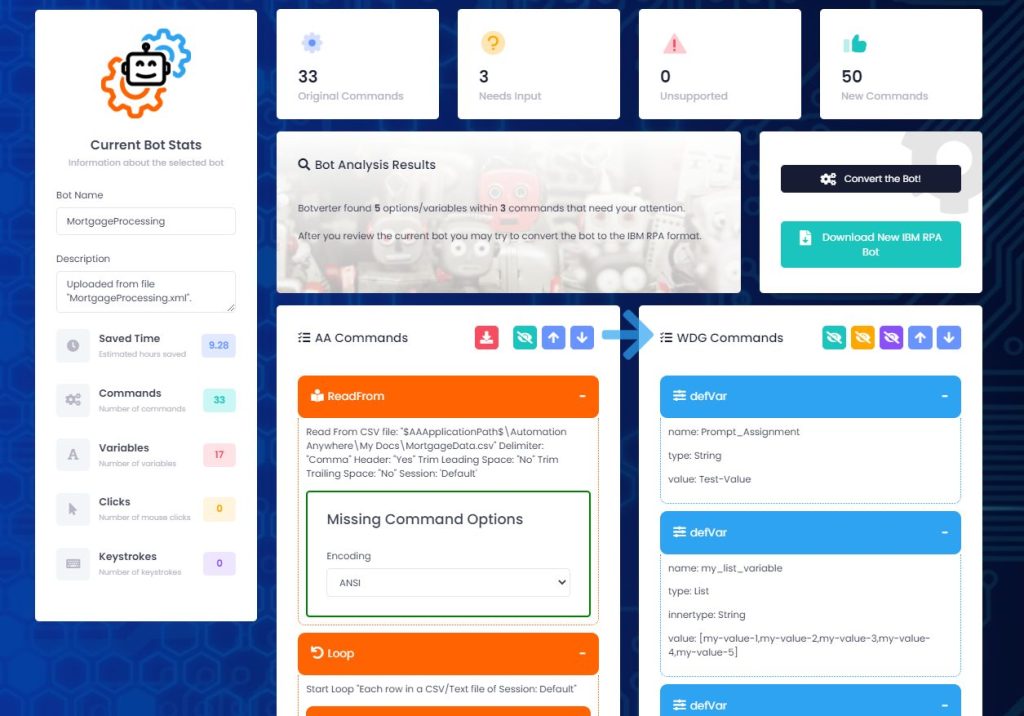
 6. Convert the Bot

Everything that has been done so far is offered at no cost to all users of BotverterIn order to actually convert the bot to the new IBM RPA format, an organization will need to contact Salient or IBM to gain access. It is often possible for Salient to provide this service at no cost as well, but it will depend on the circumstances and if Salient is assisting with the migration or providing the new IBM RPA platform. Either way, our main goal is to make the cost of conversion, plus the cost of the IBM RPA, to be equal to or less than the cost of staying on IBM Automation Anywhere. 

The conversion is completed with a single click of a button and the new bot is displayed side-by-side with the current Automation Anywhere bot. This provides a visual comparison between the two bots, and the new commands can be clearly reviewed for reference. The bot can then be downloaded in the IBM RPA format (a .wal file).  

Figure 6: Convert the Bot 

7. Manually Complete the Migration

There are many times when the automated conversion is 100% complete in Botverter so that the new downloaded bot can be imported and run in IBM RPA with zero changes or additions. However, there are also times where the bot includes unsupported commands or references to scripts and MetaBots that need to be added to the new bot. These manual activities are clearly outlined in Botverter prior to conversion, and placeholders are added as comments so that it is very clear to the developer where these additions need to be made.  

Figure 7: Complete the Migration 

 Summary 

Botverter provides a rapid on-ramp to IBM RPA adoption even if you are already heavily invested in IBM Automation Anywhere. This allows organizations to compare the features and benefits of IBM RPA without worrying about the cost of moving to the new platform. Our clients are seeing dramatic benefits from using the automated conversion.

If you are interested in learning more, or even trying it out for free, please visit one of the links below for more details:  

Register for Botverter

Learn more about  Botverter


Let’s Chat!

START YOUR HYPERAUTOMATION JOURNEY TODAY!

Contact VP of Client Services, Jared Michalec to learn more


RELATED CONTENT
MORE ON HYPERAUTOMATION:
MORE ON SALIENT PROCESS:

Salient Process is a full-service digital business automation shop and proud IBM Automation business partner. To learn more about us at our website, request a free consultation with one of our expert automation advisors! We look forward to guiding you and your company along your own unique Hyperautomation journey.


STAY CONNECTED

👉Subscribe to Bots & Thoughts: The Hyperautomation Podcast

👉Subscribe to our Spotify Here

👉Subscribe to our Apple Podcast

👉Subscribe to our Google Podcast Here


⏩Subscribe to Salient’s Monthly Newsletter Here 

🎤Be our next guest! Sign up Here

📲Contact our Podcast Host Here 


  ⏩LinkedIn

👉 Follow Bots & Thoughts on Here

👉 Follow Salient Process Here

👉 Follow our Podcast Host Here

  ⏩Youtube 

  ⏩Twitter 

🌐Learn more at Salient Process

IBM Automation Solves Problems

How IBM Automation Pays for itself 


Author: Geoffrey Hamm, Sr. Automation Advisor


IBM Automation pays for itself.  

Literally. 

This is a statement I frequently relay on my calls, and oftentimes I can feel the lingering distrust and skepticism. The statement is often discarded, and sometimes the tone even shifts as if to implicitly say, “you’re not the first sales guy we’ve ever met”. Sometimes the response isn’t implicit at all 

And I get it – it’s a bold claim. 

This article is my best attempt to prove that our claim is not only possible, but probable. 

Let’s start with a scenario 

In the realm of Automation, no scenario is off limits. That being said if this article was lacking specifics, I’d really be missing the mark 

Today’s chosen scenario is both accessible, and universal: Accounts Payable (AP). We’ve all got bills to pay, am I right? 

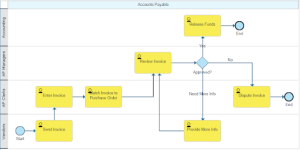
Our current state AP process is as follows:

In our current state process, the vendors send their invoices to a group inbox. This group inbox is monitored by a team of AP Clerks who then enter it into the system. Once entered, an Accounts Payable Manager must review the invoice against the Purchase Order (if one exists). Once the invoice is approved, the Accounting team then releases the funds to the vendor.

Anyone familiar with AP can probably identify several problems, or at least improvement areas, in this diagram. The biggest problem with … problems… is that it take time to resolve.

Problems take time.

This process seems simple enough but, as is usually the case with business processes, the devil is in the details. Here is an abbreviated list of problems with our current state model:

Group inboxes are hard to track

Since all the AP clerks are working out of one group inbox, they are frequently stepping on each other’s toes, or worse – missing invoices completely.

Invoices are entered incorrectly

The human condition prevents AP clerks from entering the invoices perfectly every time. This degrades the data quality and can have more profound impacts on the process (especially in situations where amounts are entered incorrectly).

Managers are too busy to review

The managers are not able to review the invoices in a timely manner. Keep in mind that one’s involvement in a process is only a subset of their overall job description. 

There are some higher-level problems as well. For instance, if our payments are not made on time, we may incur late fees. And if this keeps happening we may gain a reputation for not paying on time, resulting in vendors not wanting to work with us.

Let’s also consider what this process (problems and all) costs us to run.

Time takes money.

Our current state has seven steps, but only five that are performed by us. Since the “Send Invoice” and “Provide More Info” steps are both performed externally by the vendor (i.e. not us), we can exclude them from consideration. No need to worry about things we cannot change.

For the sake of calculations, let’s give each of the remaining steps an average work time. To be fair, most of the activities happen fairly quickly, with the exception of “Dispute Invoice” – which can take clerks hours to resolve (finding the right vendor contact, playing lengthy games of phone tag, putting people on hold to check on things, being put on hold while people check on things, etc…)

Here is a breakdown of our average work times:

Activity

Work Time (in minutes)

Enter Invoice 10
Match Invoice to Purchase Order 10
Review Invoice 10
Release Funds 10
Dispute Invoice 10


In order to provide numbers that are as authentic as possible, I’ve taken the average salaries for AP Clerks, AP Managers and Accounting Clerks from Glassdoor in order to calculate what each instance of this process is costing us:

Activity Work Time (in minutes) Participant Cost (per instance)
Enter Invoice 10 AP Clerk $3.46
Match Invoice to Purchase Order 10 AP Clerk $3.46
Review Invoice 10 AP Manager $5.71
Release Funds 10 Accounting $4.67
Dispute Invoice 60 AP Clerk $20.75


Since the process has two outcomes – the payment being released, or the invoice being disputed – we can comfortably say that the process costs us somewhere between $17.29 and $33.37 for every single invoice.

Now let’s assume that we have 1,000 incoming invoices per month – 70% are paid out and the remaining 30% are disputed. That means the process is costing us $265,363.75 per year.

It is also costing our workers a lot of headaches. After all, data entry is not exactly soul-enriching work… nor is being put on hold.

So how does Automation provide relief, not only for our workers, but for our bottom line? How can we solve these problems while also lowering our operational costs?

Automation solves problems.

First, we can use a workflow application to systematically pull the emails out of the inbox and put them into the formal constructs of a process flow. This will eliminate the issue of clerks not knowing which invoices have been transferred and which have not. It will also give us insight into where each invoice is in the process at any particular moment.

Second, we can use our capture solution to extract the data from the attached images. In addition to eliminating the “swivel chair activity, this will also increase our data integrity issue as systems are much less likely to type something incorrectly than their error-prone human counterparts.

Third, we can lean on a rules engine to auto-approve invoices in certain circumstances. We may still need AP Managers to review invoices sometimes, but the rules engine can be the first line of defense – reducing the noise for management, and in many cases bypassing the step that was previously a bottleneck.

Since “Dispute Invoice” is such a costly activity, perhaps we can even handle it with an automated email to the vendor letting them know the invoice was rejected. Something like this:

Hello Vendor,
The attached invoice ####### was rejected for x reason. If you believe you are receiving this in error, please reach out to us at ###-###-####. Until then, we’ll keep our money. Thanks.

Albeit a little “on the nose”, an automated email might prove sufficient in some instances (more than expected, perhaps). In other instances, the “Dispute Invoice” activity might still need to be performed. Worst case, it will spare your worker’s ears a little elevator music.

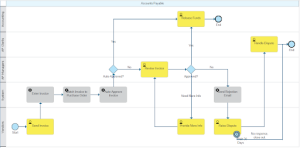
Factoring in these changes results in a future state process which looks like this:

We’ll make two final assumptions that (1) the “Auto-Approve Invoice” works 50% of the time and (2) the “Send Rejection Email” works 40% of the time.

This future state process, with IBM Automation, now costs us $103,311.19 per year to operate. Compared to the $265,363.75 in the current state, these are big savings. Less than half the cost.

Conclusion

This was a pretty straightforward application of our technology (i.e. not a “stretch”), and we were able to see a 61% reduction in the operating costs associated with this process – from $265K to $103K annually.

We didn’t even talk about other value-adds that are equally compelling, but less quantifiable:

  • Reduced wait times (we talked about work times, but wait times can be equally impactful)
  • Real-time dashboards to track each invoice throughout the AP lifecycle
  • Ability to change auto-approval rules on the fly
  • Gathering key performance metrics on both the process as well as its participants…

We also didn’t consider indirect costs:

  • Decreased licensing costs offset by IBM Automation
  • Reallocation of unused hardware when moving to cloud
  • Coffee and aspirin for our AP Clerks stuck on hold listening to Kenny G’s discography…

Lastly, this is only a single process. Our tools are meant to handle processes of all shapes and sizes, in harmony. So, while we were able to save $162K here, we may be able to automate another process down the road and realize another $100-200K in annual savings, and so on, and so on… without incurring any additional software costs.

Speaking of software costs –

While there are too many factors to provide an earnest figure, I can say with confidence that, given today’s scenario, a positive return on investment in year one is possible – taking both software and services into account.

IBM Automation pays for itself. A claim that is not only highly possible, but highly probable.


Let’s Chat!

START YOUR Digital Business Automation JOURNEY TODAY

CONTACT SR. AUTOMATION ADVISOR, GEOFFREY HAMM HERE TO learn more


MORE ON Digital Business Automation:
MORE ON SALIENT PROCESS:

Salient Process is a full-service digital business automation shop and proud IBM Automation business partner. To learn more about us at our website, request a free consultation with one of our expert automation advisors! We look forward to guiding you and your company along your own unique Digital Business Automation journey.


STAY CONNECTED

👉Subscribe to Bots & Thoughts: The Digital Business Automation Podcast

👉Subscribe to our Spotify Here

👉Subscribe to our Apple Podcast

👉Subscribe to our Google Podcast Here


⏩Subscribe to Salient’s Monthly Newsletter Here 

🎤Be our next guest! Sign up Here

📲Contact our Podcast Host Here 


  ⏩LinkedIn

👉 Follow Bots & Thoughts on Here

👉 Follow Salient Process Here

👉 Follow our Podcast Host Here

  ⏩Youtube 

  ⏩Twitter 

🌐Learn more at Salient Process


The economic and operational malaise caused by the COVID-19 pandemic has forced many companies to focus on quick automation wins. It appears a majority of those quick wins have been RPA (task automation) implementations without a focus on the bigger picture and business processes the task automations are a part of. This blog, which is part two in a series, will discuss the approach and tools needed to scale beyond Hyperautomation. 

Note this blog is available as a video as well, and that is the primary intended format. The video format is recommended over the blog format since some of the images/slides are builds and can’t be properly represented in a blog.

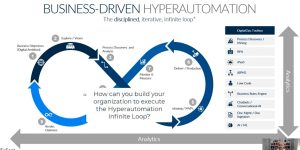
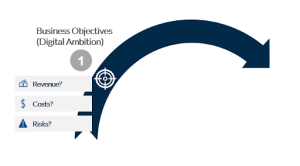
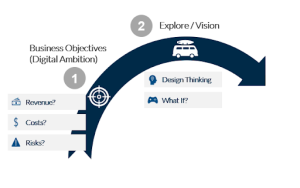
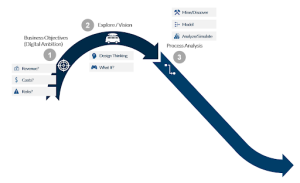
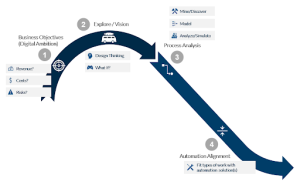
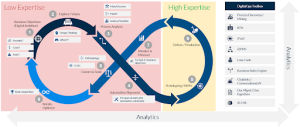
Previously, in Part 1 of this series, we covered the disciplined, iterative, infinite loop that describes Business-Driven Hyperautomation. Let’s quickly review before moving into scaling beyond RPA. Business-Driven Hyperautomation starts with defining your business objectives, or your Digital Ambition. Where do you want to go? You then explore and figure out what the vision is to get you to your Digital Ambition. Once you have your vision to get there, you can hone in on the processes you’ll need to change, and do the necessary process analysis.

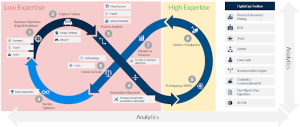
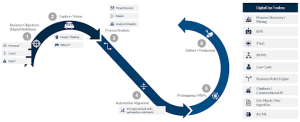
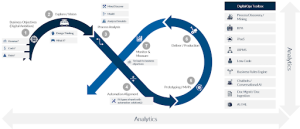
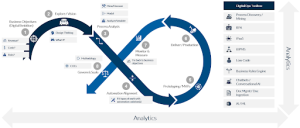
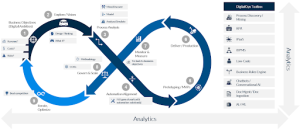
Hyperautomation Infinite Loop
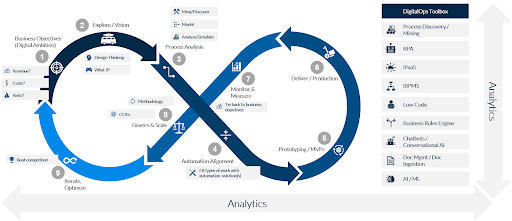
Since automation should be applied wherever it makes sense, you’ll want to use an Automation Alignment framework to determine the best fit of automation with the various types of work being done. The DigitalOps Toolbox has a lot of different tools you’ll need to leverage to scale to Hyperautomation. Automation Alignment is a critical step to fit the right tools with the right work.

Then you get into prototyping and delivering production solutions to satisfy your Digital Ambition. Beyond this, you need to monitor and measure your solutions to determine if you are meeting your Digital Ambition. Without this step, you have no idea if you are successful. Now that you have some initial success, you can begin to scale via rigorous methodologies, which should be a part of your COE efforts. Note you will need multiple COEs as there are a lot of disciplines involved in Hyperautomation. We’ll cover this in a later presentation. As you move forward, you’ll continue to iterate and optimize your overall Hyperautomation program so you can stay ahead of, or catch, your competition.

To scale beyond RPA, or siloed automation solutions, you’ll need to grow beyond the common approach to automation, which is focused mostly on delivery, and scale to the disciplined iterative portions of Hyperautomation, which are much less commonly practiced. For a deeper dive into the iterative loop that is Business-Driven Hyperautomation, see our previous presentation on this subject.

The Ugly Truth About RPA

Now that we have a foundation for Hyperautomation, let’s discuss the Ugly Truth About RPA. Below is a quote from Elena Christopher, Senior Vice President of HFS Research. By the way, if you don’t follow HFS Research, you really should. They are outstanding. You can find their blog at horsesforsources.com.

“In 2012, HFS launched the concept of RPA… In the seven years since, the ugly truth is that we’ve simply succeeded in using RPA to move data around enterprises faster with less manual intervention rather than to rewire our business processes and create new thresholds of value. We are largely missing the opportunity to transform business operations.
https://www.horsesforsources.com/RPA_Top10_2020_012920
Elena Christopher, SVP of HFS Research

The critical thing in this quote is the last sentence. While there is a lot of hype around RPA, we’re still not achieving real business transformation with it. However, this should be expected. RPA is task automation, not process automation.

Gartner’s DigitalOps Toolbox

Most companies doing RPA are just doing stand-alone RPA. What the RPA vendors have started to put together since mid to late 2019 is a vision and toolset to do Complemented RPA, but they are still not offering enough to do Hyperautomation. It is interesting to hear RPA vendors discuss Hyperautomation, and how to them, it still always leads back to RPA being the center of the universe. This is unfortunate, as there is no logical way RPA can be the center of the Hyperautomation universe given it is strictly Task Automation. We discuss where we believe RPA sits later in this blog. However, if you are an RPA vendor, of course, that is the story you’re going to tell.
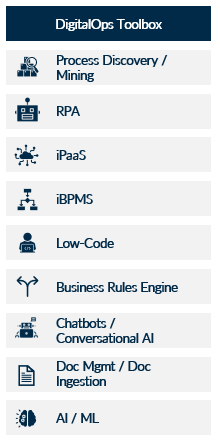
Let’s look at the DigitalOps technology toolbox Gartner defines, which we have slightly modified. At the top, we have Process Intelligence, a term I first saw used by HFS Research, a combination of Data Mining, Process Discovery, and Process Analysis. Document Ingestion covers all those physical and digital documents that are still involved in many business processes and have to be ingested and digitally processed to accommodate automation. User and Customer Experience are more critical than ever, and need to be combined with your automation efforts to make sure you aren’t doing things faster but somehow creating worse experiences for your customers.

Analytics and Machine Learning will be ubiquitous and applied across all of these tools. An Intelligent Business Process Management Suite, or iBPMS, is your overall process execution and orchestration platform. With more sophisticated processes, we just don’t see how you can avoid using some sort of process execution engine. And as businesses move faster and faster, modeling and automating decisions to make sure you are making the right decisions at the speed of digital will become more and more relevant. With all of this, you’ll need to be integrating across heterogeneous systems, and you won’t want to have be a genius to accomplish this. An Integration Platform as a Service, or iPaaS, is the platform to achieve this.

Gartner’s Hyperautomation Spectrum

When you start to want to scale your automation efforts beyond RPA, at least in relation to the Hyperautomation infinite loop, the initial area you want to focus on are the first three steps of Business Objective, Exploring and thinking about various ways to transform your business, and then Process Analysis. When you start to think about the number and diversity of automation tools available in the DigitalOps Technology Toolbox, it becomes apparent scaling to Hyperautomation is not a trivial exercise. It is necessary to determine your automation scope based on the desired business outcome or your Digital Ambition.

Gartner’s Hyperautomation Spectrum is a great way to see exactly where RPA can help with your Digital Ambition, but more importantly what other types of automation you’ll need to consider to reach your business objectives. The way this works is we have Business Objectives, or your Digital Ambition, along the right axis, with our scale going from immediate savings on the bottom up to Business Creation / Reinvention / Recalibration on the top. Along the left axis, we have our degree of automation, which scales from Routine to Dynamic. Along the bottom axis, we have the Scope of Automation, which goes from Narrow to Broad. And then across the top axis, we have something Salient added, which is the Breadth of Processes, which scales from a single activity to a process or multiple processes, up to a Value Chain. We added this because we felt it was critical to highlight the scope of processes the different tools in Hyperautomation can cover.

As you move from the lower left-hand corner of the matrix up to the upper right-hand corner of the matrix, your risk, reward, cost, and business impact go from being very low at the lower left-hand extreme, to being very high at the point where the Breadth of Process and Business Objective axes conjoin. From this spectrum, what you would want to do, just as we describe in the Business-Driven Hyperautomation infinite loop, is begin with your business objective or Digital Ambition. What is it you want to achieve with your business? This will determine the level of Hyperautomation you need to reach. If you are just looking for immediate cost savings with little to no change in the way your business operates, and the tasks you are targeting are very predictable and repeatable, Task Automation will be just the ticket for you.

If you want to move beyond routine automation and cost savings, but don’t have a digital ambition of business transformation, the Process Automation level in the spectrum may be just the right level for you. Or, if you want to transform your business, you will need to get to the areas of Orchestration Across Functions, and Business Operations Creation and Reinvention.

Now that you know where you want to go, and where that puts you in the Hyperautomation Spectrum, let’s figure out what tools in the DigitalOps toolbox fit where in this spectrum. We’ll start in the lower left-hand corner and work our way diagonally across the spectrum to the upper-right. Task automation is the natural fit in the lower left-hand corner. This is essentially RPA. RPA is really great at automating routine repeatable tasks. That is low hanging fruit, and a great deal of the time, it brings immediate savings and ROI. However, remember the statement from HFS research about the fact all we’re doing with RPA is moving data around faster, but not really transforming processes.

That should be expected. RPA is not a process transformation, or even a process automation tool. It is a task automation tool. As you can see from where it lands in the Hyperautomation Spectrum, it is as far away from the upper right-hand corner, where business and process reinvention happen, as possible. Task automation, or RPA, is very limited in terms of any transformative effect it can have on your business, at least as a stand-alone automation tool. Think about it; what you are doing with Robotic Task Automation makes your existing processes run faster. However, you aren’t fundamentally changing anything other than speed and accuracy.

Let’s move on to process automation. This is where Complemented RPA starts to play a role. With Process Intelligence, you can begin to look at your processes for specific automation possibilities and analyze how those changes will impact your operations. However, Complemented RPA is still highly limited in what you can achieve. Its scope is simpler processes that don’t span functions or need sophisticated orchestration. As you start to move into Orchestration Across Functions and Business Operations Creation or Reinvention, that is where you get into more sophisticated processes, and the hard, but highly rewarding, work of transforming your processes and business.

RPA plays a much smaller role here. It certainly has a role, but it is a bit player. Essentially, you are looking at your processes, and determining for each type of work being done, what the best automation tool is to get that work done. Sometimes that will be RPA, but many times it will not. Essentially, RPA becomes just one possibility among many for completing a particular task within your overall process flow. As always, it comes back to your business objective. If you are trying to achieve more than just immediate savings, and are looking to transform your business, or even just automate more than tasks, stand-alone RPA isn’t enough. You’ll need to look to leverage more of the tools in the DigitalOps toolbox.

Automation Alignment Matrix

Now that you know what tools will be necessary depending on what you’re trying to achieve, you can go more granular and determine for each activity in a process, what is the best automation fit depending on the type of work being done? If you take a look back at our Hyperautomation infinite loop, where you are now in this loop is in the context of an activity within a single process, and determining for each activity in that process what type of work is being done. This is step four in the loop. Here you can determine which type of automation tool is the most appropriate for your needs.

Let’s take surface level look at Salient’s Automation Alignment Matrix. The Matrix has two axes. The bottom, or X-axis, is based on the Volume of Work, with the scale going from Low to High volume. The left, or Y-axis, is based on the Uniqueness of Work, with multiple scales. We have one scale going from Repetitive to Unique, and another traversing from Programmatic to Transactional to Exploratory (see blog linked above for definitions). The way you use this matrix is to document and analyze your process, which is step 3 of the Hyperautomation Infinite Loop, then you take a look at the type of work being done at each activity, or task, in that process. You can then layer the type of work onto this matrix, and thus try to determine what type of automation will help you get closer to your Digital Ambition. In our opinion, you should never lose sight of that Digital Ambition or Business Objective. Everything needs to be driving towards that. The Automation Alignment Matrix is a key way to help you scale beyond RPA and achieve Hyperautomation. For more information on the Automation Alignment Matrix, please read our previous blog on the subject.

In summary, stand alone RPA has made a lot of tasks execute faster and with fewer errors, but RPA by itself does not transform processes. It just makes your existing processes run faster. Leveraging the tools from the DigitalOps toolbox will at least give you the ability to transform your processes and business, and scale beyond RPA. The Hyperautomation Spectrum helps you determine, based on your Business Objective, or Digital Ambition, what tools from the DigitalOps toolbox you’ll need to scale beyond RPA. From there, within each process, leveraging Salient’s Automation Alignment Matrix, you can analyze the type of work being done at each task and choose the proper automation tool to help you achieve your goals.

As we mentioned at the start of this presentation, this is the second in a series. We’ll follow this with presentations about structuring your Hyperautomation organization, and leveraging IBM Digital Business Automation to do Hyperautomation. In a previous presentation, we discussed What is Hyperautomation.


The economic and operational malaise caused by the COVID-19 pandemic has forced many companies to focus on quick automation wins. It appears a majority of those quick wins have been RPA (task automation) implementations without a focus on the bigger picture and business processes the task automations are a part of. We believe this will create long-term process and technical debt for companies.

Thus, we are starting a series on Hyperautomation, which is the bigger picture for automation and scaling beyond RPA. This blog, defining Hyperautomation, is Part 1 in a multi-part series. All of the items in the series will have both a blog and a recorded presentation so you can consume the content in the method you prefer. However, we do recommend the recorded presentation format over the blog format. The blogs are derived from the recorded presentations, so they may not flow as well as the presentations. However, we understand there are still a minority of people who prefer reading over watching a video.

The other areas we plan on covering are:

  • How to scale beyond RPA and reach Hyperautomation

  • How IBM Digital Business Automation and Hyperautomation are complementary

  • The Automation Alignment Matrix for Hyperautomation

  • Navigating the Hyperautomation Roadmap

We may not do them in that particular order, and we may even add or subtract titles as we go along. The general idea is this series will give anyone interested a fantastic foundation in understanding Hyperautomation.

What is Hyperautomation?

Business-driven Hyperautomation refers to an approach in which organizations rapidly identify, vet, and automate as many approved business and IT processes as possible through a disciplined approach. Hyperautomation involves the orchestrated use of multiple technologies, tools or platforms.

(Gartner, Dec 2019).

The critical thing in the definition is the bolded words. Hyperautomation is business-driven, disciplined, and involves the orchestrated use of multiple technologies, not just RPA. It is our intention you will see the importance of these bolded words as we dive deeper into what Hyperautomation is.

What we’re going to discuss in this blog is the core of Hyperautomation. We’re going to step through the disciplined, iterative, and infinite loop that is Hyperautomation. We will go through every step in Figure 1 and explain what they represent and why they are essential.

Figure 1: The Hyperautomation Loop

1. Define your business objectives

The first step is to define your business objectives (Step 1). What are you after? What needs to change? Are you trying to chase growth, and thus revenue needs to increase? Are you trying to boost profitability? Do your costs need to go down? Is compliance a big driver for your company? For Wells Fargo the last few years, compliance has been their primary driver. Due to them breaking some rules, everything they are doing needs to be driving back towards lowering risk and making sure they are compliant with government regulations. When you start with the business objective, this will drive what your Digital Ambition ends up being. This makes sure you don’t lose the forest for the trees. It is always about the business objectives you are trying to achieve. The technology is just there to help.

2. Explore / Vision

Now that you have your business objectives, you can start to explore what you need to do with your programs and processes. Much of the improvements and changes will be automation, given the fact so many jobs have substantial pieces of them that can be automated. According to WorkMarket, 53 percent of employees believe they could save up to 20 hours per month by automating tasks (WorkMarket 2020 In(Sight) Report). However, you should take a more comprehensive view than just automation. To widen your perspective, you may decide to employ approaches like Design Thinking or Game Theory to take your company through What-If scenarios. Your vision may end up being to completely tear down what you have and automate everywhere you can, or to iteratively improve on what you have by automating portions of it.

3. Process Analysis

Now that you have objectives and a vision, the hard detailed work begins. You need to do process analysis to see how you can make your process outcomes align with your business objectives. Fortunately, this work is not as hard as it used to be. Data Mining and automated Process Discovery tools have come a long way from where they used to be. However, don’t let the smooth taste fool you. You are still going to need subject matter experts working with process analysts to take your models “the last mile.” Automated process mining and discovery tools have inherent limitations that still require human intervention and analysis to give you the necessary insights to design your processes so they align with your digital ambitions.

In particular, the Process Mining tools attached to RPA tools are almost always going to direct you towards RPA. If you have a hammer, everything looks like a nail. Also, this is where you will want to simulate scenarios to see what happens as you make changes to your processes. What happens if instead of manually sorting through invoices, I have a document ingestion engine doing that? What happens if I have bots take over certain rote and mundane work? You can use Salient’s Automation Compass tool to help with this analysis.

4. Alignment 

This leads us to the Automation Alignment Matrix, which is a matrix Salient Process created to fit the type of work being done with the most appropriate automation technology. The matrix was created because our customers were struggling to determine when to use which of the many automation tools available. The tools Gartner lists as being part of what they call the DigitalOps Toolbox make up what our matrix aligns against. Automation Alignment is a very crucial step that makes sure you avoid the “I have a hammer, so everything looks like a nail” problem.

We will cover the Automation Alignment Matrix in another presentation in this series. For the purposes of this presentation, it is vital a step you need to take to make sure you’re using the right automation tool at the right time and right place in your processes. One could argue it belongs in the Process Analysis step. However, we felt it was important enough to give it its own step.

5&6: Prototyping/MPVs & Deliver/Production

You’ve done some excellent groundwork to make sure what you build is aligned with your objectives. Now we get into the part everyone has been doing a lot of already, at least concerning RPA and deploying bots, and that is Prototyping, or building minimum viable products to determine fit quickly. We won’t spend a lot of time here, as this is well appreciated and practiced throughout the industry. And, the same with being able to deliver and go to production, at least for initial deployments. Where there are challenges are with scaling beyond prototypes, pilots, and limited production deployments. We’ll get deeper into that later, as well as in future presentations in this series.

7: Monitor & Measure

This next piece is very critical. All of the steps are key. However, monitoring and measurement are essential to being able to establish scale and grow your Hyperautomation efforts. I like to think of measurement and monitoring as being a bit like having Google Maps or Waze on your phone. The map is beneficial to help you get where you want to go. However, it is much less helpful if it does not know where you are right now. It can’t possibly give you directions if it doesn’t have that context. Also, where you’ve been is very helpful for the map software in predicting where you may want to go. In the case of your automation landscape, none of that is possible without Analytics. However, it isn’t good enough to have analytics for the business data collected as your business processes execute. To truly map and track where you want to go, and accurately know if you are getting there, you’ll also need to be able to measure your program’s performance. And, you’ll want to be able to predict what will happen based on what has happened. Essentially, all of this data has to report and forecast if your process outcomes will help or hinder you from achieving your business objectives defined in Step 1. Fundamentally, this is all that matters. It doesn’t matter if your process is running more efficiently (faster) if the end outcome isn’t helping you reach those business objectives. If you aren’t getting the proper process outcomes, you’ll need to figure out how to affect the appropriate change to achieve the desired result.

8: Govern & Scale

With all of this, as you start to see initial success, you’ll need to be able to govern and scale your program. What is both interesting and challenging now is you have many disciplines necessary for the breadth of tools available in the DigitalOps Toolbox, as well as less technical, but no less critical, disciplines such as process analysis. Also, as you scale, you will be running concurrent automation efforts. You may have 5, 10, 15, even 20 parallel automation efforts going on across your organization. Your methodologies and COEs will have to take all of this into account. It is Salient’s contention you need an automation COE, which will encompass multiple COEs specific to the disciplines necessary for the various DigitalOps capabilities, as well as for process analysis. Trying to scale without this in place will create duplicate efforts, fiefdoms, and chaos. In other words, you may be automating, but your approach will be highly inefficient across your company, and thus you will fall behind your competitors. This is a vast subject and will be covered in one, or more, of the later presentations in this series.


9: Iterate & Optimize

The iterate and optimize step is vital, and is integral to the fact we have now built an infinity symbol to represent our model for iterative business-driven Hyperautomation. Through the course of my career in process improvement, which started back in 2005 at Intel, people have always asked me, “when do we stop improving the process?” What they’re really asking is, “when can they stop spending money on process improvement?” My answer then was the same as it is today, even with all of the advances in technology. The answer is, “when you decide your process is so good you don’t need to worry about the competition anymore, then you can stop improving it.” So, the question you need to ask yourself is, “are you that good?” Or, more importantly, “are you ever that good?” It isn’t very likely given the churn in the Fortune 500. As of 2019, only 10.4% of Fortune 500 companies from 1955 are still on that coveted list. On the other hand, basing this decision strictly on competition is an oversimplification. There is also the consideration of business objectives. Those objectives, as well as the reality of non-infinite resources, will dictate there are only certain processes you can commit to continually improving. However, Hyperautomation is depicted as an infinite loop for a reason.

The driver for success

A holistic approach 

What we’ve seen frequently in the automation space is initial successes with RPA implementations. Everyone gets excited about the initial success, but then gets bogged down in how to scale and grow to Hyperautomation. The keys to success are only partially the right, or the High Expertise, side (steps 5 and 6) of the infinite loop. The more significant drivers for success, once you get beyond the initial low hanging fruit, is the left two-thirds, of the infinite loop. This is where there is low expertise in Hyperautomation. Steps one through four, and seven through nine, are where the disciplined, iterative portion of the infinite loop comes in. These steps are where the heavy lifting is. They are the discipline part of Hyperautomation. However, they also have the most significant payback for your efforts. The best way to distance yourself from your competition is if you are tying process outcomes to business objectives and adjusting based on those outcomes. To achieve this, you need to take a holistic approach to automation, and not just focus on the right one-third of the Hyperautomation Infinite Loop.

In summary, Hyperautomation is a business-driven, iterative, and disciplined approach to automation, that allows you to accelerate your automation efforts and results. You cannot achieve Hyperautomation with RPA alone. The DigitalOps Toolbox is key to being able to have the necessary tools to scale. While automation efforts are usually successful in the initial pilot and small departmental deployments, companies struggle with scaling beyond those initial successes. To get to Hyperautomation requires a more rigorous approach of defining your business objectives up-front, and letting those drive the digital decisions you make as you grow your automation program.

As we mentioned, this blog is the first in a series. We’ll follow this with blogs and presentations about how you can scale beyond RPA to reach Hyperautomation, leveraging IBM Digital Business Automation to reach Hyperautomation, how you align the right automation tools with the right type of work, and discuss the scaling strategies that will allow you to navigate the Hyperautomation roadmap.

Contact us to learn more about RPA and Hyperautomation.

The Client

Large Long-Term Disability Insurance Company

The Business Challenge

The client manages a large amount of insurance accounts for long-term disability needs. Since most of these policies require a long-term relationship there is often a requirement for the client to change their payment method. Prior to the IBM solution, this would require intensive manual processing and review and would take many weeks, if not months, to complete.

The Solution

Salient Process and IBM partnered to deliver a comprehensive solution that allowed for these requests to be largely automated, along with providing necessary checks-and-balances via robust business decisions.

Improving on a Document and Human-Centric Process

The client handles a large number of long- term disability claims, and many of these policies have been managed by the client for decades. When the payment method of these policies needed to be updated, perhaps to a new credit card or bank account, a form was required to be submitted. This document could be sent via email or the web site, or even by fax. This document was then manually reviewed by an account specialist in order to determine eligibility or to determine any suspicious activity on the account. These reviews could take weeks or even months to process and confirm the update.

Further, the process would require manual updates to multiple systems. This was both time-consuming and could introduce issues if there were mistakes or missing information.

Lastly, there was no tracking nor visibility into the progress and status of the new payment authorization request. If a client requested a status update or needed information, it was just not possible to provide it.

Salient Results

IBM and Salient Process partnered to work closely with the client in order to build a solution that provided the required visibility and oversight the client required, as well as adding automations and validations that would govern the new business processes put in place.

A new input was established to receive and digitize the information from the request form (regardless of the source) and kick off the new workflow process in IBM Business Automation Workflow (BAW). Prior to any human involvement, the data would be sent through the new business rules build in IBM Operational Decision Manager (ODM) that were created to validate the data, check for inconsistencies, and detect any suspicious activity. Once these checks passed, IBM ODM was used to determine the best course of action for the workflow to take.

A task would then be assigned to an account executive to review and process the information sent from the client. Many of the necessary updates to other systems were performed automatically through integrations and other service calls. If there were other systems that needed to be referenced or updated, those views were provided through the single portal built for the client. This allowed for a single view for the client representative so that they did not need to have multiple systems open on their desktop. This greatly increased throughput on the few manual transactions that required an agent’s input.

Salient helps clients to achieve “higher level thinking,” meaning they can focus on the things that add value rather than working on redundant tasks or menial data entry. This was a great example where a solution was put into place in a matter of months that greatly improved the process and delivered immediate results.

Automation in the Time of COVID-19


Author: Geoffrey Hamm, Sr. Automation Advisor



During these unprecedented times… although an applicable phrase, it has quickly become a tired one. In lieu of baseball, Instagram Live and Zoom happy hours have become the new American pastime. And hearing phrases like “the new normal” has become… the new normal.

As a global citizen, I wonder what things will look like going forward. Will luxury brands start to peddle designer face masks? Will social distancing make flying in coach more comfortable? Will Best Buy remain by appointment only (I kind of hope so)?


As an Automation professional on the other hand, I wonder what we can do to prepare our clients for an uncertain future. After spending more time than I care to admit thinking about this, I have reached the conclusion that there are three valid (and somewhat sequential) steps for responding to this pandemic:

  • Maintain Operations Amid Disruption
  • Use Available Resources to Improve Operations
  • Iterate Towards Disruption-Proof Operations
Maintain Operations Amid Disruption

Preface: “Maintain Operations Amid Disruption” is a phrase I borrowed from our friends at Automation Anywhere. I reused it because I agree.

In times of disruption, the first thing we need to do is find our footing. This can be especially difficult when concepts such as a distributed workforce are novel. Before these “unprecedented times”, some companies were not enabled to work remotely and had to literally figure it out overnight. For a lot of companies, so much depends on co-location:

When you’re in the office, someone may hand you your work and, when you’re finished, you may hand it to someone else. If you don’t know how to complete it, you may call in reinforcements from a few desks over.

When you’re working remotely, these transactions are much harder to observe.

Recommendation: Model your processes so everyone has a clear understanding of their roles and responsibilities.


Also, a lot of workers didn’t have company-issued workstations and some companies didn’t have VPNs in place (another crutch when it comes to remote work).


Recommendation: Lean on task bots to interact with on-prem systems and applications (intranet sites, desktop applications, mainframes, etc…).

Unlike humans, bots cannot contract coronavirus.

While these are two steps we can take immediately to stay afloat, we need to be honest with ourselves here. If we are only keeping our heads above water, we will still eventually drown.

We can’t remain in a stabilization state forever. At some point, we need to graduate to subsequent steps. At some point, we need to build a boat.


Use Available Resources to Improve Operations

I am constantly getting asked what my clients are doing and how they’re handling the pandemic? The ones asking me this: other clients.

These past few months, I’ve been sitting courtside with these companies watching them plot their respective courses. There appear to be only two outcomes – some are in a holding pattern, and some are doubling down. There is no in-between. There is no “business as usual”.

From my vantage point, there is no better time to get ahead than now (once you’ve stabilized, of course). There is no better time to get creative about the way your business runs than a time in which you are already forced to be creative. A down economy is the best time to prepare for a rebound, especially if you have idle resources. Finding a project that is transformation (one that matters) can not only improve the way in which you operate, it can also improve the headspace of your employees in the interim – something they can sink their teeth into / a reason to get out of bed in the morning.

Recommendation: Use Automation Compass to analyze your process models and discover automation opportunities.

There are so many things we can do to improve operations – I’ve made a career out of it. Here are just a few ideas:

Recommendation: Build workflow applications.

Build applications that coach workers through their tasks. This will cut down on the back-and-forth. We can also use this exercise to extract valuable insights as to how our processes are actually performing – insights that will be pivotal in subsequent steps (i.e. Disruption-Proofing).


Recommendation: Automate complex decisions.

There is always going to be a need for humans when it comes to creativity and decision making. That being said, there are a lot of decisions that are calculation-based and monotonous.
Part of the “Art of Automation” is determining what work should be performed by humans, and what should not. Calculation-based decisions (especially very complicated ones with lots of inputs) are much better off in the hands of a rules engine.

Recommendation: Digitize physical documents.

With a distributed workforce, it’s very hard to reference the contents of a filing cabinet. Not only does digitization make your documents accessible, it also makes them searchable. Getting the data off the page and into a content management system will make it possible to share with people outside the office… even if those people outside the office are the same ones that used to be inside the office.

Iterate Toward Disruption-Proof Operations

The future is uncertain and disruption is unforeseeable, thus you may be asking “how can we prepare for something that is uncertain?”. The answer is simple: use scalable technologies to build flexible solutions.

By taking advantage of things like the Cloud Pak for Automation and all its componentry, we can work towards the goal of being Disruption-Proof.
Recommendation: Create a Center of Excellence to responsibly scale your Automation solutions.

Recommendation: Consolidate your software footprint. Only keep what you use. Only use what you need.

Recommendation: Re-evaluate your infrastructure. It might be a good time to move to cloud.


To get all philosophical on you, Automation should be put in place to improve the lives of not only your suppliers and customers, but also your employees. Automation makes everyone’s life a little easier. Leaning into technology in times of need is hardly a new concept – just Google all the technology invented for WWI and WWII. Turning to technology to make things easier during hard times can be a great neutralizer, and a great catalyst for progress. 

If we can use this pandemic as a time of creation and innovation instead of paranoia, we can create a better future for both ourselves and for our work. So, instead of focusing on the “new normal” (at some point it will just be “normal” anyways), why not focus on the future of work and how to make it Disruption-Proof?


Let’s Chat!

START YOUR Digital Business Automation JOURNEY TODAY

CONTACT SR. AUTOMATION ADVISOR, GEOFFREY HAMM HERE TO learn more


MORE ON Digital Business Automation:
MORE ON SALIENT PROCESS:

Salient Process is a full-service digital business automation shop and proud IBM Automation business partner. To learn more about us at our website, request a free consultation with one of our expert automation advisors! We look forward to guiding you and your company along your own unique Digital Business Automation journey.


STAY CONNECTED

👉Subscribe to Bots & Thoughts: The Digital Business Automation Podcast

👉Subscribe to our Spotify Here

👉Subscribe to our Apple Podcast

👉Subscribe to our Google Podcast Here


⏩Subscribe to Salient’s Monthly Newsletter Here 

🎤Be our next guest! Sign up Here

📲Contact our Podcast Host Here 


  ⏩LinkedIn

👉 Follow Bots & Thoughts on Here

👉 Follow Salient Process Here

👉 Follow our Podcast Host Here

  ⏩Youtube 

  ⏩Twitter 

🌐Learn more at Salient Process

IBM Cloud Paks. Everything you need to know 

IBM Cloud Paks, Packs a Punch!


Author: Geoffrey Hamm, Sr. Automation Advisor


Introduced early last year, IBM brought Cloud Paks to market with the intention of helping their clients as they embarked on their personalized cloud journey (cloud journeys are like snowflakes – no two are the same).

Cloud Paks are “enterprise-ready, containerized software solutions that give clients an open, faster and more secure way to move core business applications to any cloud”.

And they mean any cloud.


Although there are six Cloud Paks offered by IBM

  1.  Applications
  2. Data
  3. Integration
  4. Automation
  5. Multicloud Management
  6. Security

we are going to focus in on the Cloud Pak for Automation. Sometimes abbreviated CP4A which, although it sounds like an off-brand Star Wars character, isn’t. It is however exceptional at Human-Cyborg relations. 

The IBM Cloud Pak for Automation contains: 

Today we will touch on the key value propositions of the Cloud Pak for Automation and why you should consider it for your organization.

  • Cloud Paks are less stressful
  • Cloud Paks are more portable
  • Cloud Paks are less expensive
  • Cloud Paks are more feature-rich
Cloud Paks are less stressful

Have you ever had to make a tough decision? Buying a car for instance. It takes time. With a decision of that caliber you want to make sure you have all the facts and that you aren’t being too hasty. You want to drive every make and model, compare prices and features, make sure it’s fast enough without worrying the salesman riding co-pilot, etc… 

The same due diligence and stress is applied to making an enterprise-wide software choice. In fact, the stakes are much higher because it’s not something you alone will be driving. This could be the software stack you are resting your laurels on for the next 5-10 years (or longer). That’s a lot of pressure!

With Cloud Pak for Automation, the decision just got easier. Because we are given entitlements to all Digital Business Automation offerings (plus a few Pak-exclusives), we can pick the products we think will best serve us. And if that turns out to not be the case, we can simply switch them out for something else. This alleviates the stress of making an enterprise-grade software decision and leaves us with the freedom to experiment – tailoring our software solutions to perfectly fit our organization.


It becomes less like buying a car and more like drafting a diet and exercise routine – fully aware from the offset that we can always change it if we’re not seeing results.


You should feel empowered by your solutions, not trapped by them.


Cloud Paks are more portable

When I was 12, I went on an Alaskan cruise and saw an iceberg for the first time. I’m convinced that every time someone sees an iceberg there’s always someone else within earshot who says, “you know, 80% of an iceberg is underwater”. And every single time they say that, nobody cares. We care about the part above water – the part we can see.

The same is true with software. We want it to work and we don’t care about what’s underneath so long as it works. This is why containerization has been so transformational – it packages up all the stuff that’s underneath and removes the variables, so the part we actually do care about just… works. It doesn’t matter if it’s in the Amazon cloud, the Google cloud, the Microsoft cloud, the IBM cloud, or a “cloud” in your mother’s basement. It just works.

The containers in the IBM Cloud Pak for Automation are Red Hat OpenShift certified. They are also CNCF Kubernetes certified, but they are “optimized” for OpenShift. This advent in containerization allows us to pick and choose what, where and how much – an ounce of Business Automation Workflow on an Azure cloud, a smidge of Operational Decision Manager on premise, etc…

Since the software is containerized, it is inherently portable – both on-prem and on-cloud.

Cloud Paks are less expensive

My uncle, who is a Mechanical Engineer and about as detail oriented as they come, once found a flaw in the menu of a local taco place. If he ordered all the components of one of their combos piece-by-piece, it was cheaper than buying the combo itself. Luckily, this is not the case with Cloud Paks.

With CP4A, you can rest assured that you are getting much better pricing than if you were to purchase the individual licenses separately.


Cloud Pak pricing centers around Virtual Processor Cores. These Virtual Processor Cores (or VPCs) vary per product and, since the ratio tables might change in the future, we’ll table that for now. Basically, you can think of these VPCs as the currency with which you can pick and play.

The savings run even deeper than the licensing cost. According to IBM, these Cloud Paks were designed to reduce development time by up to 84 percent and operational expenses by up to 75 percent. Keep in mind that this is on top of the general ROI-guided conversations around Automation itself. Rather, this relates to some of the no code / low code accelerators exclusive to the platform (which we’ll talk about in the next section), and the increased portability due to containerization (which we talked about in the previous section). The fact that we can deploy these solutions to any cloud also reduces overhead by letting us make use of what we already have.

In terms of the “Cloud Race”, IBM is a Peacemaker.

Cloud Paks are more feature-rich

My Star Wars fandom might have become apparent earlier in this article when I said that CP4A sounds like a droid’s name. One thing any Star Wars fan knows is that the movies are constantly changing – adding new scenes and modernizing old ones with updated special effects. If you watched the 1997 re-release of A New Hope for instance, you may have noticed a scene in which Han talks to a very CGI-looking Jabba the Hutt. In terms of the Star Wars franchise, these additions are usually a backwards step. Not the case with Cloud Paks. There are quite a few newcomers, or Cloud Pak-exclusives, and they are all welcomed additions:

Pre-built catalogues of AI-powered “digital workers” (Automation Digital Worker), no-code and low-code development tools for applications and workflows (Business Automation Studio, Business Automation Application Designer, and Automation Workstream Services), and real-time, customizable dashboards with all the underlying data being sourced for you behind the scenes (Business Automation Insights).

For all intents and purposes, Cloud Paks are the cognitive future of IBM DBA. They collect information across all your applications… and emails, file servers, Sharepoint, SAP, etc… (note the Content Collectors) and creates these “lakes” of data. These data lakes can in turn be used to feed Machine Learning algorithms with the volumes of data they require to return valuable insights back to the business – next best step, for example. Thus, by pursuing Cloud Pak, you are passively setting yourself up for success in the cognitive future… which by the way, Gartner predicts that by 2022, ONE in FIVE workers will RELY ON AI to do their jobs. I just did the math and that’s only two years away, so the time to lay foundation is now if you want to remain competitive.

It’s not just feature-rich, it provides a rich future.


To recap, Cloud Paks are not like buying a car, they are not like icebergs, they are not like combos at Tulsa-based Mexican chain restaurants and they are not like any unwanted additions to movies that got it right the first time.

They are less stressful, more portable, less expensive and more feature-rich.

…they truly Pak a Punch!