
Automating 200k Manual Hours with Reddy Mallidi


On this episode of Bots & Thoughts: The Digital Business Automation Podcast, our host, Jimmy Hewitt, sits down with guest, Reddy Mallidi,  Former VP of Global Operations at Autodesk Inc., to discuss the transformative effect that Digital Business Automation can have on a company. During this conversation, Reddy speaks about implementing Digital Business Automation throughout Autodesk, from his visionary period to implementation and everything in between. Reddy gets into topics such as how to get your team behind Digital Business Automation the right way, how to overcome apprehension and staff off disappointment, his virtuous cycle of Digital Business Automation that combines professional development with operational excellence, and so much more. Reddy imparts his knowledge and passion for Digital Business Automation in this episode and you don’t want to miss it!

Follow along with the episode now!

Guest Background: Reddy Mallidi, former vp of global operations at autodesk inc
  • One of the most experienced and accomplished Digital Business Automation leaders in the world
  • Led Autodesk’s $4 billion global automation operations
  • Has run global operations for last 3+ years
  • Team: 550 people

Beginning of role at Autodesk

  • Lots of processes and the complexity has evolved overtime
  • As systems become old, people have to deal with tedious, mundane, manual tasks (I.e., copy and paste, importing and exporting, etc.)
  • CFO was his boss
    • Supported his Digital Business Automation vision
    • Began to invest in Digital Business Automation
    • Started with a small team
Automation at Autodesk:
  • The automation journey began in 2019
  • Automated to improve the quality of the employee experience
  • Automated over 200,000 manual hours
Reddy’s philosophy: How to implement Digital Business Automation into a company

New technologies are messy and complex and different narratives happen, so you need to be careful

Always go slow

Understand that disappointments will happen

You need to have a c-staff sponsorship


Critical! You need your team behind it:

  • How:

  • Go smaller

  • Prove the concept

  • Show the employees automation isn’t going to take their jobs, it is going to help them spend more time on less tedious, more strategic tasks

  • Remember we are at the beginning of the technology adoption curve

1. Begin with use cases: How Reddy introduced Digital Business Automation to Autodesk employees
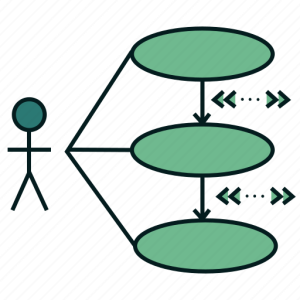
Start with several obvious use cases

Example: Cut and paste across multiple windows, dealing with 15+ different systems

Shadow employees to learn their role and see where automation can help make their jobs better

By automating mundane employee tasks to improve employee experience, you will also improve customer experience

List of use case request became so long and the demand for automation became so high from employees after seeing other use case successes


2. Investment: How Reddy generated excitement around Digital Business Automation

Must invest to be able to take on more use cases!

Investing generates enthusiasm throughout the company

Investing allowing Autodesk to create a process team

Autodesk investment examples: Process-side

RPA

AI & machine learning (NLP)-side

Citizen Development Program:

Innovation idea pooling system

Collected the ideas people were enthusiastic about


People close to the business and close to the customers know the pain points

Ran ideas through Autodesk’s innovation program, Innovate to Operate

  • Reddy’s role: channel the positivity and excitement, take the ideas and get the support for them, and get the ROI

3. Prioritization: How Reddy managed the incoming case requests for automation
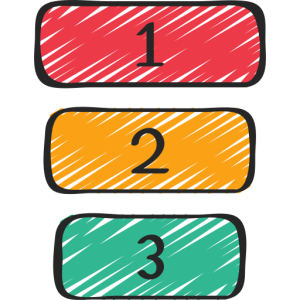
Created criteria that took ROI into account (i.e., the numbers of hours saved, the risk that it mitigated, customer experience enhanced, employee experience enhanced, etc.)

Assign an ROI score/weight to each case

Determining the ROI: Art & science

Science: quantify possible metrics (i.e., financial, hours saved, etc.)

Art: prioritize what you care about as a company (i.e., employee experience, customer experience, etc.)

The employees who submit cases are given the criteria template

They score the case and explain its importance

Makes the employee think through the idea in detail and in terms of ROI

Employees understand there are limited resources

Employees then present their idea to a steering committee

  • Benefits:
    • Allows employee to stand by their idea
    • Trains employees to learn presentation skills
    • Improve employee engagement
    • Aligns employees with the company mission
    • Employee is recognized
    • Employee can see their idea become a reality
    • Leads to more intakes

4. Implementation: How Reddy decided which use cases to implement
Created a Steering Committee that decided which ideas would be implemented based on the ROI criteria template and presentation

Reminder: don’t implement a steering committee too soon

Implement one after you have proven the concept with at least several use cases

You do not want to “over process” too early

Don’t want the bureaucracy present before your employees believe in the Digital Business Automation mission

When people see the first couple successful use cases, more ideas will follow

Team needs to mature first

Success will breed success

You must map the process and clean the process

5. Process Mapping: How Reddy’s team mapped and cleaned their processes

Created a process team: Process experts work closely with business experts (someone who is doing the job day in and day out)

They sit together and map out an entire process

If changes (i.e., new business models, new events, rules change, etc.) happen along the mapping process, they go back and clean the process again

They do not want to automate a process that is bad or inaccurate

Create a “to be” future process

  • Business expert role: explain how the business works daily
  • Process expert role: provide process perspective
    • Cleanup process explained by business expert
    • Key for process reengineering
    • Get the process ready for automation
  • Reddy’s Advice:
    • Before any automation happens, make sure that your “to be” future process makes sense
Example Autodesk use case: Term changes for customers 
  • Problem: When a customer needed to change terms on a subscription agreement with Autodesk, specialists at the company needed to make the changes manually
    • Took time to filter through many systems
    • Customer had to wait for confirmation until the task was completed manually
  • Solution:
    • Business analyst team: create the process for any new business model
    • Mapped from when a customer calls in until the customer gets notified of the change made
    • Automate: After the process is mapped, Autodesk automated the process in 3 iterations
      • Determined what steps of the process could be automated
      • Made sure that the steps that couldn’t be automated were not a hindrance to the automation
      • Automated the steps in increments
        • Easiest to most difficult
        • Automate as many quick wins as possible
    • Reminder: You do not need to automate the entire process at once
    • Result: Saved 15,000 manual hours each year
Digital Business Automationjourney:

Next steps: Once small wins start to add up and you generate ROI from Digital Business Automation profits you can…

  • Invest in more ROI-positive capital machinery
  • Move from mapping one process to mapping an entire process group or an entire department
  • Support more complex situations and business cases (versus mundane tasks)
  • Invest in more advanced automation capabilities
  • Build Center of Excellence
  • Invest more in people
    • Reminder: with Digital Business Automation, you should be able to support growth in the business without taking on additional assets (i.e., people)
      • Example: Same operations team able to support 2x the business after automating processes in their process map
  • Digital Business Automation definition:

    • Reddy: It is an approach,It’s not tool specific It’s not technology specific. It is business driven and you need to have a disciplined approach that shows business value in terms of ROI, customer experience, employee experience, etc.

A combination of tools and capabilities

ARE THERE MORE EPISODES?

YES! Bots & Thoughts is officially on all podcast streaming platforms. Check it out now!

HAVE A TOPIC IDEA? LET US KNOW!

We would love to hear from you. This podcast is for you, and if you have something that you want to hear, we would love to know. This form is also a place for you to ask questions or get in touch with our Salient Process team. 

Submit a request for a podcast topic here❗


👉Subscribe to Bots & Thoughts: The Digital Business Automation Podcast

👉Subscribe to our Spotify Here

👉Subscribe to our Apple Podcast

👉Subscribe to our Google Podcast Here


⏩Subscribe to Salient’s Monthly Newsletter Here 

🎤Be our next guest! Sign up Here

📲Contact our Podcast Host Here 

 

  ⏩LinkedIn

👉 Follow Bots & Thoughts on Here

👉 Follow Salient Process Here

👉 Follow our Podcast Host Here

  ⏩Youtube 

  ⏩Twitter 

🌐Learn more at Salient Process


RELATED CONTENT


More on Digital Business Automation:

Digital Business Automation Home Page

What is Digital Business Automation?

Scaling Beyond RPA to Digital Business Automation

North Star Methodology

More on Salient Process:

Salient Process Home Page

Bots & Thoughts: The Digital Business Automation Podcast

Process Mining vs Mapping

Salient Process is a full-service digital business automation shop and proud IBM Automation business partner. To learn more about us at our website, request a free consultation with one of our expert automation advisors! We look forward to guiding you and your company along your own unique Digital Business Automation journey.


A Love Letter to Automation


Author: Geoffrey Hamm, Sr. Automation Advisor

 

In media, Automation and Artificial Intelligence are often portrayed in a negative light. This mischaracterization can quickly make its way into the proverbial water cooler – “it’s taking our jobs”. To workers, it can be perceived as a threat. To management, it can be undervalued while looking through the myopic lens of overnight ROI. With the Great Resignation in full effect, workers are in a unique position to negotiate with historically high leverage. Meanwhile, management is struggling to attract and retain top talent. From my perspective, Automation is the missing piece here: the mediator.

More than ever before, workers are demanding meaningful roles and companies are bending in order to make good on that promise. I want to talk today about why workers often fear automation (and why they shouldn’t), as well as how AI-powered Automation plays into the current economics of today’s workplace – alleviating both sides of the Great Resignation woes and building a better future workplace for all of us.

To: Management

Why You Should Invest In Your Employees

The Great Resignation has been blowing up my feed lately, and the coverage seems warranted – nearly 47 million Americans quit their jobs in 2021. In the coming year, another 41% of workers are considering it. As it stands, for every unemployed person in America, there are 2-3 vacant job openings.

This has left many of us scratching our heads, but there are some answers amid the chaos. To understand the Great Resignation, you need to understand how people feel about their jobs.

Employees feel unhappy.

What causes employee unhappiness? There are many reasons, but today I want to address three:

  1. Employee burnout
  2. Unheard voices
  3. Lack of meaningful work
  4.  

Employee Burnout

With the pandemic shifting us to remote work virtually overnight, workers unexpectedly began logging more hours. Some of this can be attributed to a lack of process understanding and the pressure of maintaining “optics”. The lack of process understanding makes sense as many of these processes were also stood up overnight. Unfortunately, some of them made life harder – not easier.

Having good processes in place that are visible and understood by your workers is imperative to burnout prevention. By shifting to a results-based work model versus a time-based “9 to 5” (or “5 to 9” in some unfortunate cases), you can help increase focus on performance and decrease the stress that comes with maintaining “optics.”

Unheard Voices

A lot of workers feel that they don’t have a voice within their organizations. When there is no outlet for those voices, resentment starts to build. I wholeheartedly believe that the best ideas come from within. Your workers have the best feel for how things are running. They live it. So why would you not involve them in the process improvement exercise?

If you’re not capturing their ideas and working to get them on the roadmap – it can be detrimental to their happiness. People need to feel in control of their positions, not the other way around. We’ve been using our Automation Compass tool to encourage workers at any level to contribute to the idea pipeline. Even just acknowledging that these ideas are being considered is sometimes enough to combat resentment before it begins.

Lack of Meaningful Work

Humans crave meaningful work. Period. Employees who engage in meaningful tasks are 3.2x more likely to be happy according to research conducted by Robert Half.

Using tools like Blueworks Live and IBM Process Mining, we can quickly determine which tasks are being performed, which are adding value, and which are not. We can then flag everything that is not adding value (i.e. not meaningful) as an Automation candidate and use our other tools (Business Automation Workflow, Robotic Process Automation, etc…) to remove the noise, allowing your workforce to focus on the remaining work – the meaningful work.


If you proactively invest in the happiness of your workers, their positions will become more desirable and they will be more likely to keep the seat occupied. Perhaps a good workplace parallel to “happy wife, happy life” might be “happy employee, happy company” – which is true. A study found that happy employees are up 20% more productive than unhappy ones. Happy salespeople outperform unhappy ones by nearly 37%. Even stock prices are affected – Fortune’s “100 Best Companies To Work For” saw stock prices rise 14% per year between 1998 and 2005, while companies not on the list were only averaging around 6%.

I talk to a lot of customers who are considering investing in Automation. These conversations often default to a conversation around ROI and, while we have tools to help justify these pursuits from a cost-saving perspective, there are more forces at play. There is this pain index that drives workers to work somewhere else.

To reiterate, we need to focus on how our workers feel.


“I have a job I hate, but I’m not dying from it”.

This is a common sentiment in the modern workplace. Hopeful, isn’t it? Not hopeful, but surprisingly not even true – many people are dying from it.


In Jeffrey Pfeffer’s book “Dying For a Paycheck”, his research suggests that simply hating your job accounted for up to 8% of annual health costs and was associated with 120,000 excessive deaths each year. A “toxic” workplace can cause mental health issues, sleep loss, severe headaches, stomach aches, muscle aches, lower libido, constant fatigue, in addition to just plain getting sick more often.

So next time you have a conversation about automating highly automatable tasks – there’s more to the story than ROI. You’re creating a workplace that attracts and retains talent, and maybe even saves lives.

The first “legal” job I ever had was at the Tulsa County Courthouse. “Legal” because it was the first time taxes were withheld …and “legal” because it was literally in a courthouse. I traded my under-the-table lawn gigs in for a rolling chair. As a bright-eyed 16-year-old, I was pretty excited to have an esteemed job in the Records Department – badging through security each day, making grown-up chit-chat with the security guards, eating bagels, all of it.

The job was data entry. Each day, I’d sit down at my desk and begin strengthening my neck muscles with the constant back and forth between paper and screen. Down left to the paper document, up right to the antiquated computer system where the data needed to land.

Don’t get me wrong – I loved the people I worked with, and it kept the lights on in my 2003 Ford Focus – but this type of work was a spirit killer.

Today, I frequently interact with people who have a similar disdain for what they do. Yet, I also encounter hesitation towards the prospect of Automation, often from the same exact people.

I want to take a few moments to dispel some misconceptions.

The main criticism of Automation is that it replaces humans. So, does it?

It Doesn’t

According to Landon Spring with RK Logistics, responding to recent Automation investments:

“It wasn’t about trying to replace people. It was about using the employees that we have for the tasks that they are good at, and are interesting, and that they want to be doing… we have not laid off one person because of [Automation] and in fact, because it’s made us even more competitive, we’ve only been hiring”

This seems to be true in most cases. As AI-powered Automation is properly implemented across the enterprise, it makes every single one of us more efficient and effective. In short, Automation gives us superpowers, and it gives our companies the ability to reinvest in us.

It’s also worth noting that doing nothing isn’t an option. Companies that do nothing will eventually, and inevitably, find themselves in a position where they can no longer compete.

“When you stop growing, you start dying” – William S. Burroughs

A company that ceases to exist employees nobody. That is a more rational job loss fear.

And sure, there will sometimes be casualties – most of which cannot be foreseen. This is the result of unpredictable technological advances and changing business landscapes. But there isn’t a direct correlation between job loss and Automation. In fact, it is often even less obvious than you might think. For example:

When the ATM was first introduced in the late 1960s, there was widespread panic amongst bank tellers. These devices were taking their jobs! But these actions had an adverse outcome. By leaning into this technology, banks were able to lower their branch overhead requiring fewer tellers to successfully operate any given branch; however, it also enabled them to open up way more branches. As a result, the number of tellers in the U.S. doubled from under 300,000 in 1970 to around 600,000 in 2010. This amid many other disruptive technological changes like mobile banking, eDeposits, etc…

The takeaway there is that the future of any job is completely unforeseeable. Some jobs don’t exist now that did decades ago – probably not a good time to get into the business of operating switchboards, cutting ice, or setting up bowling pins for instance. On the flip side, some jobs exist now that we couldn’t even fathom decades ago (try explaining “Social Media Marketing” to your grandparents).

Thus, as an employee, the best way to keep your job is to simply grow with it, using the time Automation gives you back to retrain, diversify your skillset, and work on more meaningful tasks. Embrace Automation, don’t resist it.

And here’s the silver lining – Automation lowers the barriers to entry for almost any job. So, while retraining and reskilling might be necessary to stay competitive, jobs are getting easier across the board to pick up and run with.

“When you stop growing, you start dying” – William S. Burroughs

Equally as applicable to the company as it is to the ones who work there.

To further ease anxiety, it should be noted that in a World Economic Forum article by James Hewitt (no relation to our own Jimmy Hewitt, host of Salient’s Bots and Thoughts: THE Digital Business Automation Podcast), he claims less than 5% of occupations are 100% automatable. He does mention however that 30% of the work involved in most jobs could be automated… and it’s probably the 30% you hate (like manually entering records in the courthouse).

There are some things that humans are just much better at than machines: solving complex problems, handling unique one-off situations, building relationships, being creative, etc…

Automation for instance cannot run an independent Twitter account or write listenable songs. It can however be used as an effective songwriting tool. And that’s exactly the point – AI-powered Automation is a tool. Tools don’t replace humans, they enable them.


Automation is doing things today that would seem fresh out of a Sci-Fi novel to people a decade ago. Things like grading high school essays, diagnosing diabetic retinopathy, and driving cars.

Automation gives us the tools we need to be better, faster, stronger, smarter. It encourages us to rethink the way we do things. It works on our behalf so we can be more innovative and focused. It does all the dumb things I don’t want to do, so that I can in turn focus on the important things in life – like drinking my fancy Millennial coffee, staying up on current affairs, and spending extra time with my family.

Like Prince’s LM-1 drum machine, Automation is generally a thankless technology.

That’s ok. Automation doesn’t suffer from employee burnout, lack of recognition or meaningful work. It doesn’t care that you can go on vacation and it can’t. It doesn’t care that you work only 8 hours a day while it works 24. It doesn’t care that you get an office with a view while it gets shoved into a claustrophobic server farm.

Automation isn’t our enemy, it has our back. It’s in the trenches with us. It’s a co-worker that we can truly rely on – a friend.

So Automation, if you’re reading this, I am thankful for everything you do to help shape the future of work and make our world a better place. I for one enjoy working smarter, not harder.

Automation, je t’aime. Automation, I love you.


Let’s Chat!

START YOUR Digital Business Automation JOURNEY TODAY!

Contact Sr. Automation Advisor, Geoffrey Hamm Here to improve your job, corporation and life. 


RELATED CONTENT
MORE ON Digital Business Automation:
MORE ON SALIENT PROCESS:

Salient Process is a full-service digital business automation shop and proud IBM Automation business partner. To learn more about us at our website, request a free consultation with one of our expert automation advisors! We look forward to guiding you and your company along your own unique Digital Business Automation journey.


STAY CONNECTED

👉Subscribe to Bots & Thoughts: The Digital Business Automation Podcast

👉Subscribe to our Spotify Here

👉Subscribe to our Apple Podcast

👉Subscribe to our Google Podcast Here


⏩Subscribe to Salient’s Monthly Newsletter Here 

🎤Be our next guest! Sign up Here

📲Contact our Podcast Host Here 


  ⏩LinkedIn

👉 Follow Bots & Thoughts on Here

👉 Follow Salient Process Here

👉 Follow our Podcast Host Here

  ⏩Youtube 

  ⏩Twitter 

🌐Learn more at Salient Process


Digital Business Automation Standards, Notations, & Frameworks


Following episode 4, “What do I automate next?” Host Jimmy Hewitt has put together an episode that will help you learn some of the most important standards, notions, and frameworks within the world of Digital Business Automation.

Additionally, you will hear about several prominent industry organizations and guilds that prove most useful in nurturing our Digital Business Automation journeys. Our host, Jimmy Hewitt, will walk through the WhoWhat, and Why of each standard, notation, and framework revealed in this episode. As a reminder, the technical components discussed will apply to all viewers ranging from experienced to newer in the Digital Business Automation and business architecture space.

Listen to episode 4

Episode 3: Salient Process x Primanti Brothers Podcast!

Follow along with the episode now!

Guiding Principles

Business Process Model and Notation (BPMN):

  • Graphical representation, a modeling notation, a collection of symbols that can rapidly convey meaning (specifically about business process)
  • The de facto standard for business process diagrams
  • Original version: BPMN 1.0
    • Developed by the Business Process Management Initiative (BPMI) in 2004
    • BPMI merged with the Object Management Group (OMG) in 2005
  • Most current version: BPMN 2.0
  • Why BPMN matters:

  • 1. Rapid information sharing: pertaining to business processes
    • Normal communication (describing using sentences/paragraphs): doesn’t allow for rapid communication of ideas, as the viewer must read every word to see and understand the full picture
    • Visuals: allows for much more rapid and efficient information dissemination when compared to using our words
      • Creating a key or legend will help your viewer understand the visual better = BPMN
      • Examples: A sheet of music enables someone with a bit of training to play a song
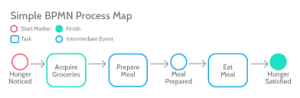
    • BPMN Process Map: allows someone with a bit of training to understand a business process and a wealth of data and metadata about it just by looking at it
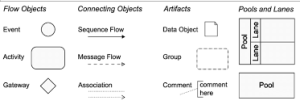
    • Common elements of BPMN Process Flow: each element has a specific symbol

Events = Circles

Start and stop of process

Activities = Rectangles


Happen in between events

Gateways = Diamonds

Decisions, diverges, and converges along the process

Very Specific BPMN examples: rarely used

Transaction = Double-lined rectangle

  • 2. Interoperability: between process mapping, process mining, and workflow execution tools (software like BPM)
    • Without the BPMN standard, it would be nearly impossible to compare the results of a process mining exercise with the results of a process mapping exercise
    • However, because both capabilities use BPME standard notation, you can compare you process map with your mined process data

NOTE: a process map is only as good as the information collected during a process mapping workshop or interview
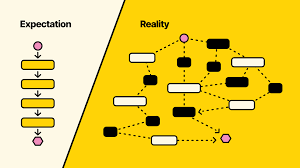
A process map only represents what a person intimately close with the process tells you about it

Often time the resulting process map is not so much a reflection of the business process itself, but rather a reflection of that person’s understanding of the business process

    •  

Not perfect, but best we can do up until process mining came around

Rather than interviewing people who are close to a given business process, modeling their understanding of it, process mining involves the ingestion of your systems log data (including a case ID number, an activity name, and at least one timestamp)


Process mining will create one of many visual representations of this systems log data from your ERP (Enterprise Resource Planning) or CRM (Customer Relationship Management)

    • One of these visualizations is a BPMN diagram
  • Mining is different than mapping because of the data source!
    • Mining: deriving process information from a system
      • Can pick up on more accurate process details
    • Mapping: deriving process information from a human
  • How do you normalize your ERP log data with what a process owner’s understanding of that process is?
    • BPMN!
    • Reach out to Salient and Jimmy Hewitt where we will show you how to use BPMN to compare a process map with a process mining output

Workflow:

Rather than creating a workflow application from scratch, all you have to do is import your BPME file

How: if you create a business process map or model in BPME notation in a proper process mapping platform (Blueworks Live), then you’re able to simply export that “.bpm” file out of your process mapping platform and import it directly into your process management and execution platform


American Productivity and Quality Center’s (APQC’s) Framework:
  • APQC:

    • Founded in 1977
    • 150,000 members across 1,000 organizations (Adidas, Zappos, etc.) and 45 different industries
    • World’s foremost authority on business benchmarking process and performance improvement thanks to their process classification framework (APQC’s PCF)
  • PCF: two forms

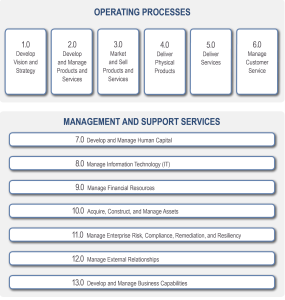
    • Generic (cross-industry) form: contains 13 categories of processes across an entire organization
    • Examples:
      • “Market and sell products and services”: APQC #3.0
      • “Manage information technology (IT)”: APQC #8.0
      • “Manage Financial resources”: APQC #9.0
    • Industry specific form: much more specific
      • Example:
        • “Entering employee time worked into a payroll system”: APQC #9.5.2.1
    • Once your business and its procedural architecture has been mapped out within the APQC framework, you can benchmark your business performance with other companies to see where you stand and to see where you could improve modeling your business
    • Important in the Digital Business Automation community because it accommodates a holistic approach, not a siloed one
Overview:
  • Business Process Model and Notation (BPMN): modeling notation, a collection of symbols that can rapidly convey meaning about business process
    • Enables both rapid and detailed information sharing about a business
    • Key to interoperability between process mapping, mining, and workflow
  • American Productivity and Quality Center (APQC): world’s foremost authority on business benchmarking process and performance improvement
    • Process Classification Framework (PCF) accommodates a holistic approach, rather than a siloed one, for business benchmarking within the Digital Business Automation community
WATCH EPISODE 5 ANIMATION

are there more episodes?

YES! Bots & Thoughts is officially on all podcast streaming platforms. Check it out now!

https://www.salientprocess.fm/

Have a topic idea? Let us know!

We would love to hear from you. This podcast is for you, and if you have something that you want to hear, we would love to know. This form is also a place for you to ask questions or get in touch with our Salient Process team. 

Submit a request for a podcast topic here❗


👉Subscribe to Bots & Thoughts: The Digital Business Automation Podcast

👉Subscribe to our Spotify Here

👉Subscribe to our Apple Podcast

👉Subscribe to our Google Podcast Here


⏩Subscribe to Salient’s Monthly Newsletter Here 

🎤Be our next guest! Sign up Here

📲Contact our Podcast Host Here 


  ⏩LinkedIn

👉 Follow Bots & Thoughts on Here

👉 Follow Salient Process Here

👉 Follow our Podcast Host Here

  ⏩Youtube 

  ⏩Twitter 

🌐Learn more at Salient Process


RELATED CONTENT


More on Digital Business Automation:

Digital Business Automation Home Page

What is Digital Business Automation?

Scaling Beyond RPA to Digital Business Automation

North Star Methodology

More on Salient Process:

Salient Process Home Page

Bots & Thoughts: The Digital Business Automation Podcast

Salient Process is a full-service digital business automation shop and proud IBM Automation business partner. To learn more about us at our website, request a free consultation with one of our expert automation advisors! We look forward to guiding you and your company along your own unique Digital Business Automation journey.

The Client

VMware

The Business Challenge

The newly-created VMware Process Stewardship team was tasked with documenting and cataloging all the organization’s core business processes. The goal was to be able to create a centralized, common repository to get everyone on the same page and to better enable process improvement and automation.

The Solution

Salient Process Provided best practices, methodologies, and a unique technology accelerator called “Blueworks Insights” to enable the Process Stewardship team and grow IBM Blueworks Live adoption.

One Step at a Time

Many organizations strive for Process Excellence or Operational Efficiency. Historically, this has been addressed using a proven methodology, such as Lean Six Sigma, and documents and spreadsheets. In addition, a drawing tool, such as Microsoft Visio, can be used to visualize the documented processes and workflows. However, it is important to understand this is not a true process documentation solution.

In 2009, IBM introduced a purpose-built tool for process discovery, modeling, and documentation called IBM Blueworks Live. This platform revolutionized how companies document and understand their business processes. This not only accelerated the speed at which processes could be modeled, but the details about the process could be captured directly within the activities. This was a huge improvement to a drawing tool like Visio where the details needed to be collected in a separate spreadsheet or text file. Further, the collaboration capabilities empowered users and allowed for process improvement to be something that the entire company could participate in, not just a small group of highly- trained individuals.

After an exhaustive comparison of technologies, VMware chose Blueworks Live as their strategic platform with one caveat: VMware needed some additional reports and dashboards for their process excellence goals, and this is where Salient Process came in.

Salient Results

Salient Process has been helping clients with IBM Blueworks Live adoption since the platform was introduced. Initially this came in the form of training and enablement for new users, then methodologies and best practices as users became more experienced. When the REST API for Blueworks Live became available, Salient then provided consulting services to build out reports and dashboards to extend the visibility and value to the Blueworks Live footprint.

At the same time VMware was evaluating process documentation technologies, Salient Process was introducing a new platform based on the pooled experience and development from the work provided in integrating reports and dashboards with Blueworks Live. This new standalone platform that would sit on top of Blueworks Live was to be named “Blueworks Insights” and would exceed everyone’s expectations.

VMware and Salient agreed to a partnership as part of the small starting footprint of Blueworks Live licenses that VMware purchased. In exchange for testing and feedback of Salient’s new Blueworks Insights offering, VMware would be able to use the accelerator at no additional charge. This, in combination with additional training and workshops that Salient provides, would prove to be a recipe for success.

VMware started with 15 users with a plan to double that within a year. However, after only a few months it became clear that the combination of IBM Blueworks Live with the reporting and management features of Blueworks Insights, the team was far-exceeding even their most aggressive estimates. By the end of the 6th month, VMWare added over 500 new users, and have steadily grown since then. After using the platform for less than 2 years, they now have more than 1,200 Blueworks Live users! None of that would have been possible without Salient’s oversight and technology.

The business value is more than just how many users have adopted the tool. Based on their own conservative estimates, the effort of documenting, understanding, and socializing their core processes provided a business benefit exceeding $10M.

Another exciting outcome of this successful partnership is that Salient Process can now provide all new and existing users of Blueworks Live additional reporting and management capabilities. In addition to the reporting and analytics, Blueworks Insights now allows Blueworks Live users to document for Robotic Process Automation (RPA), regulatory/compliance, customer journey maps, value-streams, “Metro Maps”, and much, much more.

Reach out to Salient Process today for a demonstration or free trial!

 What Do I Automate Next?


After listening to episode three, “Automate Financial Reporting with IBM RPA: Salient Process x Primanti Brothers“, you might have found yourself wondering “how can I score my first quick win?” or even have the realization that there is more work to do in achieving your corporate goals. You may have thought to yourself… “What do I automate next?”

In this episode of Bots & Thoughts, host, Jimmy Hewitt, will guide you through the decision process of what to automate next. Hewitt will first establish two guiding principles for our listeners to follow throughout the decision-making process for automation. Then, you will hear about two considerations to keep in mind as well when deciding on your next automation venture. The guiding principles and considerations in this episode will touch on a range of automation maturities, from your first automation to your second automation and beyond, making them applicable to all listeners regardless of automation experience.

Read about our episode 3 now!

Follow along with the episode now!

Guiding Principles

The efforts of early adopters have given the Digital Business Automation community two principles:

1. Find the balance between innovation/experimentation and governance:

Too much red tape can stifle innovation projects

A lack of governance can lead a  Digital Business Automation team awry

How: find and build a quick win quickly

If done with just enough governance at the early adopter stage, focusing on and building a quick qin can lead to the “can we automate this, can we automate that?” effect


A quick win leads to inbound requests for more of what you’ve done, which leads to the establishment of evaluation/prioritization criteria and better governance

Importance: Not focusing on a quick win or biting off more than we can chew will delay, stall, and even kill a Digital Business Automation journey before it sees any success

  • Example: attempting a multicomponent Digital Business Automation too soon like combining RPA with workflow and capture. This is the endgame of Digital Business Automation, but not a quick win

Goal: Achieve momentum and a quick win

2. Use evaluation/prioritization criteria: Two buckets


A. Evaluating your first automation: Building your first bot should be done in the spirit of innovation and experimentation

  • “Is this for us?” Or “Can we, our customers, employees, and bottom-line benefit from Digital Business Automation?”
  • Is this work item or task relatively repeatable and/or route?
    • Example: moving information between applications or spreadsheets
  • Is this work item or task being done manually?
    • Example: copy and paste or manually keying in information
  • Is it so boring that it is painful?
  • Does this task happen a lot (at random times, on-demand, on a schedule, etc.)?
  • Is this team experiencing pressure, increased workload, or longer hours than usual?
    • Example: Short staffed
  • What seems like a solid work item, task, or report to automate?

 Quick win checklist: Look for all or some of the following… Reference: Salients Last Quick Win

  • Had a low financial barrier to entry. Paid for itself entirely in less than 3 months. Is generating an 8x return year over year
  • »View Case Study

B. Evaluating your second automation and beyond:

  • Once you have achieved your quick win, more governance comes into play
    • Higher-level evaluation criteria: Does this use case align (1-10) with your North Star?
    • North Star: your company’s “big why”.  Improving customer experience, improving employee experience, compliance, cost and time repurposing, ROI, etc.. View North Star Methodology
    • Goal: Ensure you are prioritizing your next automation with your North Star in mind
Considerations

There are two considerations used on top of the principles:


1. Consider your Digital Business Automation practice’s level of maturity:

Ask yourself: What automation have we already built?
If none: Call on guiding principle number one and start with a quick win


Example: one RPA bot, one workflow app, one capture infusion, etc.

If one or more: Once your Digital Business Automation practice matures, you can combine capabilities that complement each other into one process, as long as it is done in a thoughtful manner with proper governance

2. Consider your Digital Business Automation practice’s level of maturity:

  • The more advanced your code becomes, the more tools you should have access to
  • Ask yourself: Do we have a platform that gives us everything from process mapping and mining to RPA and workflow, decision management, and capture, or are we just working with an RPA platform?
  • Consider what tools you have access to based on your level of maturity and evaluate accordingly
  • Just getting started:
    • Process mapping or modeling and a base RPA platform are all you need to get started for your first several automations
    • End phase: As your quick wins pile p and your momentum grows, the business will want more and more
  • Intermediate phase:
    • Consider adding process mining to investigate a broader breadth of process improvement opportunities and perhaps even try out a workflow or BPM platform
    • Infusing workflow into your business can unlock an entire order of magnitude of value (if done properly)
    • End phase: Utilizing process modeling, mining, RPA, and workflow in concert
  • Advanced practice:
    • Utilizing the entire Digital Business Automation toolkit
    • Discover what creative and meaningful combinations of RPA, workflow, decisions, capture, and content can be designed and developed to unlock the next order
    • Where organizations truly achieve their end goal aka North Star.
Summary


Guiding principles:

  1. Find the balance between innovation/experimentation and governance.
  2. Use evaluation or prioritization criteria (your North Star).

Considerations:

  1. Your Digital Business Automation practice’s level of maturity
  2. Which Digital Business Automation tools and combinations of the tools are appropriate based on this level of maturity.


How to manage everything at once:

Salient Process is building the Automation Compass to guide you along your automation journey and bring all the guiding principles and considerations into one place


Start your 30-day Free Trial Here!
Let us know what you think so we can make improvements as we build the tool!

are there more episodes?

YES! Bots & Thoughts is officially on all podcast streaming platforms. Check it out now!

https://www.salientprocess.fm/

Have a topic idea? Let us know!

We would love to hear from you. This podcast is for you, and if you have something that you want to hear, we would love to know. This form is also a place for you to ask questions or get in touch with our Salient Process team. 

Submit a request for a podcast topic here❗


👉Subscribe to Bots & Thoughts: The Digital Business Automation Podcast

👉Subscribe to our Spotify Here

👉Subscribe to our Apple Podcast

👉Subscribe to our Google Podcast Here


⏩Subscribe to Salient’s Monthly Newsletter Here 

🎤Be our next guest! Sign up Here

📲Contact our Podcast Host Here 


  ⏩LinkedIn

👉 Follow Bots & Thoughts on Here

👉 Follow Salient Process Here

👉 Follow our Podcast Host Here

  ⏩Youtube 

  ⏩Twitter 

🌐Learn more at Salient Process


RELATED CONTENT


More on Digital Business Automation:

Digital Business Automation Home Page

What is Digital Business Automation?

Scaling Beyond RPA to Digital Business Automation

North Star Methodology

More on Salient Process:

Salient Process Home Page

Bots & Thoughts: The Digital Business Automation Podcast

Salient Process is a full-service digital business automation shop and proud IBM Automation business partner. To learn more about us at our website, request a free consultation with one of our expert automation advisors! We look forward to guiding you and your company along your own unique Digital Business Automation journey.

The Client

Primanti Bros Restaurant and Bar

Business Challenge

For the past 89 years, this company has experienced exponential growth, expanding to 38 locations across the US, with an additional one in each stadium in Pittsburgh. The well-loved restaurant has always adapted to changing times, and they recently recognized the need to enhance efficiency in their back- of-house operations. They were in urgent need of improvements, and Primanti Bros wasted no time in finding a solution.

They found their answer in Salient Process, and together we implemented an IBM RPA bot within two weeks. This bot is expected to generate an annual return of $84,000 for the business by automating the task of generating a Daily Sales & Labor tracking report. Primanti Bros is not just serving their renowned “Almost Famous” sandwiches and refreshments; they are also embracing the future with their new menu item: automation.

Primanti Bros Before RPA

Before implementing the IBM RPA bot, Primanti Bros had a long and inefficient reporting process:

  1. Log into sales & labor management platform
  2. Select the report parameters
  3. Run and download the report
  4. Open the Excel report
  5. Find and copy the right data
  6. Paste data into forecasting .xls
  7. Repeat for all five national locations
  8. Save and send the report to the manager
  9. Repeat this process every day

This process took at the very least 45 minutes per person to generate around 40 reports, all before 10 AM (including weekends and holidays), so they could make possible adjustments before opening for the day. There are eight regional managers that have, on average, five restaurants.

Primanti Bros After RPA

IBM RPA bot is now scheduled to do steps 1-8 every day.

New Daily Tasks:

  1. Analyze the forecast
  2. Act on financial insights

With One RPA Bot, Primanti Bros was able to:

  • Repurpose 6 hours of labor across ALL 8 regional managers to higher-value tasks
  • Save 2,100 Hours / Year
  • Save $84,000 / Year in Payroll repurposed to higher-value tasks
  • Achieved 100% ROI in 3 Months

Hear the Full Primanti Brothers Hyperautomation Success Story on our Podcast today.

 Automate Financial Reporting with IBM RPA: Salient Process x Primanti Brothers


 Dating back to 1933, the iconic “Almost Famous” restaurant chain Primanti Brothers was created in Pittsburgh, Pennsylvania. For the last 89 years, the company has grown exponentially as they now have 38 locations across the US, plus 1 in each stadium in Pittsburgh. The beloved restaurant has been no stranger to the evolving times as they realized their back-of-house operations needed some efficiency improvements and they needed it fast. In this episode, you will hear from Caitlin Stritmatter, Director of Financial Planning & Analysis at Primanti Bros about their experience improving their manual reporting processes with IBM RPA.

Download the Primanti Brothers Case Study here!

Follow along with the episode now!

The Primanti Brothers’ story

Founded in 1933, Primanti Bros draws loyalty, especially from Pittsburgh. 
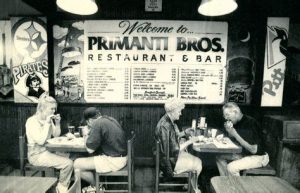
The ideal Primanti Bros sandwich: Bread, Meat, Cheese, Tomato, Coleslaw, AND fries all in one. 

This sandwich appealed to the steelworkers back in the day who didn’t have much time for lunch and if they were working odd hours, this is the most efficient lunch for them that they could grab and go.

  •  
  •  
  •  
  • Pre-Covid Era
    • Covid-19 hit the restaurant industry hard. This required most restaurants to scale down on staff while trying to keep things moving and be as efficient as possible to stay in business.
    • During this time labor shortages were still an issue, supply chain shortages were happening more often, and data became more important than ever before
      • Ex: Real-time reporting data, sales reporting data, cost reporting, Scheduling, etc.
    • Unfortunately, to have this data, sacrifices had to be made. Restaurant managers absorbed more busy work, regional managers absorbed work that the restaurant managers couldn’t do anymore, and they were resorting and reprioritizing our responsibilities. Something had to give!
  • Goals for a new, more efficient system
    • Data needed to be easily accessible, quick, and accurate
    • How to bring responsibilities back to the home offices but still keep it visible for the restaurant on an everyday basis
    • Become more scalable
    • Improve customer and employee experience.

Primanti Brothers 1933


The Digital Business Automation Journey

“You only have so much time every day before you start running the restaurant. You can get so bogged down in the process of copying, pasting, filling out, and double-checking a spreadsheet, when you should be focused on actually looking at the numbers and what they’re saying,… So, we wanted to take the busy work out of the process to free up time for thought and planning.” 

Caitlin Stritmatter

Director of Financial Planning & Analysis, Primanti Brothers

 
Before RPA bot:
  • Every morning, 365 days a year, these Regional Managers go into each of the 5 restaurants to look at the sales of the previous day using the online tool, point of sales solution. 
    • Their morning process:
      • Step 1. Run a sales report for each location
      • Step 2. Key it into a spreadsheet
      • Step 3. Run labor report for each location
      • Step 4. Key it into a spreadsheet
      • Step 5-10. Using the information, get the week trends, what’s upcoming for the day, forecast sales for day/week/month, get everything they know about the restaurant, forecast labor, get a snapshot, etc.
      • Step 11. Inform restaurant managers prior to the opening of possible adjustments to be made for the day
  • This process took at the very least 45 minutes per person to generate around 40 reports all before 10 AM (including weekends and holidays) so they could make possible adjustments before opening for the day. There are 8 Regional Managers that have on average 5 restaurants. 

Original Location in Pittsburgh, PA


After RPA bot:
  • Their new morning process:
    • The manager is able to login to the SharePoint site, the spreadsheet is already filled out by 7 am, and all of the prior days’ data is already there
      • No longer have to spend time filling in data
      • Regional managers can jump straight to making decisions on today, tomorrow, etc., and suggestions to each restaurant manager
      • Relief from employees
  •  Accuracy:
    • No longer potential for misinformation due to manual data input
  • Benefits:
    • Manual hours:
      • Maximum of 45 minutes per morning per manager
      • 6 hours of labor across all 8 managers being repurposed to higher-value tasks
        • ~2,100 hours per year
      • ~$84,000 of payroll being repurposed per year to higher-value tasks
    • Primanti Bros. achieved 100% ROI in 3 Months

  •  Customer experience: improved from the extra hour’s managers can now dedicate to the restaurant
  •  Employee experience: improved from the removal of mundane tasks


Prioritization: What can I automate next?

After Primantis Initial Win:

  • Many were curious about what else Primanti Bros could automate
  • . This opened up the possibility to all internal departments (Payroll, HR, IT, Development, AP, Operations, etc.)
  • They received tons of requests from employees for tasks (ex: reports) that could be automated
  • Lastly, the RPA bot paid for future software already with the initial use case

How to determine what should be automated next

  • How much time is spent on a task
  • How often does this task occur
  • Where do the reports go
  • What decisions are made based on the reports
  • Determine ROI on how much it will cost to automate
  • Determine ROI on how much time it will save
  • Team burnout from mundane tasks
    • Ex: Automating a task may not have a financial return but it will keep employee retention high

Primanti’s 3 Month Plan: 

  • Look at the mapping results, figure out which reports have the biggest ROI and which reports would be most impactful on an individual’s day-to-day workload
  • Move on to the next phase of mapping and expanding some of the reports into other departments
  • Adding in more that will be a direct impact on the operations team and the restaurants
  • Start the cycle over again
    • What are the processes?
    • How long are they taking?
    • What process improvements can we find along the way?
  • Figure out how to allocate the money to spend

Primanti’s 1 Year Plan 

  • Get to a point where there are so many reports being automated
  • Sort where to store reports
    • Create a dashboard
  • Ensure automation is updated and management
  • Get someone on staff whose sole responsibility is the report management and automation
    • Aka, a Business Architect
    • Figure out where efficiencies could be found and where process improvements could be made
Jobs in Digital Business Automation

“I would love to have a person here on staff whose sole responsibility is the report management and automation.”-Caitlin Stritmatter

More Job opportunities arise when your employees have more bandwidth to perform at a more efficient rate instead of sending 8 hours a day doing mundane tasks. 

  • New jobs are being created specifically for Digital Business Automation in companies
    • Director of Intelligent Automation
    • Chief Automation Officer
    • Process Analysts
    • Operational Excellence Analyst
      • Others involved
        • Data Scientists
        • User Experience Designer
        • Business Architect
Experience, Insights, and Guidance from Caitlin 


The biggest surprise during this experience to Strittmatter was watching the Bot work.

” It was pretty shocking during the process of the build phases there’s just a recording of me going through the process. it recorded me logging into the website,  what report you’re selecting, etc. You pick your parameters and talk through exactly what I was doing and how I was making those selections and then the follow-up meeting to that was where I watched the bot do it all. What would take me 20-25 minutes from start to finish was done in less than a minute with the bot. It was like watching someone work and control the mouse.”

One word to describe the Digital Business Automation experience?

“Relief.” 

“It’s been a huge relief for me with all these data-hungry coworkers and operations that we have a solution we can get you what you need and want.”

Guidance or advice to the next director of FP&A or a Director of Intelligent Automation

“Automate Everything.”

“The less busywork that you can do, the better off everyone is, and the happier you’ll be. The more effective you’ll be at your job when you don’t have to waste time doing something that can be automated.”

Overview

Salient Process helped save Primanti Brothers 2,000 hours of manual work with IBM RPA. Jimmy Hewitt, Senior Automation Advisor at Salient Process, says: “I really like two things about this specific automation technology. First is that because it takes the bot no time at all to do work that took humans 2,000 hours per year to do, it quite literally gives you the gift of time. They say you can’t buy time. I say, yes you can! Second is how low the barrier to entry is for this capability.”


WATCH EPISODE 3 INTERVIEW

are there more episodes?

YES! Bots & Thoughts is officially on all podcast streaming platforms. Check it out now!

https://www.salientprocess.fm/

Have a topic idea? Let us know!

We would love to hear from you. This podcast is for you, and if you have something that you want to hear, we would love to know. This form is also a place for you to ask questions or get in touch with our Salient Process team. 

Submit a request for a podcast topic here❗


👉Subscribe to Bots & Thoughts: The Hyperautomation Podcas

👉Subscribe to our Spotify Here

👉Subscribe to our Apple Podcast

👉Subscribe to our Google Podcast Here


⏩Subscribe to Salient’s Monthly Newsletter Here 

🎤Be our next guest! Sign up Here

📲Contact our Podcast Host Here 


  ⏩LinkedIn

👉 Follow Bots & Thoughts on Here

👉 Follow Salient Process Here

👉 Follow our Podcast Host Here

  ⏩Youtube 

  ⏩Twitter 

🌐Learn more at Salient Process


RELATED CONTENT


More on Digital Business Automation:

Digital Business Automation Home Page

What is Digital Business Automation?

Scaling Beyond RPA to Digital Business Automation

North Star Methodology

More on Salient Process:

Salient Process Home Page

Bots & Thoughts: The Hyperautomation Podcast

Salient Process is a full-service digital business automation shop and proud IBM Automation business partner. To learn more about us at our website, request a free consultation with one of our expert automation advisors! We look forward to guiding you and your company along your own unique Digital Business Automation journey.

The History of Hyperautomation


Now that we have defined and dissected what hyperautomation is, let’s take a step back in time to as early as 1920 to understand how all seven hyperautomation capabilities came to be.

During this episode,o. you will learn about the history of the seven distinct hyperautomation capabilities. Specifically, you will hear how Process Mapping, Process Mining, Task Automation, Capture, Workflow, Content, and Decision Automation capabilities originated. From parenting twelve children to defining process mapping, saving man-hours on Wall Street to the start of Robotic Process Automation, scanning a simple picture of your child to the creation of Optical Character Recognition, and much more, each automation capability has its own story of how it came to be. Not only will you get a glimpse into the history of the hyperautomation capabilities, but you will also listen to a bonus section that travels back to the very beginning of hyperautomation, nearly 2 million years ag

Follow along with the episode now!

Watch Episode 2 NOW


The History of each Hyperautomation Capability:

1. Process Mapping 

  • The early 1920s:
    • Process mapping was introduced into the Industrial Engineering curriculum.
    • Made cross over from pureplay engineering over to the business side with Procter & Gamble, applying Frank’s concepts to a program they called “The Deliberate Methods Change Program
  • 1921: Created the same year Babe Ruth achieved the homerun record

Frank Gilbreth: Father of Process Mapping

Mechanical Engineer

Who the father in the movie “Cheaper by the Dozen” is based on. Author of the original book that inspired the movie.

Made a presentation to the American Society of Mechanical Engineers called “Process Charts: First Step in Finding the One Best Way”


Many of his concepts still hold true today

For Example, His method for making examining, and improving a process

2. Process Mining: “the missing link between process mapping and data science”

  • Why?
    • Process mapping has equally lacked in data and big data as much as data science has lacked in process or procedural context
    • Process mining bridges this gap
  • 1999:

Will Van der Aalst: Godfather of Process Mining

Computer scientist and prolific Dutch researcher

Coined the phrase in a research proposal

New Field: Process Mining Research

Celonis Chief Scientist as of 2021

    •  
    •  
  • 2000:
    • Alpha Minor: First practical algorithm for process discovery was introduced
  • 2009:
    • A governing body formed to overlook the norms and standards used in this field
  • 2011:
    • “The Process Mining Manifesto” was published
    • Read the brief document “Four guiding principles and 11 challenges”: View “The Process Mining Manifesto” Now
    • Most challenges have been addressed today by combining mining with mapping to create the most accurate possible view of business processes and business architecture

3. Task Automation: RPA (Robotic Process Automation)

  • 1991

Wall Street: to make the most informed trades and financial models, the late 80s/early 90s bankers would subscribe to a financial data company (ex: Thomson Reuters) that would serve up finance data on virtually anything that could be bought and sold.

Consuming this financial data from the banker’s perspective was done on something similar to a web browser

Bankers would look over endless data tables, find the data they need, and manually key this data into their financial models to make a trade


 Realized they were going to the same place, to get the same data continuously so they made lines of code to consolidate all the data into one table and screen scrape/data scraping on the UI level of the finance page

Saved bankers a significant amount of time every morning on data prep

  •  1993:
    • Excel version 5: included Visual Basic for Applications (VBA)
    • VBA: automated a series of repeatable tasks that happen in Excel based on predetermined triggers
    • Macro based technology went beyond screen scraping
    • The intent of this technology has stayed the same for over 30 years

4. Capture: Intelligent OCR (Optical Character Recognition)

  • Goes back 200 years
  • 1957:
    • Russell Kirsch (and team): built the first image scanner called a “drum scanner”
    • Drum scanner: Combined technologies from the telegraph and telephones and photographs
      • Took the first-ever digital scan by digitizing a photograph of Kirsch’s son Walden from 1957
      • Kicked off the next century of capture
    • The 1960s: The First modern fax machine was invented which led to
      The 1970s: Creating the High-resolution flatbed scanner

5. Workflow: Business Process Management (BPM)

  • 1980s:

Office productivity spiked with the scanners and fax machines

Ted Smith: an entrepreneur who founded FileNet in 1982

How can we continue to digitize how work gets done?


1985: Smith combined various emerging technologies like the scanner for input, laserdiscs for storage, network for connectivity, and a bit of his own proprietary technology to create FileNet Distributed Operating System (FDOS)

  • The first operating system that included a workflow scripting system

1990s: FDOS was improved upon and eventually renamed Workflow Business System

    • After acquisitions, turned into a product called Visual Workflow
      • Featured the work workflow graphical user interface
    • Ted Smith and FileNet (later acquired by IBM) commercialized the idea of pushing work to users based on an originating business event (Ex: scanning a paper application form)

6. Content: Enterprise Content Management (ECM)

  • Solves another problem created by capture…. What do we do with all these paperless documents? How do we store, manage, and secure them?
  • Predates worldwide web, public internet, and the original internet (1983)
  • 1973:
    • Champaign, Urbana, Illinois, and the university’s computer back education research lab
    • A group of researchers started a project and then called the company Plato Notes
    • Plato Notes: created first of a kind email, phonebook, and document database platform
      • Renamed to Lotus Notes in 1984
      • Each product within the Lotus Notes platform took on its own product development lifestyle and the document database was that seed that turned into modern-day ECM
      • Inspired other famous document management systems (ex: FileNet and Laserfiche)
    • 2017:
      • Association for information and Image Management: Authority on document management systems since 1943
      • Tried to officially rename Enterprise Content Management to Intelligent Information Management
      • Content Management VS. Enterprise Content Management:
        • The difference comes down to one word….“Workflow”
        • ECM: becomes ECM when you add an awareness of the business process for which that piece of content was created

7. Decision Automation: Business Rules Management or Decision Automation

  • Historical roots are nestled deeply within “The Business Rules Manifesto”
  • The Business Rules Manifesto: Written by The Business Rules Group
    • Founded in 1980s
    • Defined and refined statements and supporting standards about the nature and structure of business rules
    • Includes 20 years of thought, leadership, and practical experience
    • Has been translated into 12+ languages
    • Still references as an authoritative source of guidance on modern-day business rules projects
  •  Software: ILOG (Intelligent Software)
    • Founded in Paris, France in 1987
    • IBM acquired in 2008
Bonus Section!


The essence of Automation:

  • Technology, digital or physical
  • Anything that makes our office life easier

2000 years ago: Created aqueducts to automate carrying water to the city

2 million years ago: Created the stone axe


Summary
Things don’t change that much! Half of these technologies were designed to create a paperless office.  That was 40 years ago! And then again, things do change. Learning about the history of hyperautomation has shown how far we have come. It shows how much easier it is to get from having an idea to actual business value with how far each of these capabilities has come.
 
Download now
 
 
are there more episodes?

YES! Bots & Thoughts is officially on all podcast streaming platforms. Check it out now!

Have a topic idea? Let us know!

We would love to hear from you. This podcast is for you, and if you have something that you want to hear, we would love to know. This form is also a place for you to ask questions or get in touch with our Salient Process team. 

Submit a request for a podcast topic here❗


👉Subscribe to Bots & Thoughts: The Hyperautomation Podcast

👉Subscribe to our Spotify Here

👉Subscribe to our Apple Podcast

👉Subscribe to our Google Podcast Here


⏩Subscribe to Salient’s Monthly Newsletter Here 

🎤Be our next guest! Sign up Here

📲Contact our Podcast Host Here 


  ⏩LinkedIn

👉 Follow Bots & Thoughts on Here

👉 Follow Salient Process Here

👉 Follow our Podcast Host Here

  ⏩Youtube 

  ⏩Twitter 

🌐Learn more at Salient Process


RELATED CONTENT


More on Hyperautomation:

Hyperautomation Home Page

What is Hyperautomation?

Scaling Beyond RPA to Hyperautomation

North Star Methodology

More on Salient Process:

Salient Process Home Page

Bots & Thoughts: The Hyperautomation Podcast

Salient Process is a full-service digital business automation shop and proud IBM Automation business partner. To learn more about us at our website, request a free consultation with one of our expert automation advisors! We look forward to guiding you and your company along your own unique Hyperautomation journey.

What is Hyperautomation?


As companies continue to integrate digital applications and systems into their processes, digital transformations become more common. Shifting to digital formats can boost efficiency, improve customer experiences and allow businesses to remain competitive in the modern market.

One essential aspect of digital transformation is hyperautomation. During this process, businesses automate manual procedures in workflows. Hyperautomation uses tools like artificial intelligence (AI) and robotic process automation (RPA) to reduce manual and repetitive tasks, allowing employees to focus on higher-priority responsibilities.

This article — and the accompanying episode — takes a closer look at hyperautomation by:

  • Providing several definitions of the term from leading technology companies.
  • Breaking down each definition and highlighting some key similarities, differences and overlapping capabilities of hyperautomation and business intelligence.
  • Discussing the most common tools and technologies within the world of hyperautomation.
  • Exploring the most valuable conversations you should have about hyperautomation, which can enable you to identify the “why” and “how” of hyperautomation for company success.

Follow along with the episode now!

What is Hyperautomation?

Here is a hyperautomation definition from Jimmy Hewitt:

“At a high level, Hyperautomation is an approach, it is a method, it is a category. Hyperautomation is a framework, a set of tools, even a mindset or a philosophy. Hyperautomation allows you, your team, and your company to infuse various types of automation into your existing business and it enables you to define new, more efficient processes so you don’t find yourself automating bad processes to begin with. It is a space that touches both employees and customers, and it’s typically introduced via the operations or finance departments—for starters—until it grows into a level of maturity that requires its own small team and a leader like a “director of intelligent automation” or “of hyperautomation.”- Jimmy Hewitt

Hyperautomation Defined

It’s often beneficial to look at multiple definitions to gain a complete understanding of a topic. In this section, we provide three different definitions of hyperautomation from leading technology companies. Each example can help you develop a stronger hyperautomation meaning.

1. Gartner

Gartner is a leading information technology (IT) and research company. They conduct critical research about digital trends and assist clients with digital transformations. They define hyperautomation as a “business-driven, disciplined” strategy that companies use to “identify, vet and automate” their company and IT processes.

Then, the company lists examples of the resources used in hyperautomation, such as:

  • Machine learning (ML)
  • Artificial intelligence (AI)
  • Event-driven architecture
  • Robotic process automation
  • Business process management
  • Intelligent business process management suites

Salient’s Analysis

We analyzed Gartner’s definition to understand it more closely. Their description contains several different components, which we break down below. It uses these approaches to define hyperautomation:

  • Defines it as business-driven: Gartner emphasizes that hyperautomation is a business-driven strategy. It looks directly at your business’s capability and process map and points out methods that add value, generate revenue and improve customer experiences. These techniques are your company’s lifeblood.
  • Emphasizes the method: This definition also notes the importance of discipline behind hyperautomation. The process isn’t a single task but rather a consistent approach based on research and adjustments.
  • Identifies three steps: It also lists three steps within hyperautomation — identifying, vetting and automating. In the first step, you find processes that could benefit from automation. Then, you evaluate these workflows and discover opportunities for automation. Lastly, you finalize the automation process using selected tools and resources.
  • Breaks down the term “orchestrate”: Gartner also uses the term “orchestrate” to describe hyperautomation. This usage indicates a coordinating combination of several hyperautomation tools, not just robotic process automation. In addition, the term “orchestrate” suggests the difference between hyperautomation and data analytics/business intelligence.
  • Explains that AI and ML tools replicate human behavior: Lastly, the definition lists the multiple AI and ML tools and capabilities used in hyperautomation. These tools and capabilities replicate human behavior as their primary function. For example, robotic process automation uses AI to mimic human behavior, while a business rules management (BRM) platform replicates human decision-making to finalize complex business decisions.

Overall, Gartner’s definition thoroughly explains different components of hyperautomation and how it relates to other digital procedures.

2. Automation Anywhere

Next, we looked at a hyperautomation definition from Automation Anywhere, a leading provider of intelligent process automation solutions:

“Hyperautomation is the combination of RPA and other AI technologies, which together enable rapid end-to-end business process automation and accelerate digital transformation.”

Salient’s Analysis

Automation Anywhere’s definition is more succinct. They emphasize robotic process automation (RPA), but we like the acknowledgement of working together with other hyperautomation tools to achieve end-to-end business process automation.

3. IBM

Lastly, we included an explanation from IBM, another top industry name:

“The concept of automating everything in an organization that can be automated.”

Salient’s Analysis

IBM’s definition is simple and accurate. It summarizes hyperautomation concisely but lacks a bit of detail.

Hyperautomation Capabilities and Tools

After exploring different definitions, let’s take a closer look at the essential features of hyperautomation. Here are six hyperautomation capabilities and their tools organized in order of how to start your hyperautomation journey.

1. Process Mapping and Mining

Process mapping and mining are important tools for hyperautomation. You must understand your processes before you can automate them, and these strategies give you a starting point for evaluation. These tools allow businesses to:

  • Visualize business procedures.
  • Investigate important steps and processes for each procedure.
  • Identify connections between different processes.
  • Simulate automation and evaluate which process works best.
  • Approach hyperautomation projects by considering current placements and visualizing ideal future scenarios.

Check out these resources for more information:

2. Robotic Process Automation (RPA)

Robotic process automation is known as your “digital employee.” It can replicate human activity on computers. The best use case for implementing RPA is to automate those highly-repeatable, high-volume tasks. That way, you remove manual work from typical workflows.

Warning: Some RPA vendors are building capabilities within RPA platforms. Be discerning about non-task automation capabilities coming out of RPA platforms and look at purpose-built capabilities.

3. Business Process Management (BPM): Workflow

The key differentiator between business process management and RPA is the amount of time it takes to complete a unit of work.

For example, RPA measures work in hours and minutes, while BPM uses hours, days, weeks and months.

BPM is proactive automation. In other words, it tells people what to do and when to do it. In addition, BPM has more visibility.

BPM provides visibility into current workflows for managers and executives. It allows you to reassign work and provides rich dashboarding into the completion status of the work that matters most.

4. Business Rules Management: Decisions (ODM)

Business rules management captures, organizes and facilitates intuitive management upkeep of business rules and decisions. It frees up time for higher quality and knowledgeable work.

Additionally, BRM is easily adjusted and not hard-coded. Business rules change depending on inflation, regulations and other critical market factors. BRM decision platforms allow users to modify rules as needed.

5. Enterprise Content Management (ECM): Content

Enterprise content management provides proper content, document and record taxonomy structure. The platform’s content search function embeds into common Office products, like Word, Excel and Outlook. ECM can also help you manage retention and disposition schedules.

Overall, ECM allows you to seamlessly interact with important content such as application and claim forms, correspondences and notices, or anything that drives your business capabilities.

6. Data Capture (OCR)

Lastly, data capture classifies general content to reduce manual monitoring of general inboxes. It extracts data and metadata from the content for you, reducing manual workloads. Then, it passes data and metadata downstream to other humans or hyperautomation tools (RPA or Workflow) to finalize the rest of the process. You can mostly find data capture at the front end of workflows, capabilities and business processes.

Summary

At Salient Process, we carved out a space for this term and topic at the intersection of business architecture, technology, process improvement and operational excellence with a host of secondary benefits. Overall, hyperautomation allows you to:

  • Reclaim high-value manual labor hours to use on other tasks.
  • Improve cycle times for key capabilities and processes.
  • Create happier employees, customers and shareholders everywhere.

It’s important to maintain a regular discussion about hyperautomation with your company. For instance, you should consider the reasoning behind your hyperautomation goals and how you plan to execute them. Here are other questions to think about:

Why?

Consider your end goal for wanting to employ hyperautomation. Get specific with your reasoning. Make it measurable and use it to direct your company to see if and how you are achieving it. That way, your goal becomes more manageable and possible.

For instance, answer questions like:

  • How many manual hours can we free up or reclaim for our knowledge workers?
  • How much can we increase throughput for _____?
  • Are you doing it to digitally transform or improve your customer experience or ____?

How?

In addition to why, discuss how you plan to achieve hyperautomation. Identifying a plan beforehand makes it easier to follow through and achieve your overall goal.

These are a few tips for getting started:

  • Use a method, capability or process map. Interactive maps also give you a more in-depth look at your workflows.
  • Confirm your as-is map with process mining and create thousands of to-be scenarios.
  • Estimate ROI and prioritize use cases before jumping into your automation.
  • Don’t forget to have fun and stay creative with the process.

Are There More Episodes?

Yes! You can find our podcast Bots & Thoughts on all podcast streaming services. Check it out now!

WATCH EPISODE 1 NOW

Download now
 
are there more episodes?
  • YES! Bots & Thoughts is officially on all podcast streaming platforms. Check it out now!
    • https://www.salientprocess.fm/

Have a Topic Idea? Let Us Know

If you have a topic idea, contact us today. We want our podcast to answer your questions, and if you have something that you want to hear, we would love to know. In addition, you can ask questions and get in touch with our Salient Process team.

Why Salient

At Salient Process, we understand the importance of comprehensive digital transformation. We work closely with each client and use a North Star methodology to align your procedures with overall business goals. Our expert team works hard to understand your unique needs, making a customized plan for success. With our hyperautomation solutions, you can move closer to your digital transformation goals.


👉Subscribe to Bots & Thoughts: The Hyperautomation Podcast

👉Subscribe to our Spotify Here

👉Subscribe to our Apple Podcast

👉Subscribe to our Google Podcast Here


⏩Subscribe to Salient’s Monthly Newsletter Here 

🎤Be our next guest! Sign up Here

📲Contact our Podcast Host Here 


  ⏩LinkedIn

👉 Follow Bots & Thoughts on Here

👉 Follow Salient Process Here

👉 Follow our Podcast Host Here

  ⏩Youtube 

  ⏩Twitter 

🌐Learn more at Salient Process


RELATED CONTENT


More on Hyperautomation:

Hyperautomation Home Page

What is Hyperautomation?

Scaling Beyond RPA to Hyperautomation

North Star Methodology

More on Salient Process:

Salient Process Home Page

Bots & Thoughts: The Hyperautomation Podcast

Salient Process is a full-service digital business automation shop and proud IBM Automation business partner. To learn more about us at our website, request a free consultation with one of our expert automation advisors! We look forward to guiding you and your company along your own unique Hyperautomation journey.